This thread has been locked.

If you have a related question, please click the "Ask a related question" button in the top right corner. The newly created question will be automatically linked to this question.

ADS1298R failed to save data in Save tab

Other Parts Discussed in Thread: ADS1298R

Hi,

I have been working with the ADS1298R and I can measure ECG and RR signal. But I have some problems when I tried to save the data I got.

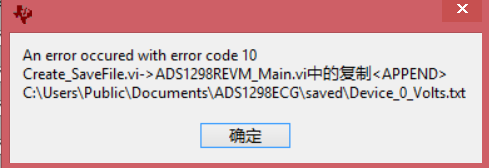
When I tried to save data in Save tab, I clicked Data - Volts. And then I clicked Save to File Button. After that, a window appeared and I need to choose where to save the file. Then, the following error window appeared.

So how to solve the problem? The system of my laptop is Win 8.1.

Thank you very much.
  • Hey Jifu,

    Firstly, I'd like to give you our disclaimer that this EVM does not support operation on Windows 8. We recommend Win7 SP1.

    That being said, I have seen this error before. Check the directory "C:\Users\Public\Documents\ADS1298ECG" for a folder titles "saved". If such a folder does not exist, create one. If it does, try saving the contents of the existing "saved" folder elsewhere, deleting the folder, and creating a new one.

    Regards,
    Brian Pisani