Part Number: ADS8698
Hello,
I have a ADS8698 to acquire an analog input in ±10 V, and an Arduino Uno for read data in a SPI communication.
I have never use SPI communication before so did you have any example of code for this ship please ?
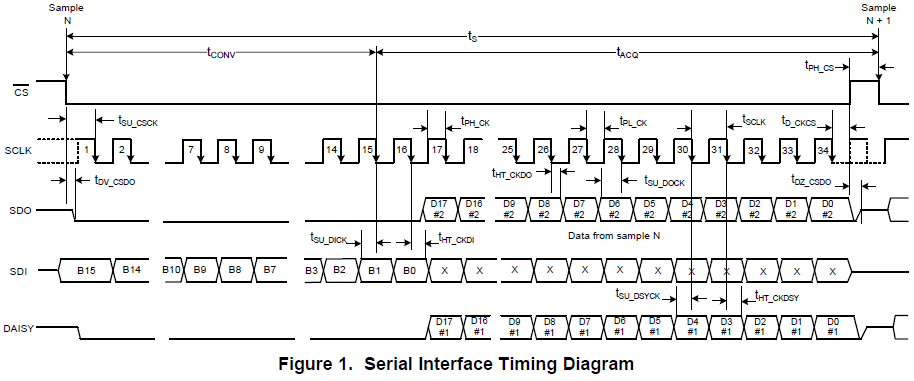
Actually, I have a problem to communicate with this device. When I try to vary the input, my output stay the same.
Should I configure something before reading the channel ?
My arduino code is like this :
################################################
#include <SPI.h>
byte result1 = 0;
byte result2 = 0;
byte result3 = 0;
byte result4 = 0;
byte result5 = 0;
const int END_While = 6;
void setup()
{
Serial.begin(250000);
while(!Serial){;};
SPI.begin();
SPI.beginTransaction(SPISettings(14000, MSBFIRST, SPI_MODE2));
pinMode(END_While, INPUT);
pinMode(SS, OUTPUT);
digitalWrite(SS, LOW); // p47
SPI.transfer(0x85);// Reset
SPI.transfer(0x00);
SPI.transfer(0x0000);
SPI.transfer(0x0000);
SPI.transfer(0x0000);
digitalWrite(SS, HIGH);
}
void loop() {
digitalWrite(SS, LOW); // p47
SPI.transfer(0xC0); // voie0
SPI.transfer(0x00);
SPI.transfer(0x0000);
SPI.transfer(0x0000);
SPI.transfer(0x0000);
digitalWrite(SS, HIGH);
while (digitalRead(END_While) == LOW)
{
digitalWrite(SS, LOW);
result1 = SPI.transfer(0x0000);
result2 = SPI.transfer(0x0000);
result3 = SPI.transfer(0x0000);
result4 = SPI.transfer(0x0000);
result5 = SPI.transfer(0x0000);
digitalWrite(SS, HIGH);
Serial.println(result1,BIN);
Serial.println(result2,BIN);
Serial.println(result3,BIN);
Serial.println(result4,BIN);
Serial.println(result5,BIN);
Serial.println();
Serial.println();
}
}
################################################
Could you help me please
Regards
Thibaut