This thread has been locked.

If you have a related question, please click the "Ask a related question" button in the top right corner. The newly created question will be automatically linked to this question.

TSW14J56EVM: TSW14J56 EVM drivers and buses not being properly recognized

Part Number: TSW14J56EVM


I loaded the HSDCpro application and installed the additional FPGA firmware (and placed it into the HSDCpro's directory). My computer is not able to identify any drivers when I plug it in via USB (it recognizes the USB itself, but nothing else). I tried giving all the resets possible with SW11 (and the main reset switch for the power), even unplugging the system and plugging and repowering it into different ports, but the errors still seem to be prevalent. I uninstalled the program and reinstalled version 4.70 into my computer, even adding in the firmware a second time, but it still does not seem to identify any buses or drivers correctly. Are there any methods to help properly identify these drivers and buses so I can load the firmware and HSDCpro can properly identify the TSW14J56 EVM? 

  • Hi Christopher,

    When you install HSDC Pro 4.70 you should not need to install any additional FPGA firmware. Which firmware are you installing?

    You do need to install the HSDC Pro as an administrator so that the Cypress FX3 drivers are installed properly (right click install as administrator). Once HSDC Pro 4.70 is done installing, then plug in the TSW14J56 and check the device manager (do not run HSDC Pro yet) - it should enumerate the USB and show up in the device manager/USB as a "Cypress FX3 USB Streamer Example Device". If this does not enumerate this way then there is a problem with the driver install.

    Note you do need to log in as an administrator account for this to install properly. This will not install properly with a standard user account.

    BTW what Win version are you using?

    Ken.
  • So I will try running as admin next time I reinstall (although I am the admin on this work computer, but I'll give it another go). It does identify the Cypress USB, but nothing else in that regards (from what I've read up, there are 4 buses that the computer detects). So I will reinstall it without putting in the FPGA firmware if there is no real need for it.
  • Christopher,

    Can you please tell me which FPGA firmware you are referring to? There shouldn't be any need for you to install any firmware manually - any firmware that goes into the TSW14J56 will be pushed into the FPGA via HSDC Pro automatically once it is running via the USB3 connection. The Cypress USB driver should only register as 1 port, Some of our other capture cards and device EVMs use a 4 port USB chip which would register as 4 serial ports. However this is not the case for the Cypress FX3 USB3 chip.

    Refer to Figure 6 of the HSDC Pro users guide. It shows an image of what the Device Manager should look like once you installed HSDC Pro (drivers will be installed as part of the install) and plug in the TSW14J56EVM.

    Let me know if you run into any other issues. We are here to help.

    Ken.
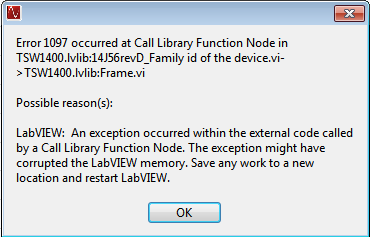
  • Okay, I got all of my previous issues resolved (and yes there was no need to download the additional firmware package provided on the TSW's page). Onto a new issue however, the ADC's are not accepting the loaded firmware, causing this error pop-up to occur:


    Keep in mind that there are no other applications running at this time. 

  • Christopher,

    Please ensure that your 5V supply to the TSW14J56EVM is rated up to 2.5A-3A. We have seen cases where the power supply current limits (set too low) and resets the FPGA/firmware causing problems when HSDC Pro tries to communicate with the FPGA. Also some of the LEDs should light up once the firmware is loaded properly.

    Ken