This thread has been locked.

If you have a related question, please click the "Ask a related question" button in the top right corner. The newly created question will be automatically linked to this question.

ADS127L01EVM: Core application GUI can’t identify ADS127L01 device

Part Number: ADS127L01EVM
Other Parts Discussed in Thread: ADS127L01

Hello,

A customer has complained that GUI doesn’t connect to ADS127L01EVM.

I’ve confirmed bellow things with UG sbau260.
1) windows 7 32bits and Net Framework 4.6 used.
2) Core application and DVCPKG are installed correctly.
3) Generic Bulk Device driver, VID_1CBE and PID_003, is installed correctly.
4) Jumpers and switches on EVM are set up correctly as Table 2. Default Settings in SBAU261B.

5) Do UG 3.1 Startup Screen (No Hardware Connected) correctly.
6) Connect the EVM and then appear the GUI, title [Delta sigma Evaluation Software, but without ADS127L01].
7) For a while, some statements are showed on the bottom status bar.
  Hardware Not Connected -> Unable to identify device= ADS127L01 -> Hardware connected,
  but Register Map isn’t appeared, as image2.zip attached.

Let us know how to handle, please. I wonder ADS127L01EVM isn’t work correctly.

Regards,
Kazuo Yamauchi

image2.zip


  • Hello Yamauchi-san,

    Thank you for supporting our customer with ADS127L01!

    Can you ask them to confirm the directory for the Device Package files? Under File -> Options, there should be a User Directory path that points to where the device package was installed: C:\Users\...\Documents\DSEvalSW.

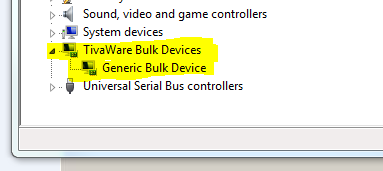
    Also, please confirm how the device is enumerated in Device Manager. It should appear like this:


    Best Regards,

  • Hello Ryan,

    This user has installed the GUI by administrative right, but uses it as user level. So there is not DSEvalSW in user folder. I asked him to copy DSEvalSW folder from admin folder to user folder. ADS127L01EVM now work correctly.

    Thank you very much for your support.

    Best Regards,