This thread has been locked.

If you have a related question, please click the "Ask a related question" button in the top right corner. The newly created question will be automatically linked to this question.

PGA300: Calibration point

Part Number: PGA300
Other Parts Discussed in Thread: PGA309, PGA302

Dear team, 

Once the customer use 2T value(0, and 50C degree) for calibration, how can this device measure value of lower temp(-40C) and higher temp(+85C)? 

Firstly, the calibration process find gradient of line using 2T value(0C,50C). After that this device measure value of lower temp(-40C)/higher temp(+85C) using this gradient of line. Is it right? 

If this method is right, the customer use only 1T value(room temp), how can measure other points? 

I am sorry to bother you but I don't understand of calibration process. please advise on this question. 

Thank you.  


  • Hi Dino,

    I'm not sure I understand your question. Would you like to know how to set the calibration for more temperature points?

    Any of the included calibration settings files in the GUI can be edited to do 3P-1T, 2P-2T, 3P-3T, or 4P-4T. The temperature points, pressure points, DAC codes and desired values can all be adjusted by the user before doing the guided calibration or in the ADC&DAC calibration page.

    The details of the calibration algorithm are TI proprietary, and cannot be shared publicly.

    If your customer can supply me with the following information I would be happy to make a calibration.ini file that they can use with the guided calibration on the PGA300 GUI.

    Temperature points: (1-4)

    Temperature point values: (celsius)

    Pressure points: (1-4)

    Pressure point values: (any unit)

    Desired output voltages/currents: (V or mA)

    They can also create their own .ini file by modifying one of the existing files and saving it on the guided calibration page here:

    Please let me know if this answers your questions.

    Regards,

  • Hello Scott,

    Thank you for your reply. I am sorry for confusing.

    This project is concept stage but the customer are concerning calibration time. At previous project, they have been using PGA309 and 3P3T calibration. The calibration time was so long so they tried 3P1T or 3P2T. But If used 1T(room temp) or 2T(0C, 50C) calibraion, output linearity was poor at out of calibration range(below 0C, over 50C). so they requested performance and way of data process of PGA300 at out of calibration range.

    please review one more time. 

    Thank you. 

  • Hi Dino,

    The compensation algorithm in the PGA300 is dependent on suitable calibration points to provide accurate results. If the customer needs great accuracy over a wide range of temperatures they will have to calibrate over that range of temperatures. The sensor nonlinearity will be quite large at extreme temperatures, so it is important to calibrate near those values.

    Regards,
  • Hello Scott,

    Thank you for your strong support. There more questions

    1. If the customer use PGA302 instead of PGA300, Is it available to use mass production tool for PGA300? If they don't use mass tool, Is there other mass production tool for PGA302?
    2. Is it available to use above 4 Temperature points or 4 Pressure points? Is max point only 4 ? If not, What is max calibration points?(temp, pressure)

    Thank you.
  • Hi Dino,

    1. There is a mass production tool in development for the PGA302, however it will not be completed for some time. Most likely near the end of 2Q18.

    2. For the current tools, only 4 calibration points are supported.

    Regards,
  • Hello Scott,

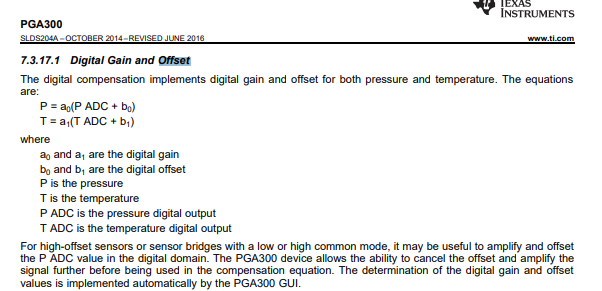
    Is there any function for offset adjustment of PGA300?
    For PGA309, there is comment at datasheet " the input-referred coarse offset adjust DAC has approximately a +-60mV offset adjustment range."
    so If PGA300 has same function, please let me know offset adjustment range of PGA300.
    If PGA300 don't have same function, how can PGA300 cancel offset voltage? and please let me know about controllable offset range?

    Thank you.

  • Hello Scott,

    Is there any comment on above question?

    Thank you.
  • From the datasheet:

    You cannot manually adjust the offset cancellation. The offset values are 16 bit signed.

    Regards,