This thread has been locked.

If you have a related question, please click the "Ask a related question" button in the top right corner. The newly created question will be automatically linked to this question.

PGA300EVM-034: Error on Guided Calibration

Part Number: PGA300EVM-034

Hello,

when I select a Calibration file, I get an Error message: "The selected calibration file doesn't match with the GUI version..."

Pressing OK to continue the calibration, it seems to work: "OWI Configuration": no error - "OWI Actiovation": nothing to do because OWI is active (pressing next), reading of registers starts, but than the monitor is clear and the following error appears:

Unexpected Error occured during calibration

Error -20145 occurred at Error occured during interpolating values

Possible reason(s):

Analysis: Each independent variable must contain the same number of values as the dependent variable.

Try calibrating again

What can I do? I installed the latest version (3.5.1.0) from the GUI and I use the original ini-files...

Thanks for any help

Walter


  • Hi Walter,

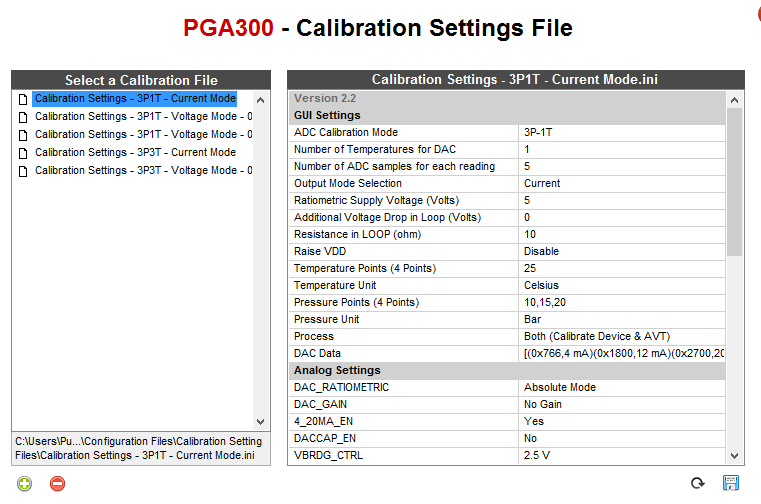
    Can you go through the settings on the "Calibration Settings File" page after selecting a .ini file and double check that there are the correct number of temperature points, pressure points, and DAC data sets? For example:

    In this case there is 1 temperature point, 3 pressure points, and 3 sets of DAC codes with a corresponding desired output voltage. It's strange that the default .ini files might have an error here, but it seems like one of these fields is incorrect on your setup.

    Regards,

  • Hi Scott,

    Thanks for your hints, but I can't see a mistake in my ini Files - I used the original TI files...

    I'm using a PC with WIN10, but I will try an other PC with a clean installation. My be, there is a mistake.