This thread has been locked.

If you have a related question, please click the "Ask a related question" button in the top right corner. The newly created question will be automatically linked to this question.

ADS131A04: No Power on XTAL

Part Number: ADS131A04

We’re having some trouble interfacing with the ADS131a04. With some debugging, we found that we’re not getting our 16.384 MHz clock to come through. Further debugging shows that there is no power on XTAL2 (pin 26), where we would expect some sort of voltage to supply the crystal.

We've double check the schematic to the datasheet and the configuration seems correct. We've also verified electrical connection between all the pins.

Any thoughts on what may be causing this?

  • Nicholas,


    Offhand, I'm not sure what voltage to expect on XTAL2. If the device is running, I would have guessed between 1V and 2V. However, if the crystal isn't running, I'm not sure what voltage to expect.

    What crystal are you using? What load capacitance do you have on the XTAL1 and XTAL2? Generally, I would go with whatever we using on the EVM. Looking that up, we use a CTS 407F35E016M384 crystal with 8.2pF capacitors. Often there will be some parasitic capacitance on the board or in the device, and that may affect what is used for the build. From what I've seen, lowering the load capacitance helps more often than raising the capacitance.

    Finally, have you tried using an external clock for XTAL1/CLKIN? That should at least get the device running.


    Joseph Wu

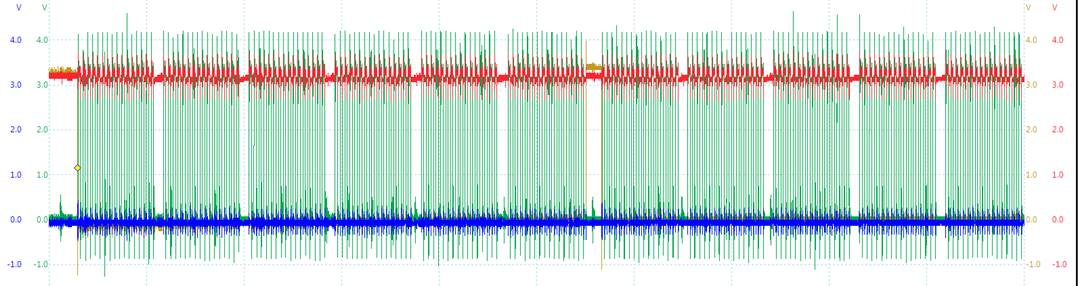
  • We hooked up our 16 MHz digital clock to the XTAL1 input. We have found that the device still does not respond. We send a RESET command (0011h), then wait 5+ ms, then ask for status (0000h). We get nothing back (FFFFh). Here are the scope pictures of our reset


    And the status response


    Legend:

    • Red = DOUT
    • Blue = DIN
    • Green = SCLK
    • Yellow = Chip Select

    It’s a bit noisy because of our probes, apologies. I have verified that XTAL1 is getting a 16MHz clock train.

    Any thoughts on what we can try?

  • Nicholas,


    I don't really see anything from the digital shots. However, it's a bit cluttered and I can't really make very much out. Would it be possible to separate out the different lines? What is the scale of the x-axis? What is the SCLK frequency?

    Because you're getting nothing out, it would be good to check the physical connections between the device and the microcontroller (maybe measuring out the resistance pin-to-pin). Also, do you have a schematic? It might be good to review the whole circuit.

    What is /RESET connected to? For the device to be in operation, it should be set to high. Setting /RESET low keeps the device in reset and would make it so that the device is unresponsive. Measure that voltage just to be sure the device is in operation.

    Note, to start this device, I would use the flowchart from page 79 of the datasheet. If you are sending commands, start with the UNLOCK command after you get the READY word.


    Joseph Wu

  • For the rest of the forum:

    This issue is now resolved. The problem was a faulty LDO supply used for analog power. It's likely this would have held the device in reset and therefore the device wouldn't respond to commands.

    Joseph Wu