This thread has been locked.

If you have a related question, please click the "Ask a related question" button in the top right corner. The newly created question will be automatically linked to this question.

ADS1278EVM-PDK and LabVIEW

Other Parts Discussed in Thread: ADCPRO, ADS1278

Hi,

I have been trying to run the various VIs which are in ADCPro without success.

I understand that they are normally called by a shell program, however I want to use the kit to collect n samples at f samples/s on a single channel and use the data in my own program under Labview.

Which VIs do I have to start with (where can I find a simple example code with the bare minimum to achieve this)?

Thank you in advance for your help.

Jean

  • Jean,

    The ADC Pro software is not intended to be stripped apart and there is not any prepared sample code to show you how to strip the plug-in down to it's minimalist components, not to say that it can't be done. The ADS1278 plug-in allows you to enable a single channel and set your own sampling rate and you can write the recorded data out to a file if you wish to perform additional processing on the data.

    If you were to strip the plug-in down you're going to be interested in the VIs that communicate to the file system on the DSP. These VIs will be StyxRead and StyxWrite polymorphic VIs. For you to be able to use these functions though you're going to need to initialize communication to the file system appropriately and get the pointers to the filesystem in addition to flashing the DSP with the plug-in firmware and establish the USB connection. You'll need to strip out all object dependencies from the plug-in because most of that information is provided by the shell. There is an enumerated constant used in the plug-in for communicating to the appropriate files to make register settings on the part, which is not externally documented, but I can answer specific questions with respect to this enum.

    I can help you with more specific questions about implementing our plug-in framework in your own applications, but on the highest level you're going to just need to go through the source for the plug-in.

    -Kevin

  • Hi at all,

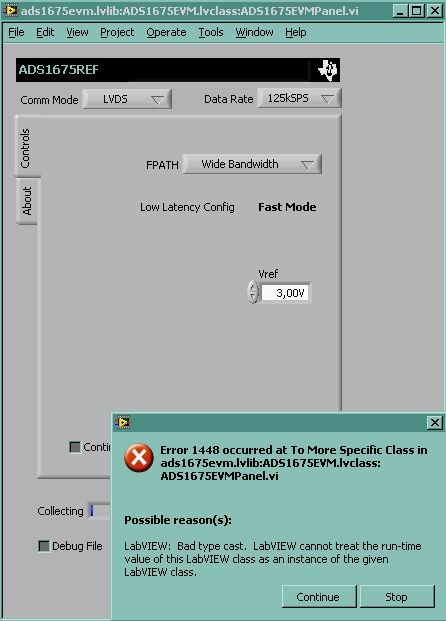
    I have the same aim and problem of Jean. I have to start start acquisition and save the data many times with a for loop inside my  labview program. I'm not understand why the VI in ADCPro installation folder give me errors...for example this:

    Regards,

    Lucio

  • Lucio,

    You get that error because the ADC Pro shell passes the object that the plug-in is trying to convert to the plug-in. If you run the plug-in separated from the shell it's expecting an input that isn't there.

    -Kevin

  • Ok Kevin, the plugin cannot be used without the shell program that sends commands and manages the plugins. But how to get the LabView code for the plugin implemented in my LabView program? Is there a wrapper VI that could be used with EVM plugins to make them easier to integrate into your own LabView code? 

    The aim is very simple and I don't want to strip the sample code, but only automatically start acquisition and save data many time (between each acquisition I have to active another instrument with my Labview program).

    Thank's a lot

    Lucio

  • The shell application sends very basic commands to the plug-in, things like: load plugin, unload plugin, acquire, and stop acquire. The plug-in itself has responsibility for register settings and things of that nature to the device under evaluation. Even when the shell sends an acquire command to the plug-in, the plug-in is still what performs the acquisition with the part. We do not have a wrapper VI around the plug-in to simulate the environment it experiences in the shell, but you could apply the same suggestions I gave to Jean to be able to write your own VI.

    I would suggest that you cultivate a good understanding of how the plug-in works, then remove all of the extraneous objects and references the plug-in receives from the shell and localize the references that you need to communicate to the file system on the DSP. As I told Jean, you're going to primarily want to get the read/write Styx functions working, from there you can manipulate the EVM for most tasks.

    Let me know if you have specific questions understanding the plug-in or implementing our code in your own VI.

    -Kevin