This thread has been locked.

If you have a related question, please click the "Ask a related question" button in the top right corner. The newly created question will be automatically linked to this question.

DAC38RF84: DAC38RF84

Part Number: DAC38RF84
Other Parts Discussed in Thread: DAC38RF82, , DAC38J84

Hi,

There is one customer who meet a question during using DAC38RF84. The sync pin of both channel are high when power up, even though no clock. 

As my opinion, according to the 204B protocal, when power up the sync should be low, and it will pull high after sending the K28.5 code. But now sync is always high. so could you please give me some advice? The schematic refers to the EVM board user's guide.

Best regards
Kailyn

  • Kailyn,

    You will have to configure the device first then start the initialization sequence before SYNC will go low. See section 9.1 of attached data sheet.

    Regards,

    Jim

    DAC38RF8x Data Sheet.pdf

  • I've followed the start up steps in section 9.1 of DAC38RFxx datasheet, but SYNC didn't go low after initialization. I wonder if it was because I didn't get everything right during the initialization. Following is my configuration of the registers. Would you please point out where I get wrong? Thank you so much!

    0x00FF0000, //0x7F
    0x00019A80, // IO_CONFIG enable 4 wire SPI
    0x00860000, //0x06 read
    0x00090004, //PAGE_SET
    0x00230000, // SLEEP_CNTL
    0x000C4F00, //CLK_OUT
    0x001B0020, // DTEST
    0x00240803, // SYSR_CAPTURE enable sysref monitor
    0x000B0000, //SLEEP_CONFIG
    0x003B1001, //SRDS_CLK_CFG dacclk pll 1.6G/3=533.33M (3B9001)
    0x003C9851, //SRDS_PLL_CFG MPY 0x28(5x)/VRANGE 0
    0x003E0C29, //SRDS_CFG2 RATE half
    0x00336410, //PLL_CONFIG2
    0x00311438, //PLL_CONFIG1 dac pll N=8/ N in reset to set M
    0x00320308, //PLL_CONFIG1 dac pll M=4
    0x00310438, //PLL_CONFIG1 dac pll N=8/ N out of reset
    0x00090001, //PAGE_SET
    0x000C27F7, //MULTIDUC_CFG2 enable NCO
    0x001E0000, //FREQ_NCOAB set NCO frequency
    0x001F0000, //FREQ_NCOAB set NCO frequency
    0x00200000, //FREQ_NCOAB set NCO frequency
    0x000D8000, //JESD_FIFO set SPI_TXENABLE to 0
    0x000A060F, //MULTIDUC_CFG1 INTERP 12
    0x00256600, // SERDES_CLK
    0x004C1303, // JESD_K_L 20
    0x004B1300, //JESD_RBD_F
    0x004D0100, //JESD_M_S
    0x004E0F6F, //JESD_N_HD_SCR scramble on
    0x004A0F03, //JESD_LN_EN
    0x00090002, //PAGE_SET
    0x000C27F7, //MULTIDUC_CFG2 enable NCO
    0x001E0000, //FREQ_NCOAB set NCO frequency
    0x001F0000, //FREQ_NCOAB set NCO frequency
    0x00200000, //FREQ_NCOAB set NCO frequency
    0x000D8000, //JESD_FIFO set SPI_TXENABLE to 0
    0x000A060F, //MULTIDUC_CFG1 INTERP 12
    0x00256600, // SERDES_CLK
    0x004C1303, // JESD_K_L 20
    0x004B1300, //JESD_RBD_F
    0x004D0100, //JESD_M_S
    0x004E0F6F, //JESD_N_HD_SCR scramble on
    0x004A0F03, //JESD_LN_EN

    0x00090001, //PAGE_SET
    0x00240000, //SYSREF_CLKDIV Don't use SYSREF pulse
    0x005C0000, //JESD SYSREF Mode Don't use SYSREF pulse
    0x00090002, //PAGE_SET
    0x00240000, //SYSREF_CLKDIV Don't use SYSREF pulse
    0x005C0000, //JESD SYSREF Mode Don't use SYSREF pulse
    0x00090004, //PAGE_SET
    0x000AF000, //CLK_CONFIG sync the clock divider
    0x008AF000, //空一个周期来保证有至少两个sysref上升沿
    0x000A7000, //CLK_CONFIG finish sync the clock divider
    0x00090000, //PAGE_SET
    0x00007861, //RESET_CONFIG only one link used/Put JESD204B core in reset
    0x00090001, //PAGE_SET
    0x00240020, //SYSREF_CLKDIV Sync CDRV
    0x005C0003, //JESD SYSREF Mode Sync JESD204B blocks
    0x00090002, //PAGE_SET
    0x00240020, //SYSREF_CLKDIV Sync CDRV
    0x005C0003, //JESD SYSREF Mode Sync JESD204B blocks
    0x00090000, //PAGE_SET
    0x00007860, //RESET_CONFIG only one link used/Put JESD204B core out of reset

    0x00040000, // Clear all DAC alarms
    0x00050000,
    0x00090001,
    0x00640000,
    0x00650000,
    0x00660000,
    0x00670000,
    0x00680000,
    0x00690000,
    0x006A0000,
    0x006B0000,
    0x006C0000,
    0x006D0000,
    0x000D8001, //JESD_FIFO set SPI_TXENABLE to 1
    0x00090002,
    0x00640000,
    0x00650000,
    0x00660000,
    0x00670000,
    0x00680000,
    0x00690000,
    0x006A0000,
    0x006B0000,
    0x006C0000,
    0x006D0000,
    0x000D8001 //JESD_FIFO set SPI_TXENABLE to 1

  • Kailyn,

    Please answer the following questions to aid me in helping you:

    LMFS settings

    K value

    RBD value

    SYSREF frequency

    DAC Sample rate

    Are you using the DAC PLL? If so, what is the input reference frequency you are using?

    Interpolation factor

    Serdes rate

    FPGA reference clock frequency

    FPGA data rate

    Regards,

    Jim 

  • Jim,

    L-M-F-S-Hd is 4-2-1-1-1, I only use one TX, so I use the one DAC only mode.

    K is 20.

    RBD is 0x10011, this is the defualt value, I didn't pay much attention on it.

    SYSREF is 26.66M.

    DAC sample rate is 6.4GHz.

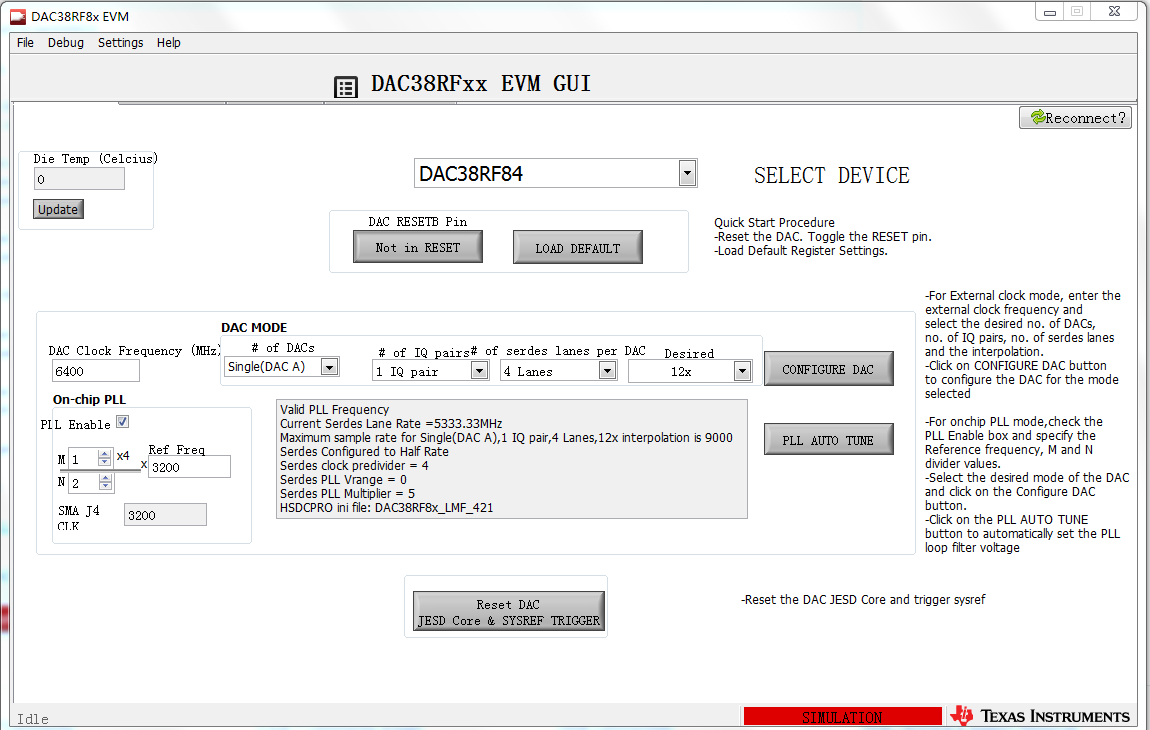
    DAC PLL is used, the reference frequency is 3.2GHz. I used DAC38RFxx EVM GUI to configure relevant registers.

    Interpolation is 12.

    Serdes rate is 5.333GHz.

    FPGA reference clock frequency is 133.33MHz.

    FPGA data rate is 533.33MHz.

    Thank you very much for your help!

    regards, 

    Rita

  • 6400_4211_INT_12X_ref_400MHz.cfgDAC38RF84_6400M_PLL_400M_12x_ref_421.pptxRita,

    Everything looks fine except for your DAC PLL reference clock. I do not see how you got this value from the GUI. Please look at the attached setup file that has this setup working using a reference of 400MHz. I have also attached the register settings as well.

    Regards,

    Jim

  • Jim,

    I will try the configuration you give me, with a reference clock of 400MHz. But there's still something I'm confused about, please help me with the following questions.

    Is the DAC PLL reference clock the same as DAC input clk? If not, what's the relationship of these clocks?  I noticed the device you selected in the GUI is DAC38RF82, when I selected DAC38RF84 and set M to 1 and N to 2, the GUI gave me the same values. Please look at the attached pictures of the GUI  that I configured and point out where I got wrong.

    I don't have the EVM board, I only use the GUI to simulate values of the registers. Our board is self-designed but the schemec refers to  the EVM board user's guide. I configured DAC directly through SPI, using FPGA. So I wonder if there are some rules such like some registers need to be configured before or after other registers, and if I didn't follow the rules the initialization will fail?

    And I noticed that on the second page of the presentation you attached, below test conditions is LMFS = 841, which suggests the number of lanes used is 8. But on the pictures of the GUI in the following pages the number of lanes used in the link is 4. Is there a mistake? How many lanes excatly do you use?

    If SYNC only gose low when the link is initialized successfully, then should I initialize JESD204B core in FPGA after DAC's initialization? Because if I initialize the 204B core in FPGA at power up, SYNC is high and FPGA will think the link is on and begin to send data to DAC, will this affect DAC's initialization?

    One more question, is it ok to set the sysref frequency at 10MHz? I don't need sysref to syncronize multiple devices because I only use one DAC. So sysref is only used to start the initialization of the link, dose the frequency of sysref matter in this case? 

    Thank you very much for helping me out!

    regards,

    Rita

  • Rita,

    The DAC PLL reference clock is the same as the DAC clock. This is an input that is either used by the DAC PLL logic or bypass and used directly as the DAC clock.

    I did not a get a picture from you showing the DAC38J84 setup you are mentioning. SYSREF must be the DAC data rate divided by K and then divided by any integer to lower the frequency if needed. There are several blocks that require two consecutive SYSREF pulses to reset properly and this frequency is required.

    When I set the DAC to DAC38RF84, M to 1 and N to 2 I get a DAC clock frequency of 800, which is not the same. Not sure what you did here. Which part do you plan on using?

    The file I sent was a copy from another setup that I edited. The updated version is attached. Sorry for the confusion.

    When configuring your board, you should first apply power, then clocks, then a hard rest to the DAC, configure the DAC, then do the initialization sequence called out in section 9.1 of the data sheet.

    If the FPGA is configured first and starts the ILA sequence, the DAC will ignore this once you do the initialization sequence. SYNC will go low and the FPGA will go back to the CGS phase.

    Regards,

    Jim

    2451.DAC38RF84_6400M_PLL_400M_12x_ref_421.pptx

  • Jim,

    Sorry I forget to attach the picture. I attach it here. Set the reference clock to 3.2G and set M to 1, N to 2, I can get a DAC sample clock at 6.4GHz and serdes clock at 5.333GHz, when select  DAC38RF84.

    I thought I get the steps right, but SYNC keeps high all the time. Is there any registers that can show me wether the DAC is initialized successfully or not?

    regards,

    Rita

  • Rita,

    Per the data sheet, the maximum the PLL reference clock frequency can be is Fvco/4. In your case this is 6400/4 = 1600.

    Regards,

    Jim

  • Jim,

    I didn't notice the limitation of reference clock frequency before, thank you for the information. I've changed the PLL reference clock to 400MHz and set M to 4, N to 1. But DAC PLL and SERDES PLL can;t lock in this case. I read the register ALM_SYSREF_DET (address is 0x05) and the value is 0x00f3, which indicates that DAC PLL and PLL in Serdes 1 block are out of lock. But strangely I can still measure right clock frequency from the CLKOUT+/- pin( I configure the CLKOUT frequency to be DAC sample clock divided by 2 and I got a 3.2GHz from CLKOUT pin). Why I can still get the right frequency from CLKOUT pin when the DAC PLL is out of lock? What should I do to make it lock?

    And I also configure a clock of Srdes PLL out frequency divided by 80 to be output from ALARM pin, the freqency is supposed to be 66MHz but I can't measure this one.

    regards,

    Rita

  • Rita,

    Once all of the PL parameters are set, you then must adjust the loop filter voltage until the PLL locks. This is done by writing to the PLL2 Configuration Register, which is address 0x33 in the miscellaneous configuration registers page. In this register, the  VCO tuning uses bits 14:8. Adjust this one count at a time, and after each count read back the PLL Loop filter voltage, which are bits 7:5 of register 0x06 in the general configuration registers page 0. If you get a value of either 3,4 or 5, the PLL is locked. I would suggest starting with a decimal value of  97 (0x61) and go a few counts down. If you cannot get it lock, then go a few counts above 97. From the GUI screen shot I sent, the value required by my board was 97 decimal, so I would expect something in this range for your board.

    Regards,

    Jim  

  • Jim,
    The value I set for VCO tuning is 100(0x64). And I've read the register 0x06, bits 7:5 is 3, so this means the PLL is locked? And I do get a clock from CLKOUT pin with the right frequency. But why the 0 bit of the register 0x05 is high, which means DAC PLL is out of lock? I cleared register 0x05 by writing 0x0000 to it every time before I read it. So is the PLL locked or not?
    And I still can't get a clock output from the ALARM pin. Have you measured this clock output? I saw it on top of page 42 of the datasheet.
    Regards,
    Rita
  • Rita,

    After you loaded the DAC registers and applied a reference clock, did you tune the PLL VCO? This is required to get the VCO to lock to the reference frequency.

    Regards,

    Jim 

  • Rita,

    Did you tune the PLL VCO? You must do this to get the PLL locked to the input reference signal. This involves writing to register 0x33 in the Miscellaneous Register Page (4) using bits 14:8 to adjust the VCO until you read back a value between 3-5 of general register 0x06, bits 7:5. In the GUI, this is done using the PLL AUTO TUNE button on the Quick Start page. We normally have the CP Current set to 0.75mA when using the PLL.

    Regards,

    Jim

  • Rita,

    You must write a "0" to 0x05 to clear the alarms before reading them. After I duplicated your setup I get a 0x02 at address 0x05 which is to be expected. If the DAC PLL is locked, bits 7:5 of address 0x6 (PLL_LFVOLT) should read between 3-5. I get a 4 when I did this indicating the PLL is locked.

    Regards,

    Jim

  • Jim,

    Thanks for your reply. I write a "0" to 0x05 every time before reading it. And now when I read 0x05, I get a value 0xfa, the last 3 bits are "010" which I think is expected, and the PLL_LFVOLT is 3, so I think the pll is locked. The problem now is why I get a value 0xfa instead of 0x02 when reading 0x05? Bits 8:3 are all ones, what does this mean?

    Regards,

    Rita

  • Jim,

    And I found strange problems about the pins GPO0, GPIO1, SYNC0+/- and SYNC1+/-. According to the datasheet, the output of pins GPO0, GPIO1, SYNC0+/- and SYNC1+/- can be selected by register 0x01. When I write 0x0080 to register 0x01, I think GPO0, GPIO1, SYNC0+/- and SYNC1+/- are all supposed to be low. But when I checked it in FPGA using chipscope, I found that GPO0 and GPIO1 is low, but SYNC0+/- and SYNC1+/- is high. And when I write 0xff80 to register 0x01, GPO0 , SYNC0+/- and SYNC1+/- are high but GPIO1 is still low. I think this is not right, GPIO1 and GPO0 should have the same output. So why is GPIO1 always low and why are SYNC0+/- and SYNC1+/- always high? I think maybe there are something wrong in the hardware, please help me figure out where is wrong.

    Regards,

    Rita

  • Jim,

    I attached the schematics of my board. Would you please help me to check if the design of DAC is right or not? Thanks a lot.

    Regards,

    Rita

    SCHEMATIC1 _ PAGE07_DAC.pdfSCHEMATIC1 _ PAGE21_FPGA_B2.pdfSCHEMATIC1 _ PAGE22_FPGA_B3.pdfSCHEMATIC1 _ PAGE29_DA_POWER_1.pdf

  • Rita,

    It appears one of serdes link PLL's is not locking. This is indicated by bit 1 being high. The other errors are in regards to the SYSREF signal not being sampled properly by the DAC. I will take a look at the schematics that you sent to see if there is something causing this.

    Regards,

    Jim

  • Jim,

    In my case I am using ONE_DAC_ONLY mode, so only serdes0 is used. The last 3 bits of register 0x05 is '010' which indicates that serdes0 PLL and DAC PLL is locked and Serdes1 PLL is unlocked. I think it is ok in my case, since I'm not using Serdes1.

    About SYSREF capture, are there some registers need to be configured before the sync process during initialization? Or it's only caused by hardware problem?

    Thank you very much! Looking forward to your reply!

    Regards,

    Rita

  • Rita,

    Your schematic looks fine. Make sure sleep is low and TXENABLE is high to get an output. I do not see what is driving SYSREF and DACCLK but make sure the DACCLK is AC coupled and at the proper voltage swing. If SYSREF is DC coupled, make sure this is at the proper common mode and swing per the data sheet.

    To verify that SYSREF is being captured properly, you can run a test only using the NCO. Setup the DAC per the attached file so that the NCO is enabled with the DAC in constant input mode. Have the NCO sync source be set to SYSREF. If the NCO frequency is not integer multiple of the SYSREF frequency, the DAC output will appear as many tones if SYSREF is being captured properly. If it is not being captured properly, the output will be a single tone at the NCO frequency.

    Regards,

    Jim

    1172.DAC38RF82_NCO_CW.pptx

  • Rita,

    Are you still having issues with this? If not, I would like to close this post.

    Regards,

    Jim