This thread has been locked.

If you have a related question, please click the "Ask a related question" button in the top right corner. The newly created question will be automatically linked to this question.

NIRSCAN source code problem

Hi, 
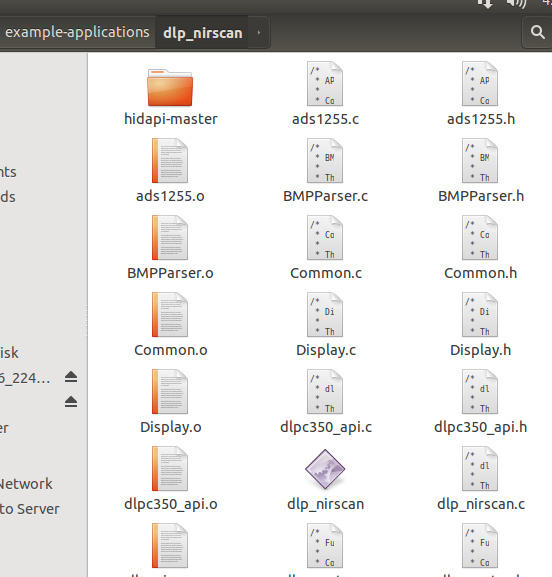
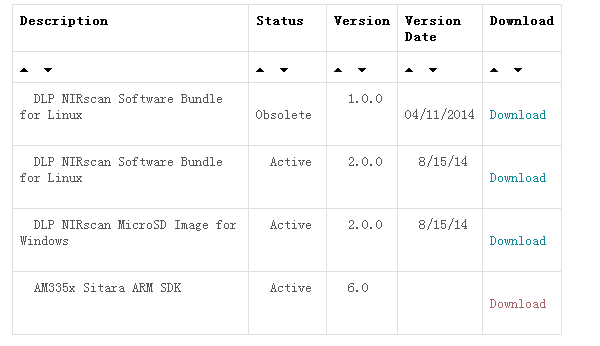
I have bought a NIRSCAN EVM ,and from the the official website(www.ti.com/.../dlpnirscanevm) ,we can download three kinds of software(picture 1) ,the first is " DLP NIRscan Software Bundle for Linux", I have Compiled and run it ,but I'm confused about the use of this code, as the result of my code is an exe (picture 3)which is about 132k(name:nir_scan), but the img file I have download is 3.4G,so  now I am confused about the  use of the code ?what does it use for ?Does it has any contact with the img file which we can download in the same website?and is this img file run on the board? Looking forward to your reply .thanks!
    

  • Hello new user,

    Welcome to the DLP Advanced Light Control section of the TI-E2E community.

    Here is guidance recevied from the NIRscan team:

    AM335x Sitara Bundle:  open source SDK for the Sitara processor

     DLP NIRscan Software Bundle for Linux – open source NIRscan specific source and make files

     DLP NIRscan MicroSD image for Windows – used to create bootable, reprogramming image to place on SD card:

    To reprogram the NIRscan without making any changes to the NIRscan source code (and rebuilding), the MicroSD image needs to be placed on a MicroSD card.  The SD card is then inserted into the NIRscan SD slot and is used to reprogram the NIRscan.  The latest version is 2.0.0.    The SD card image is bootable by the Sitara, thereby allowing it to program its own onboard flash memory.  The procedure for creating and using the SD Card image is located in Appendix C of the DLP NIRscan EVM Users Guide, found at: http://www.ti.com/tool/dlpnirscanevm?keyMatch=dlpnirscanevm&tisearch=Search-EN-Everything

    The size of the img file is intended to be loaded to a 4GB SD card hence the size.

    I hope this helps

    Fizix

  • Hi Fizix,

    I know how to  reprogram the NIRscan with the MicroSD image without any changes, but  I want to get the source code of  the MicroSD image as I want to reprogram the NIRSCAN with some change, So ,I want to make sure something:

    (1) the   DLP NIRscan Software Bundle for Linux: what is used for the compiled results ? The compiled results has any relevence with the MicroSD image?

    (2) AM335x Sitara Bundle:  If  I complie the DLP NIRscan Software Bundle for Linux , I also need the AM335x Sitara Bundle? In other words, (1)is bulid upon(2)?

    (3)DLP NIRscan MicroSD image for Window: Where can I get the source code ?

    Thanks,

    Fizix

  • Hello User,

    First,  I am sorry for the delay.  There was a glitch with the thread that prevented my replying to it.  This has been resolved.

    Let me explain the different items that you see on the NIRscan EVM page:

    DLP NIRscan Software Bundle for Linux (v 2.0.0) - This is the source software for the sofware that will run on the Sitara Linux operating system.  This bundle also has instructions on how to create the SD image in #2 from the payload compiled from this source using #3.

    DLP NIRscan MicroSD Image for Windows (v 2.0.0) - This says Windows because the click wrap license is a windows program.  Once downloaded and installed there is an SD image that can be flashed to an SD card.  This card has a Linux OS that starts and runs a program that re-flashes a payload image onto the Sitara which contains the Linux OS for the Sitara and the application compiled from #1 using #3.

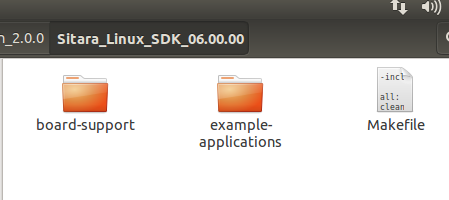
     AM335x Sitara ARM SDK (v 6.0) - This SDK is the editor and complier with libraries that uses the source in #1 to creat the payload Sitara image that can then be packaged into a bootable SD card image that will update the Sitara OS image and application with the payload when inserted into the SD slot on the NIRscan and booted up from the SD card.

    I hope this helps.

    Fizix