


I've been working with the Lightcrafter 4500 via the GUI (ver 2.0.0) for about two weeks now. For our project, we need to display 1-bit patterns as fast as possible. Furthermore, our pattern sequence may be larger than can fit into the on-board memory. Therefore, we are sending the patterns over HDMI. The current plan is to encode the 24 of the 1-bit images into a 24-bit RGB image and stream them color images to the projector.
There are a few things which I can't quite figure out. I set the GUI as shown in the following graphic, using an 8 bit pattern, the projector properly displays the HDMI output (currently whatever is on the second monitor of my computer).
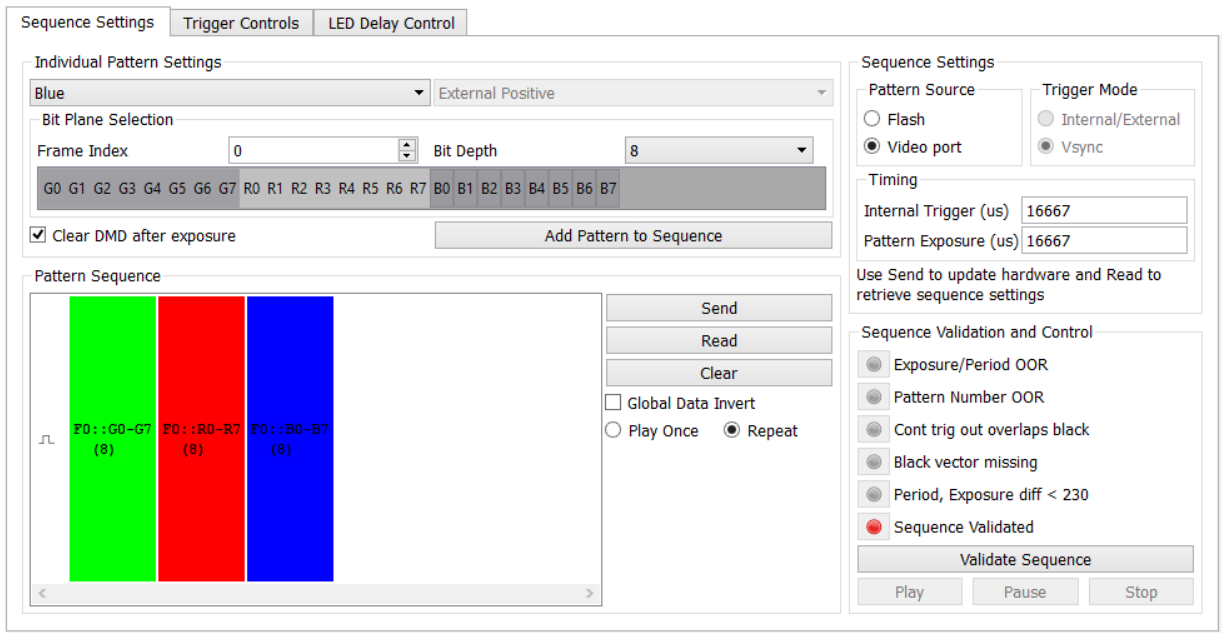
I have the following two problems:
1) The projector flickers as if the LEDs are not continuously switching, despite the timing settings which match the refresh rate (60 Hz). (Note, since it may be relevant, "Clear DMD after exposure" is only set on the blue part of the pattern.) How can I get it to display "continuously" as it does in Video mode?
2) Both Trigger Out 1 and Trigger Out 2 output 60 Hz pulses, which I presume match VSYNC, perhaps with some delay. I would like to configure one of those triggers to output on every bit. Is this possible?
Thank you,
Jason
