This thread has been locked.

If you have a related question, please click the "Ask a related question" button in the top right corner. The newly created question will be automatically linked to this question.

MCSDK VIDEO 2.0 Demo Guide

In the part 4, Preparing the EVM (http://processors.wiki.ti.com/index.php/MCSDK_VIDEO_2.0_Demo_Guide#Preparing_the_EVM).

I follow the instructions that I found in BIOS MCSDK 2.0 User Guide to update an IBL EEPROM image (http://processors.wiki.ti.com/index.php/BIOS_MCSDK_2.0_User_Guide#IBL).

In step 6, The guide say that I have to load a app.bin (i2crom_0x51_c667#_le.bin) to memory.

But I think that I have to load file (*.dat or *.bin) of MCSDK VIDEO DEMO.
I don't know if I'm right, and if this procedure is correct to prepare the EVM to run a video demo.

TIP: I want to test one of this demos:
+ pkt_1080p30_transcode_demo
+ pkt_d1dec_resize_1080penc_demo
+ pkt_multichan_transcode_demo

  • Hi Pedro, which MCSDK video version are you trying?.. Latest version don't include pkt demos, only PCIe demos.

    If you can provide us with more details about your use case we can see if we point you to one of our PCIe demos instead of packet demos.

    thank you,

    Paula

  • Hi Paula,

    In my question, I link the documentation that I using to try the Video Demo.
    In that link, you could see that I'm trying the MCSDK VIDEO 2.0 Demo Guide.
    http://processors.wiki.ti.com/index.php/MCSDK_VIDEO_2.0_Demo_Guide#Preparing_the_EVM

    I'd like to try a PKT demo, cause I want to use the EVM in a GigaEthernet network.
    Where the EVM will process a huge amount of information, and it gonna resend the result to other device by the same network.

    If you only use the EVM with PCIe, that means that the EVM is like a mathematic co-processor.
    And for this configuration, you can find many solution in the market, for example CUDA.

    Regards,
    Pedro

  • Hi Pedro,

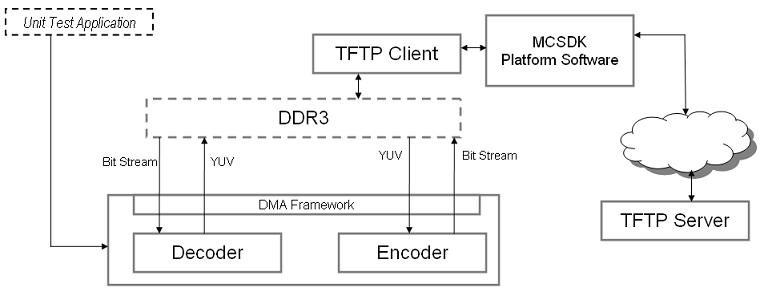
    maybe a good match could be our Codecs TFTP demos for Shannon EVM

    http://processors.wiki.ti.com/index.php/MCSDK_VIDEO_2.x_Getting_Started_TFTP_Demo_Guide 

    This demo flow is as follows:

    • Platform initialization
    • Network interface initialization
      • Read network configuration file via JTAG file I/O
      • Configure network channel for streaming, and local/remote network endpoints;
    • Read test cases configuration file via JTAG file I/O
    • Loop through all test cases
      • Parse test case configuration file, and set static and dynamic parameters
      • Codec initialization
      • Loop through all frames until end of file reached
        • TFTP Get input file into DDR
        • Process frames (decode or encode)
        • TFTP Put generated bytes to TFTP server

    thank you,

    Paula