This thread has been locked.

TI-API: TEST API

HI 

I'm getting the following error when trying out the following endpoint:

transact.ti.com/.../test

     "errorCode": "ERR-TICOM-ORDER-API-0001",
      "type": "Application",
      "section": "Orders",
      "field": null,
      "reason": "We are unable to validate your checkout profile",
      "message": "Wait 5 minutes before attempting to resubmit your request. If you are still having issues, connect with TI customer support <">support.ti.com/csm>",
      "data": null

Request:
curl -X 'POST' \
  'transact.ti.com/.../test' \
  -H 'accept: application/json' \
  -H 'Authorization: Bearer GVJ7GJSDlAiPnJ62BPdPCnqkM0s4' \
  -H 'Content-Type: application/json' \
  -d '{
  "order": {
    "checkoutProfileId": "xxxxxx",
    "customerPurchaseOrderNumber": "123456",
    "endCustomerCompanyName": "Xylem",
    "expediteShipping": false,
    "customerOrderComments": [
      {
        "message": "MY TEST ORDER"
      }
    ],
    "lineItems": [
      {
        "customerLineItemNumber": 1,
        "tiPartNumber": "NE555DR",
        "customerPartNumber": "224466",
        "customReelIndicator": false,
        "quantity": 1,
        "customerItemComments": [
          {
            "message": "SOME COMMENT GOES HERE"
          }
        ]
      },
      {
        "customerLineItemNumber": 2,
        "tiPartNumber": "LM358PWR",
        "quantity": 1
      }
    ]
  }
}'

The checkout profile status=Complete.

Can you have a look?
Thanks
Axel

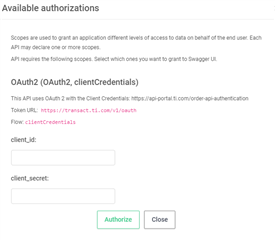
  • request received, let me look into this for you- quick note, you must authenticate with your credentials even in testing using your access key and id plus using your checkout profile id.  there is a lock icon to insert your access cred information then run as authorized and try our teatuer, i will send you more details shortly.

  • I am sorry this thread has been delayed, please let me know if issue still occurring. -it is not normal not to respond back in an untimely manner., please let me know you still need assistance.  I do see that on 6/30 you are getting a wait 5 min message and try again...  let me see if it is because of the test part being used or something  that date with the system, i will try to execute this tomorrow and share what I find, would you please try also.

  • I was able to get this working as a test order - I will share the json payload and output here minus your credentials.

    you have to use the profile id , consumer key and consumer id - that all must match to execute to get you the info as expected.

    you have to click on the lock icon and enter your consumer key and id then click  authenticate, then do the tryout feature and execute

    {
    "order": {
    "checkoutProfileId": "FD9980......",                (removed part of the ckoutprofileid for security reasons)
    "customerPurchaseOrderNumber": "Test",
    "endCustomerCompanyName": "xylem",
    "expediteShipping": false,
    "customerOrderComments": [
    {
    "message": "MY TEST ORDER"
    }
    ],
    "lineItems": [
    {
    "customerLineItemNumber": 1,
    "tiPartNumber": "NE555DR",
    "customerPartNumber": "224466",
    "customReelIndicator": false,
    "quantity": 1,
    "customerItemComments": [
    {
    "message": "SOME COMMENT GOES HERE"
    }
    ]
    },
    {
    "customerLineItemNumber": 2,
    "tiPartNumber": "LM358PWR",
    "quantity": 1
    }
    ]
    }
    }

    i executed and got this error code

    "errors": [
    {
    "errorCode": "ERR-TICOM-ORDER-API-0009",
    "type": "Validation",
    "section": "Generic",
    "field": null,
    "reason": "Order value too low for selected payment method, resubmit order with a total value > 250 USD",
    "message": "Resubmit the request with different payment options. For additional information refer to ">api-portal.ti.com/order-api-payment",
    "data": null

  • Hi

    I had the same issue with your example request.

    Steps performed:

    1. Used Chrome to go to https://api-portal.ti.com/store-order-api. I did not login to the site (upper right corner).

    2. Clicked on "Authorize" and entered key and secret. There is only one server to choose from in the Servers list.


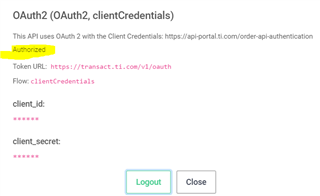
    3. the authorization looks ok (see yellow text)

    4. In the TI store test order I pressed "Try it out"

    5. I've pasted the json from your test info the request body and added my checkout profile id

    6. Pressed Execute

    The response is:

    "errors": [
        {
          "errorCode": "ERR-TICOM-ORDER-API-0001",
          "type": "Application",
          "section": "Orders",
          "field": null,
          "reason": "We are unable to validate your checkout profile",
          "message": "Wait 5 minutes before attempting to resubmit your request. If you are still having issues, connect with TI customer support <">support.ti.com/csm>",
          "data": null
        }

    Any ideá?

    Br
    Axel
  • Hi Axel,

    It looks like you have been passing your checkout profile name instead of the checkout profile ID. Typically, the checkout profile name will be a human friendly name and not something that can be confused with the ID. To find the ID, you can follow the steps outlined on www.ti.com/.../faqs-checkout-profile.html:

    1. Log in to your myTI company dashboard.
    2. Under Order Preferences, select Addresses.
    3. On the Addresses page, find the address that you wish to copy.
    4. Click the Copy icon, which looks like a piece of paper.
    5. Confirm that the copied information is correct on the Copy Address page and click Save.

    Your checkout profile ID ends with C7. I hope that helps.

    Best regards,
    Paul

  • Thanks.

    I was missing the last two digits in the check out profile ID.

**Attention** This is a public forum