This thread has been locked.

If you have a related question, please click the "Ask a related question" button in the top right corner. The newly created question will be automatically linked to this question.

DP83826I: DP83826I phy not getting up with IMX93 processie

Part Number: DP83826I

Hello

We are using DP83826IRHBR with IMX93 processor 

Below device tree entry

&fec {
        pinctrl-names = "default", "sleep";
        pinctrl-0 = <&pinctrl_fec>;
        pinctrl-1 = <&pinctrl_fec_sleep>;
        phy-mode = "rmii";
        phy-handle = <&ethphy1>;
        snps,clk-csr = <6>;
        status = "okay";        mdio {
                compatible = "snps,dwmac-mdio";
                #address-cells = <1>;
                #size-cells = <0>;                ethphy1: ethernet-phy@0 {
                        compatible = "ethernet-phy-ieee802.3-c22";
                        reg = <0>;
                        pinctrl-0 = <&pinctrl_eth1>;
                        reset-gpios = <&gpio4 26 GPIO_ACTIVE_LOW>;
                        reset-assert-us = <10000>;
                        reset-deassert-us = <80000>;
                };
        };
};


getting below error logs

[   1.963513] fec 42890000.ethernet: Invalid MAC address: 00:00:00:00:00:00
[    1.970314] fec 42890000.ethernet: Using random MAC address: 56:b0:d4:15:89:a7
[    1.978861] mdio_bus 42890000.ethernet-1: MDIO device at address 0 is missing.
[    1.986766] fec 42890000.ethernet eth0: registered PHC device 0
[   15.078672] fec 42890000.ethernet eth0: Unable to connect to phy

Pin details

MODESELECT - GND
COL - 1.8 V
CRS - NC

TX_D0 - ENET2_TX_D0 (processor pin)
TX_D1 - ENET2_TX_D1 (processor pin)
TX_D2 and TX_D3 - NC
TX_CLK - NC

RX_D0 - ENET2_RX_D0 (processor pin)
RX_D1 - ENET2_RX_D1 (processor pin)
RX_D2 and RX_D3 - NC
RX_CLK - NC

Can you please help  

  • Hi Himanishu,

    The mdio_bus error suggests you are not getting register access to the PHY. We have a DP83826 troubleshooting guide with checks to perform to ensure the PHY is brought-up correctly. I strongly recommend reading through this document and looking for discrepancies in your design.

    The pin details suggest you're in RMII follower mode. I recommend comparing your schematic to our DP83826 schematic checklist to ensure all pins are implemented correctly.

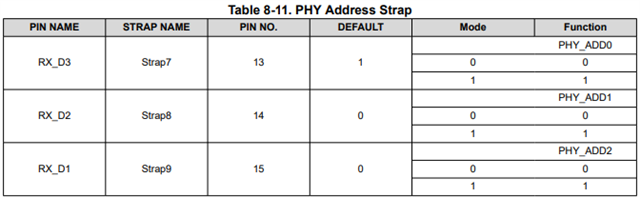
    One thing I notice from your pin description is that RX_D3 is left NC. This pin is an internal pullup, which will strap this high on start. Since this is also a PHY address strap, you are strapping the PHY to address 001, not address 0. Can you try this and all other address options to see if you're targeting the wrong address?

    Best,

    Shane

  • Hi Shane,
    Thank you for reply 
    I am able to up the debug phy and able to ping 8.8.8.8 without packet loss but observing ipef3 issue 

    ipef3 test observation. setting iperf3 client on imx93 board and iperf3 server on linux laptop 

    Client setup at imx93 board 
    $ ifconfig eth0 192.168.1.150
    $ iperf3 -s 

    server setup at Linux Laptop 

    $ ifconfig eth0 192.168.1.151
    $ iperf3 -c 192.168.1.150 


    root@test_laptop:~# iperf3 -c 192.168.1.150
    Connecting to host 192.168.1.150, port 5201
    [ 5] local 192.168.1.151 port 56686 connected to 192.168.1.150 port 5201
    [ ID] Interval Transfer Bitrate Retr Cwnd
    [ 5] 0.00-1.00 sec 5.50 MBytes 46.1 Mbits/sec 27 8.48 KBytes
    [ 5] 1.00-2.00 sec 3.88 MBytes 32.5 Mbits/sec 19 18.4 KBytes
    [ 5] 2.00-3.00 sec 5.25 MBytes 44.0 Mbits/sec 26 28.3 KBytes
    [ 5] 3.00-4.00 sec 896 KBytes 7.34 Mbits/sec 11 1.41 KBytes
    [ 5] 4.00-5.00 sec 0.00 Bytes 0.00 bits/sec 4 8.48 KBytes


    Device tree details

    &fec {
    pinctrl-names = "default", "sleep";
    pinctrl-0 = <&pinctrl_fec>;
    phy-mode = "rmii";
    phy-handle = <&ethphy1>;
    fsl,rmii-clock-internal;

    assigned-clock-rates = <100000000>, <50000000>, <50000000>;

    status = "okay";

    mdio {
    compatible = "snps,dwmac-mdio";
    #address-cells = <1>;
    #size-cells = <0>;

    ethphy1: ethernet-phy@1 {
    compatible = "ethernet-phy-ieee802.3-c22";
    reg = <1>;
    pinctrl-0 = <&pinctrl_eth1>;
    reset-gpios = <&gpio4 26 GPIO_ACTIVE_LOW>;
    reset-assert-us = <60000>;
    reset-deassert-us = <200000>;
    };
    };
    };


    Can you please help me

  • Hi Himanishu,

    To confirm, the issue you're having with iperf is low throughput correct? What speed are you linked up at?

    It seems you're getting 5.5 Megabytes per second, which is rather low. What throughput do you get when you swap the server and client? This would test the PHY's RX path rather than the TX path. Furthermore what throughput do you get between the Linux laptop and a different link partner using the same cable?

    Best,

    Shane

  • Hi Shane 

    On scope I check the MDC frequency is 2.5MHz and Reference clk freq is 50 MHz 
    Observation for above configuration

    root@imx93-emmc:~# ethtool eth0 | grep -i speed
    Speed: 100Mb/s
    root@imx93-emmc:~#
    root@imx93-emmc:~# cat /sys/class/net/eth0/speed
    100
    root@imx93-emmc:~#


    Kept imx93 ethernet as server then output is 
    root@imx93-emmc:~# iperf3 -s
    -----------------------------------------------------------
    Server listening on 5201 (test #1)
    -----------------------------------------------------------
    Accepted connection from 192.168.1.55, port 59630
    [ 5] local 192.168.1.50 port 5201 connected to 192.168.1.55 port 59638
    [ ID] Interval Transfer Bitrate
    [ 5] 0.00-1.00 sec 1.75 MBytes 14.7 Mbits/sec
    [ 5] 1.00-2.00 sec 1.25 MBytes 10.5 Mbits/sec
    [ 5] 2.00-3.00 sec 1.50 MBytes 12.6 Mbits/sec
    [ 5] 3.00-4.00 sec 1.00 MBytes 8.39 Mbits/sec
    [ 5] 4.00-5.00 sec 1.12 MBytes 9.44 Mbits/sec
    [ 5] 5.00-6.00 sec 2.50 MBytes 21.0 Mbits/sec
    [ 5] 6.00-7.00 sec 1.38 MBytes 11.5 Mbits/sec
    [ 5] 7.00-8.00 sec 1.62 MBytes 13.6 Mbits/sec
    [ 5] 8.00-9.00 sec 1.50 MBytes 12.6 Mbits/sec
    [ 5] 9.00-10.00 sec 1.12 MBytes 9.43 Mbits/sec
    - - - - - - - - - - - - - - - - - - - - - - - - -
    [ ID] Interval Transfer Bitrate
    [ 5] 0.00-10.00 sec 14.8 MBytes 12.4 Mbits/sec receiver


    whereas for client output 

    root@imx93-emmc:~# iperf3 -c 192.168.1.55
    Connecting to host 192.168.1.55, port 5201
    [ 5] local 192.168.1.50 port 55776 connected to 192.168.1.55 port 5201
    [ ID] Interval Transfer Bitrate Retr Cwnd
    [ 5] 0.00-1.00 sec 0.00 Bytes 0.00 bits/sec 17 2.83 KBytes
    [ 5] 1.00-2.00 sec 0.00 Bytes 0.00 bits/sec 2 1.41 KBytes
    [ 5] 2.00-3.00 sec 0.00 Bytes 0.00 bits/sec 5 1.41 KBytes
    [ 5] 3.00-4.00 sec 0.00 Bytes 0.00 bits/sec 6 1.41 KBytes
    [ 5] 4.00-5.00 sec 128 KBytes 1.05 Mbits/sec 11 1.41 KBytes
    [ 5] 5.00-6.00 sec 0.00 Bytes 0.00 bits/sec 5 1.41 KBytes
    [ 5] 6.00-7.00 sec 0.00 Bytes 0.00 bits/sec 2 1.41 KBytes
    [ 5] 7.00-8.00 sec 0.00 Bytes 0.00 bits/sec 5 1.41 KBytes
    [ 5] 8.00-9.00 sec 0.00 Bytes 0.00 bits/sec 2 1.41 KBytes
    [ 5] 9.00-10.00 sec 0.00 Bytes 0.00 bits/sec 0 1.41 KBytes
    - - - - - - - - - - - - - - - - - - - - - - - - -
    [ ID] Interval Transfer Bitrate Retr
    [ 5] 0.00-10.00 sec 128 KBytes 105 Kbits/sec 55 sender
    [ 5] 0.00-10.21 sec 60.8 KBytes 48.8 Kbits/sec receiver

    iperf Done.
    root@imx93-emmc:~#

     
    I have tried changing the MDC frequency from device tree as 25MHz but observation is same. MDC frequency is change to 25MHZ. I have checked on scope


    can you please suggest any thing 


  • Hi Himanishu,

    By MDC frequency are you referring to the MDC/MDIO register bus? This should not affect the PHY's ability to transfer data. The reference clock being 50MHz is good for RMII follower mode.

    It seems like the TX channel is lower than the RX channel given your images, however both look to be low if you are linked up at 100Mbps. Is the link staying up when connected to the link partner or do you notice the link dropping at all?

    Do you see errors in register 0x0015 of the PHY when the imx93 is receiving packets?

    Have you performed any loopback testing? Loopback testing is described in the troubleshooting guide I linked earlier and isolated each side of the PHY to look for errors. The two loopback tests to try would be MII loopback (tests RMII) and reverse loopback (tests MDI + ethernet cable). If you can perform each of these tests it would help us know where the issue is happening.

    Best,

    Shane

  • Hi Shane 
    Thank you for helping now I am able to resolve the issue. But I am observing that ethernet phy led linking with very low brightness.
    Can we increase the brightness on led on ethernet phy


  • Hi Himanshu,

    You can lower the current limiting resistor on the LED to get more current through. There is no register on the PHY to adjust LED drive capability.

    Of course you want to be sure the LED you're using is ok with your VDDIO as well Slight smile

    Best,

    Shane