This thread has been locked.

If you have a related question, please click the "Ask a related question" button in the top right corner. The newly created question will be automatically linked to this question.

Dealing with Canceled URB_FUNCTION_BULK_OR_INTERRUPT_TRANSFER? - TM4C1294NCPDT

Hey All,

I am stuck trying to debug an issue with some USB DMA transfers from my device to a host computer. The microcontroller interfaces with an external USB 2.0 PHY chip to send data as a device to a host computer using a bulk endpoint.


The bulk endpoint is configured such that transfers occur in chunks of 512 bytes. I use the integrated USB DMA controller to send a dataset of 16,384 bytes to the host computer over this endpoint.

On windows 8, this implementation worked just fine and there were no problems at all with receiving the data on the host computer, but after attempting to use the same hardware/software on a windows 10 setup, the device fails to get all of the data to the host computer.

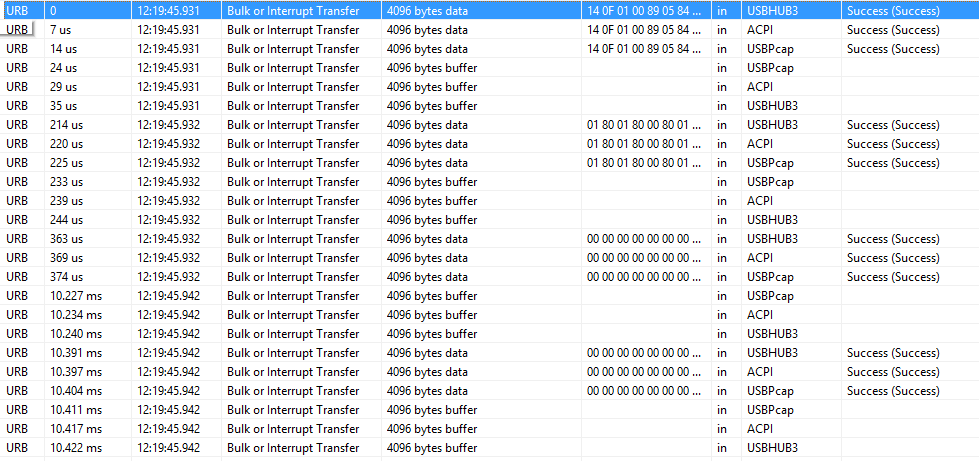
One difference that I notice is that there are some bulk/interrupt transfers that get canceled instead of completed on the windows 10 side. This does not occur on windows 8. Below are screenshots of the behavior I am seeing using USBLyzer to analyze the packets:

Windows 8:
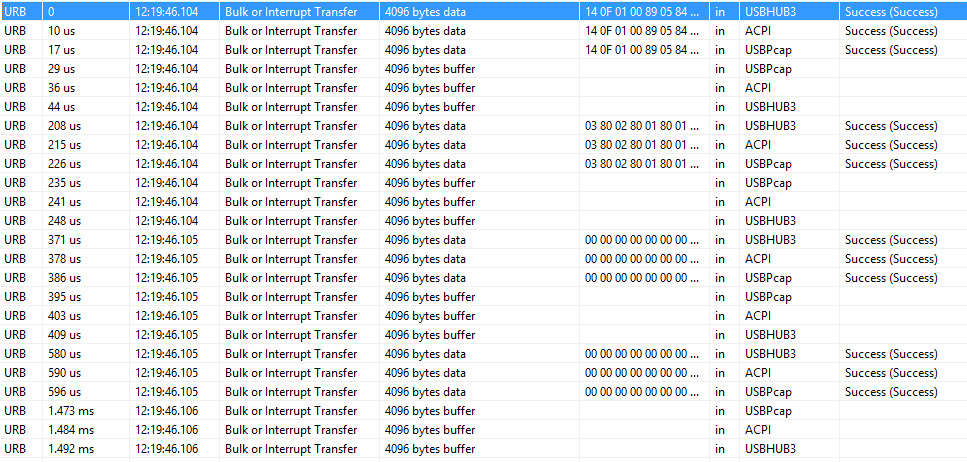
Windows 10:

Could anyone point me in the direction I would have to go with this? Right now the microcontroller just gets interrupted once the full 16kb block of data is sent over so I have no idea whether or not I am dropping packets or if things are getting canceled.

  • Hello Bryan,

    I will forward your post to our USB expert to see if they can help, but this really sounds like a question that is more appropriate for a MicroSoft developers support group as it seems the issues are on the PC OS side of things.
  • Hello Bryan

    How does your application know that the data has been dropped?

    Regards
    Amit
  • Chuck,

    Thanks for forwarding my post! Hopefully we can get to the bottom of this. I am not entirely confident in my rudimentary implementation of the USB protocol so I thought I would post here first.

    Regards,
    Bryan
  • Hello Amit!

    Quite sadly, my application does not know that the packets have been dropped. From what I can tell my processor gets interrupted once and only once when the entire data set has been transferred over by the integrated USB DMA controller. The application believes that it has completed sending all of the data.

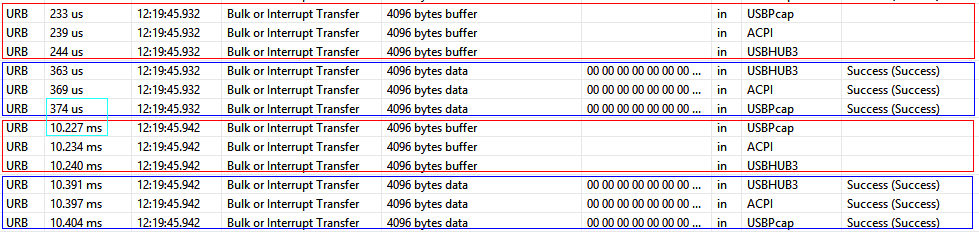
    I have noticed however that sometimes the USB transfer takes an extra amount of time as below:


    Please excuse the weird configuration of the packet capture software... What is shown here is a transfer of 16,384 bytes that seems to show up as four separate transfers of 4,096 bytes. If you look carefully you could see that there is a huge time delay between the reception of the "third chunk" of 4,096 and the "fourth chunk". One would assume that all of the transfers would occur in a uniform amount of time, but occasionally a delay like the one shown above occurs.

    For some reason this creates a problem in Windows 10, but not in Windows 8...  Perhaps if I can solve the issue of this strange intermittent delay then I can solve the problem on Windows 10.

    Cheers,

    Bryan

  • Hello Bryan

    As chuck suggested, this is a question for MS. They have changed a lot of implementation on USB for Win10.

    Regards
    Amit
  • Hi All,


    I received my Lecroy protocol analyzer today and I have captured some data and made some search filters to make it easier to read. Right now I am outputting test data through my device by sending it a command "SCAN:TRIG".


    What should follow is 4 data sets of 16,384 bytes which I read using MATLAB or a termite (RS232). The header of each of the packet can be found using the included search options. What is confusing me is that in the packet captures from Windows 10 and Windows 8, there seems to be little to no difference between the way the captures look...


    I set up my test script to stop trying to ask for more data sets if it doesn't receive all of the data associated with the command "SCAN:TRIG". It does this five times and on Windows 8 it is triggered all 5 times, while in windows 10 it successfully transfers the first four packets and then somehow fails in receiving the entirety of the data from the second call to "SCAN:TRIG"


    Could anyone who is familiar with reading this type of packet capture software help me out with understanding how it is that all of the data I am trying to send is coming across the bus and getting ACK'd, but it isn't showing up in MATLAB or my terminal emulator?

    Thanks,

    Bryan

    Also, I noticed that I receive a NAK from the device on like every microframe... Is this an issue that can be resolved or is it just how virtual com ports operate?

    USBCaptures.zip

  • Hi bryan,

    Here is a part of your USBlyzer capture,


    The first three lines mean request phase URBs, falling down over the three driver stack layers (USBPcap, ACPI, USBHUB3). The next three lines show completion phase URBs, rising up the three drivers in reverse order. That is, these six lines represent a record of single request-completion pair. The next six lines are also another request-completion pair. Now that the delay occurs after the first completion, before the second request. No USB transfer occurs on the bus wires in this period. This delay is caused by the Windows driver (usbser.sys or WinUSB?), or by your PC application.

    What is the PC driver?
    If it is usbser.sys (CDC), increase the input buffer size using SetupComm( dwInQueue ) API, so that the input buffer of the driver could hold entire transfer.
    If it is WinUSB, check the buffer status supplied to WinUsb_ReadPipe(). Is the buffer allocated "fixed" against garbage collection?


    Though it is a minor problem,
    You are using USBlyzer and WireShark (USBPcap), simultaneously. Applying two or more software sniffers at the same time is bad idea. They may conflict each other. At least, software sniffers add slight delay, as your record shows (USBPcap adds a couple of micro-seconds). Uninstall previous sniffer, before installing new one.

    Tsuneo

  • Thanks for the Reply Tsueno!

    You have clarified to me what I am looking at exactly in the packet capture software and it makes sense to me that we are running into issues because we are trying to transfer a lot more data probably than can be stored in the input buffer of usbser.sys by default!

    The issue is that we are trying to do data analysis using MATLAB right now and we are accessing our device using a serial object in MATLAB. It is possible to specify the input buffer in MATLAB but I do not think it is tied to the driver stack layer. Is there a way in windows to set the input buffer size of usbser.sys? If not, it would not be a big deal to just write some c++ code that accesses our device and interfaces with MATLAB.

    Thanks for your help!

    Bryan
  • Bryan Womack said:
    It is possible to specify the input buffer in MATLAB but I do not think it is tied to the driver stack layer.


    I believe MATLAB passes InputBufferSize property to the virtual COM port, like BaudRate.
    try it,

    s = serial( 'COM23', 'InputBufferSize', 64*1024 );
    fopen(s)

    Tsuneo

  • Hello Tsueno,

    Sorry for the late reply! I have been working on a new PC driver and I just got to test it today. It works like a charm on Windows 8 but I run into the same issues for Windows 10. It uses the usbser.sys driver I think. Here is a code excerpt from my PC driver that handles the opening of the COM Port:

    //------------------------------------------------------------------------------
    // OpenCom
    //------------------------------------------------------------------------------
    int OpenCom(const char *com_port)
    {
    	DCB dcb; // TBD should save initial state, and restore on close com
    	COMMTIMEOUTS ct;
    
    	// Create a file handle for serial communications port
    	hCom = CreateFile
    	(
    		com_port,
    		GENERIC_READ | GENERIC_WRITE,
    		0,						// exclusive access
    		0,						// default security attributes
    		OPEN_EXISTING,
    		FILE_ATTRIBUTE_NORMAL,	// | FILE_FLAG_OVERLAPPED, // don't use overlapped
    		0
    	);
    
    	// Check success
    	if (hCom == INVALID_HANDLE_VALUE)
    		return(C_COM_ERROR);
    
    	// Purge buffers
    	if (!PurgeComm(hCom, PURGE_TXABORT | PURGE_RXABORT | PURGE_TXCLEAR | PURGE_RXCLEAR))
    		return(C_COM_ERROR);
    
    	// Set RX/TX buffer size
    	if (!SetupComm(hCom, C_SCOM_BUFFER_SIZE_IN, C_SCOM_BUFFER_SIZE_OUT)) // TBD save state first? define these values
    		return(C_COM_ERROR);
    
    	// Get communcations state
    	if (!GetCommState(hCom, &dcb))
    		return(C_COM_ERROR);
    
    	// Set communications state
    	dcb.BaudRate = C_SCOM_BAUD;
    	// TBD verify the necessity for and validity of the below port properties
    	// we certainly don't want hardware flow control
    	((DWORD*)(&dcb))[2] = 0x1001; // set port properties for TXDI + no flow-control
    	dcb.ByteSize = C_SCOM_BITS;
    	dcb.Parity = C_SCOM_PARITY;
    	dcb.StopBits = C_SCOM_STOP;
    	dcb.fOutxCtsFlow = false;
    	dcb.fOutxDsrFlow = false;
    	dcb.fDtrControl = DTR_CONTROL_DISABLE;
    	dcb.fDsrSensitivity = false;
    	dcb.fOutX = false;
    	dcb.fInX = false;
    	dcb.fErrorChar = false;
    	dcb.fNull = false;
    	dcb.fRtsControl = RTS_CONTROL_DISABLE;
    	dcb.fAbortOnError = false;
    
    
    	// Check success
    	if (!SetCommState(hCom, &dcb))
    		return(C_COM_ERROR);
    
    	// This delay is not required; however, a conservative time of 60 ms is good
    	// practice to ensure that the settings are changed before any other
    	// operations take place.
    	Sleep(60);
    
    	// set the timeouts to 0
    	ct.ReadIntervalTimeout = MAXDWORD;
    	ct.ReadTotalTimeoutMultiplier = 0;
    	ct.ReadTotalTimeoutConstant = 0;
    	ct.WriteTotalTimeoutMultiplier = 0;
    	ct.WriteTotalTimeoutConstant = 0;
    	if (!SetCommTimeouts(hCom, &ct))
    		return(C_COM_ERROR);
    
    	// Return success
    	return(C_COM_SUCCESS);
    }


    C_SCOM_BUFFER_SIZE_IN is defined to be 0x4E20001 and C_SCOM_BUFFER_SIZE_OUT is defined to be 0x2000 and the command returns without error. 
    When I get the communication driver properties from the COMPROP structure using GetCommProperties, it is reported to me that dwMaxTxQueue and
    dwMaxRxQueue are 0 and that the dwCurrentTxQueue is 0 and dwCurrentRxQueue is 16384. Is the only way to setup these values to call the command SetupComm?
    The documentation for SetupComm says the inputs are "recommendations".


    Thanks,

    Bryan