This thread has been locked.

If you have a related question, please click the "Ask a related question" button in the top right corner. The newly created question will be automatically linked to this question.

MSPM0G3107: Changing the PC to different address of application code

Part Number: MSPM0G3107
Other Parts Discussed in Thread: MSPM0G3507, , UNIFLASH, SYSCONFIG

Tool/software:

Hi,

I have modified secondary_bsl_can_LP_MSPM0G3507_nortos_ticlang demo for MSPM0G3107. It is working fine. But, from the secondary bootloader how can I change PC to the starting address of the application code which is not 0x00000000.

I have tried with the below snippet by feeding it the start address of the application, which is mentioned in https://www.ti.com/lit/pdf/slaae88. But, it is not working.
/*! Jumps to application using its reset vector address */
#define TI_MSPBoot_APPMGR_JUMPTOAPP() {((void (*)()) (*(uint32_t *)(APP_AREA_START_ADDR + 4)))
();}

I have also tried the below API which is mentioned in boot_application_LP_MSPM0G3507_nortos_ticlang demo. But, it is not working.

static void start_app(uint32_t *vector_table)
{
/* The following code resets the SP to the value specified in the
* provided vector table, and then the Reset Handler is invoked.
*
* Per ARM Cortex specification:
*
* ARM Cortex VTOR
*
*
* Offset Vector
*
* 0x00000000 ++++++++++++++++++++++++++
* | Initial SP value |
* 0x00000004 ++++++++++++++++++++++++++
* | Reset |
* 0x00000008 ++++++++++++++++++++++++++
* | NMI |
* ++++++++++++++++++++++++++
* | . |
* | . |
* | . |
*
* */

/* Reset the SP with the value stored at vector_table[0] */
__asm volatile(
"LDR R3,[%[vectab],#0x0] \n"
"MOV SP, R3 \n" ::[vectab] "r"(vector_table));

/* Set the Reset Vector to the new vector table (Will be reset to 0x000) */
SCB->VTOR = (uint32_t) vector_table;

/* Jump to the Reset Handler address at vector_table[1] */

((void (*)(void))(*(vector_table + 1)))();
}

Thank you

  • Hi,

    Firstly, please make sure there is application program is placed in the address "APP_AREA_START_ADDR", and this address should be the interrupt vector table address.

    Secondly, check your .cmd linker file, to make sure the program is linked within the flash region of  "APP_AREA_START_ADDR ~ 0x20000 - APP_AREA_START_ADDR" (for MSPM0G3507).

    Thirdly, you could try below program jump code, to backup the vector_table before update stack pointer, to avoid any optimization level impacts.

    uint32_t * vector_table_backup;
    static void start_app(uint32_t *vector_table)
    {
        /* The following code resets the SP to the value specified in the
         * provided vector table, and then the Reset Handler is invoked.
         *
         * Per ARM Cortex specification:
         *
         *           ARM Cortex VTOR
         *
         *
         *   Offset             Vector
         *
         * 0x00000000  ++++++++++++++++++++++++++
         *             |    Initial SP value    |
         * 0x00000004  ++++++++++++++++++++++++++
         *             |         Reset          |
         * 0x00000008  ++++++++++++++++++++++++++
         *             |          NMI           |
         *             ++++++++++++++++++++++++++
         *             |           .            |
         *             |           .            |
         *             |           .            |
         *
         * */
    
        /* Back up of vector_table to avoid being changed because of SP update */
        vector_table_backup = vector_table;
    
        /* Set the Reset Vector to the new vector table (Will be reset to 0x000) */
        SCB->VTOR = (uint32_t) vector_table;
    
        /* Reset the SP with the value stored at vector_table[0] */
        __asm volatile(
            "LDR R3,[%[vectab],#0x0] \n"
            "MOV SP, R3       \n" ::[vectab] "r"(vector_table));
    
        /* Jump to the Reset Handler address at vector_table[1] */
    
        ((void (*)(void))(*(vector_table_backup + 1)))();
    }

  • Hi Pengfei,

    Thank you for the information.

    But, when I tried to flash the firmware after building with Linker File Generation, Startup File Reference disabled (in order to editing device_linker.cmd) i am getting errors:

    CORTEX_M0P: Flash Programmer: Error in image size. Length of block is 246, but it should be divisible by 8 since Flash Programmer writes in 64-bits

    Thank you

  • Hi 

    I assume you are using Uniflash for programming.

    Please follow the instruction of below for setting output file format.

    (+) MSPM0G1519: Uniflash error with MSPM0G1519 - Arm-based microcontrollers - INTERNAL forum - Arm-based microcontrollers - INTERNAL - TI E2E support forums

  • Hi,

    I'm getting that error in both CCS and Uniflash. The link is not working

    Page Not Found

    Unfortunately, the page you've requested no longer exists. Please use the search form above to locate the information you're interested in.

  • Hi

    Thanks for support. I'll try to look into the jumping code later.

    But, now I have a urgent issue to solve. From the secondary bootloader, I am able to receive firmware bytes (34kb) over CAN and write it at 0x12800 location and able to calculate CRC successfully. But, when trying to copy the code from 0x12800 to 0x0, I'm facing error (gErrorType = ERROR_64BIT_W) when writing at 0x1000. Below is the code I'm using to write at 0x0 as well as 0x12800. Can you please support on this process.

    uint8_t nvm_write(uint32_t write_address, uint32_t *fw_word)
    {
    
        if (gErrorType == NO_ERROR) {
                /*
                * 64-bit write to flash in main memory with ECC generated by hardware.
                * Data must be loaded 32-bits at a time, but a single word program
                * is executed
                */
                DL_CORE_configInstruction(CPUSS_CTL_ICACHE_DISABLE,
                CPUSS_CTL_PREFETCH_DISABLE, CPUSS_CTL_LITEN_DISABLE);                       //Disabling cache
                
    
                 //flash word writer
                 DL_FlashCTL_unprotectSector(
                         FLASHCTL, write_address, DL_FLASHCTL_REGION_SELECT_MAIN);
                 gCmdStatus = DL_FlashCTL_programMemoryFromRAM64WithECCGenerated(
                         FLASHCTL, write_address, &fw_word[0]);
    
                 DL_CORE_configInstruction(CPUSS_CTL_ICACHE_ENABLE,
                     CPUSS_CTL_PREFETCH_ENABLE, CPUSS_CTL_LITEN_ENABLE);                    //Enabling cache
    
                 if (gCmdStatus == DL_FLASHCTL_COMMAND_STATUS_FAILED) {
                         /* If command was not successful, set error flag */
                         gErrorType = ERROR_64BIT_W;
                     }
        }
        return gErrorType;
    }


    Thank you.

  • Hi,

    If you are using the secondary_bsl example in our SDK and did not make any change, please notice that this secondary_bsl program is placed at the address of 0x1000. (0x1000 for interrupt vector table, 0x1040 for program). So it is not allowed to erase and problem this region with program running. 

    If you still want to program your image at 0x00 address, please define a larger start address in .cmd file and also redefine the Alternate BSL Address in sysconfig (it value should be FLASH_SBSL_START address + 1)

  • Hi,

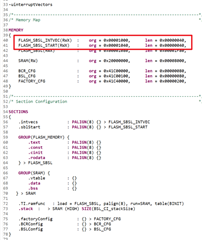
    I have updated the .cmd file. Also I have updated in sysconfig as FLASH_SBSL_START address + 1 earlier itself. Still doesn't work.
     

    -uinterruptVectors
    --stack_size=512
    /*----------------------------------------------------------------------------*/
    /* Memory Map                                                                 */
    
    MEMORY
    {
    //    FLASH_SBSL_INTVEC(RWX)  :	 org = 0x00001000,      len = 0x00000040,
    //    FLASH_SBSL_START(RWX)   :	 org = 0x00001040,      len = 0x00000040,
    //    FLASH_SBSL(RWX)   	    :	 org = 0x00001080,      len = 0x00003400,
        FLASH_SBSL_INTVEC(RWX)  :	 org = 0x000D800,      len = 0x00000040,
        FLASH_SBSL_START(RWX)   :	 org = 0x000D840,      len = 0x00000040,
        FLASH_SBSL(RWX)   		:	 org = 0x000D880,      len = 0x00003400,
    
        SRAM(RW)				:    org = 0x20000000,      len = 0x00008000,
    
        BCR_CFG		 		    : 	 org = 0x41C00000,      len = 0x00000080,
        BSL_CFG				    : 	 org = 0x41C00100,      len = 0x00000080,
        FACTORY_CFG		  		: 	 org = 0x41C40000,      len = 0x00000200,
    }
    
    /*----------------------------------------------------------------------------*/
    /* Section Configuration                                                      */
    
    SECTIONS
    {
    	.intvecs			: PALIGN(8) {} > FLASH_SBSL_INTVEC
    	.sblStart			: PALIGN(8) {} > FLASH_SBSL_START
    
        GROUP(FLASH_MEMORY) {
            .text          	: PALIGN(8) {}
            .const         	: PALIGN(8) {}
            .cinit         	: PALIGN(8) {}
            .rodata			: PALIGN(8) {}
        } > FLASH_SBSL
    
        GROUP(SRAM) {
            .vtable 		: {}
            .data          	: {}
            .bss           	: {}
       } > SRAM
    
        .stack  :   > SRAM (HIGH) SIZE(BSL_CI_stackSize)
        .binit        : palign(8) {} > FLASH_SBSL
        .TI.ramfunc   : load = FLASH_SBSL, palign(8), run=SRAM, table(BINIT)
    
        .factoryConfig          : {} > FACTORY_CFG
        .BCRConfig              : {} > BCR_CFG
        .BSLConfig              : {} > BSL_CFG
    }


    I have also noticed that flashctl_multiple_size_write_LP_MSPM0G3507_nortos_ticlang example can write from starting address: 0x1000 but failing to write before 0x1000 and continuing to write at 0x1000 for example: if I am writing from start address: 0xFF8 and continuing to write after 0x1000, it is writing till 0x1000 and giving the same error.

  • Hi,

    Sorry I miss an item to modify: Change the static write protection of MAIN low sectors. Below is the static write protection for default 0x1000-0x8000. One bit is for a sector, you need to change it to the protected region of your secondary BSL program.

    Please refer 4.3.1 Flash-Based Secondary BSL Start From 0x1000 of MSPM0 Bootloader (BSL) Implementation (Rev. C)

    As for the flash write example in SDK, the error is because in this example, only the sector of MAIN_BASE_ADDRESS is unprotected, so if it is set as 0xFF8, the next sector (0x1000) is protected, and not allowed to be programmed. 

  • Hi,

    Thank you for the information.

    Corresponding to the jumping of Stack Pointer, I have updated the .cmd linker file correspondingly and now I am able to jump the SP to 0x5800 where the main App is and successfully execute the app. I am storing the secondary bootloader at 0x1000. This process is working fine. I'll proceed with the same.

    Thank you for helping me solve this issue.

    Regards,
    Vineeth