This thread has been locked.

If you have a related question, please click the "Ask a related question" button in the top right corner. The newly created question will be automatically linked to this question.

LAUNCHXL-F28069M: instaspin motorware app not working

Part Number: LAUNCHXL-F28069M
Other Parts Discussed in Thread: MOTORWARE

Hello,

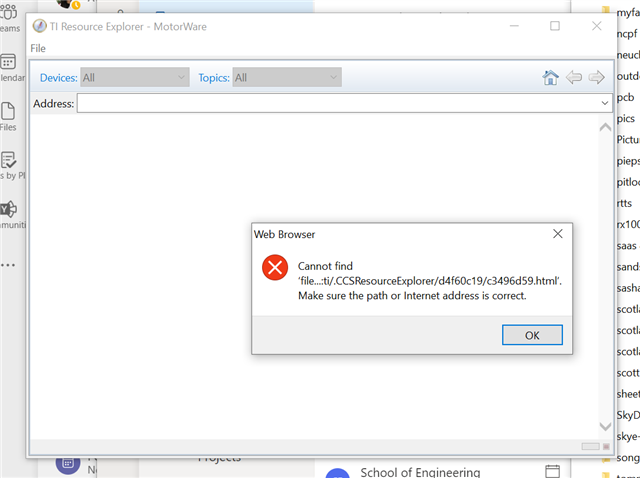
Opened the box, followed the instructions to install motorware and failed at the first step when running it on this laptop as it throws up the following error:

Any quick fixes?

regards

steve

  • Please try the link below and use the windows installer directly.

    https://www.ti.com/tool/MOTORWARE

  • Hi, thanks for answering.

    I'm not sure what you mean by using the "windows installer directly". When I follow that link, I only have an option to download the SW and then once downloaded I can click on the executable to install it on my machine. I don't make any changes and it installs in  the c:\ti subdirectory. I then start the sw using the Motorware application

    After three separate installs, including one running as administrator, I still get the same issue as before. So I'm still no further forward with this "quick" trail .....

  • It seems like you have installed the software successfully on your PC as you showed above. I try to install the software on my PC, there is no issue to install and run the software, you might have to check the OS on your PC.

  • Well, that's as may be, but I just installed it on another PC and got exactly the same response:

    Both machines are running the latest versions of windows 10 and are kept up to date with the latest updates. 

    There is no information on minimum system requirements, windows version compatibility or what browser/other helper software it might expect need to run?  I discovered an issue on the first laptop with getting the APPcenter to connect to the internet for CCSV10 when I installed it to see if that helps this problem. Changing the default browser to chrome fixed the CCS issue, but still no joy with the motorware SW.

    So so far have installed and reinstalled this Motorware thing at least half a dozen times, upgraded CCS, installed C200Ware and Control suite (some posts have indicated that got things working)  and poked around a fair bit to try and make this thing work. It has so far done nothing other than waste my time, for what was supposed to be a easy path into getting a dev board dup and running its pretty much failed....

    When I browse the installed subdirectories in the motorware install, there is no sign of an html file bearing the name as the one it says is missing anywhere. At what point in the install process is this file actually created?  Is it possible just to install/create it separately or is it an online thing? 

    Steve

  • In case it helps, here is the info on my operating system and hardware:

  • You might follow the instaspin lab guide to run the related labs without opening the "MotorWare.exe" which just introduces the lab with HTML format as described content in the lab guide.

  • but I just installed it on another PC and got exactly the same response:

    The message seems like a CCS resource explorer error, not directly related to Motorware per-say. Perhaps post error message in CCS forum Thinking

  • Sometimes people are able to fix issues with the MotorWare.exe working by deleting the metadata folder located here: C:\ti\motorware\motorware_1_01_00_18\eclipse\workspace. Can you give that a try?

    If that doesn't work, I'd follow Yanming's advice--navigate directly to the lab guide in C:\ti\motorware\motorware_1_01_00_18\docs\labs and follow it. The MotorWare.exe file gives a nice tree structure for navigating through the package contents, but it's not necessary to use it.

    Whitney