This thread has been locked.

If you have a related question, please click the "Ask a related question" button in the top right corner. The newly created question will be automatically linked to this question.

TMS320F28035: How to use onboard XDS110 to program TMS320F28035

Part Number: TMS320F28035
Other Parts Discussed in Thread: CC2640, , TM4C1294NCPDT

Hi champs,

Now my customer want to use an onboard XDS110 (on CC2640 LaunchPad) to program their  self-designed TMS320F28035 circuit board. But there are some questions.

The JTAG implementation on the onboard XDS110 is cJTAG and the F28035 needs standard JTAG, so we need to drive TRSTn signal manually. The specific operation is to manually connect the TRST signal to the VDDIO level when preparing to connect. This method does work, but the customer thinks that the manual connection method is inconvenient, and the they still hopes to control the TRST signal through the emulator. 

But I checked the schematic diagram of onboard XDS110, and did not find the TEST that can be used for connection. 

We have checked the e2e link below as a solution. According to the user manual of XDS110, the customer executes the commands marked in blue in the figure, and the phenomenon currently seen by customer is that the emulator's indicator light is flickering. According to the reply in the link below, pin31 should have a level change, but the phenomenon currently seen by customer is that there is no level change.

https://e2e.ti.com/support/microcontrollers/c2000-microcontrollers-group/c2000/f/c2000-microcontrollers-forum/1043201/launchxl-f280049c-on-board-xds110-jtag-reset

So could you please give me some suggestions about how to connect TRST signal by using onboard XDS110?

And by the way, could you please give me some suggestions about connection of onboard XDS110 and F28335? F28335 need to connect EMU0 and EMU1, just connect the TRST signal to the VDDIO doesn't work.

Thanks a lot!

BR

Julia

  • Julia,

    The connection using the XDS110 on the LaunchPad is going to be difficult as you said since both TRSTn as well as EMU0/EMU1 are not supported by the LP version of the XDS110(not needed by the CC2640). 

    The link you mentioned, that method should work but requires the customer to soldier to the TIVA device(that is acting as the XDS110) and bring out a wire connection.

    EMU0/EMU1 can be connected to a Pullup to VDDIO rail, they are not necessary for debugging(there are some additional features that CCS can use EMU0/EMU1 but aren't required for base debugging).  The state of EMU0/1 are latched as TRSTn goes low to high, so it is important to keep them high to avoid activating boundary scan.

    Best,
    Matthew

  • Hi Matthew,

    Thanks for your reply! And there is some additional question.

    Can you confirm for me which pin of TM4C129ENCPDTI3R corresponds to TRST(maybe PH2-pin31), EMU0 and EMU1? I searched the schematic and pcb file and found that it was not marked. Thanks a lot!

    BR

    Julia

  • Julia,

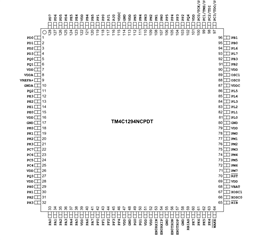
    You are correct, on the CC2640 LP this is component U5(TM4C1294NCPDT), pin 31, PH2. 

    Below is pin diagram it should be next to the last pin(pin 31) on the first side of the device.

    EMU0 is pin 42 (PF0) and EMU1 is pin 43 (PF1).

    Best,

    Matthew