I tried to install the latest v 10.0.0 runtime on an M1 mac and it fails. The installer is gcruntime-10.0.0-osx-installer.app and this is the error I get
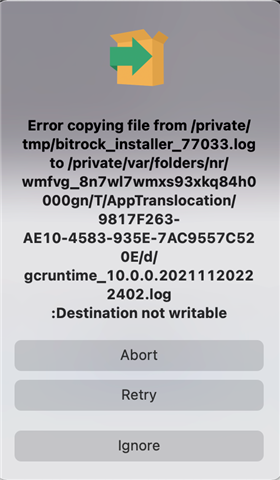
Thank you.
This thread has been locked.
If you have a related question, please click the "Ask a related question" button in the top right corner. The newly created question will be automatically linked to this question.
I tried to install the latest v 10.0.0 runtime on an M1 mac and it fails. The installer is gcruntime-10.0.0-osx-installer.app and this is the error I get

Thank you.
Neil,
I can see the same on my M1 machine. Seems to happen right at the end of the installer when it tries to save the log. I think it actually installed ok. I can reproduce so I will file a bug for this.
I just gave it a try on my x86 BigSur machine and see the same issue there.
Regards,
John
John,
Thank you. I am glad to hear it was not me! I tried to follow the rest of the instructions but there is something wrong with them. In the readme of my exported application it has the following instructions:
---------------------------------------
**Mac (OSX) Installation Instructions**
---------------------------------------
To run your application:
* open a terminal window
* cd into the designer folder that is in the guicomposer runtime folder path you
specified when installing your application.
The following commands may be required to be executed from the Terminal app with this folder as the working directory
in order to enable proper execution of the application:
sudo chmod -R a+rwx ../..
Then run the application by entering the following command
./launcher.osx
or by double-clicking on mac_start.app
However, There is no "designer" folder. I get a folder structure that is guicomposer->runtime->gcruntime.v10-> and more folders after this. There is no designer at any level. At which level should I put my application folder? When you chmod everything, it is not clear if that is working on the guiruntime folders or my application folders (since its unclear where everything should go). Is there an updated set of instructions somewhere? I tried a few places for my application folder but the Mac_start.app runs but does nothing after I click run. I also tried the launcher.osx but the OS says its not from a known developer and will not let it run.(running Big Sur).
Thanks
Neil,
I will loop in a GUI Composer expert to take a look. I do not see the Designer folder in my installation either. Not sure if this is an install issue or an instructions issue.
John
Hi Neil,
Unfortunately, the readme is an instructions issue. I'll file a ticket to have this corrected. GC Runtime installer does not create a "designer" folder. The content of GC Runtime installer is usually in $HOME/guicomposer/runtime/gcruntime.v{$MajorVersion}. There should be two main subfolders, (mac OR runtime.... depends on the major version) and node_modules. The GC app itself should be parallel to those two folders. There maybe multiple GC app folders, if they use the same major runtime. ApplicationName subfolder should include launcher.osx which would the correct executable to use on mac. Unfortunately, as you also discovered it is not signed, which I believe will prevent it from being used on BigSur. However, that launcher is just a very thin wrapper for invoking a node command. If you open "launcher.json" file in a text editor and scroll to "mac": section, then you should see what the command is. Thus as a workaround for launcher not being signed, you could open terminal, cd to ApplicationName directory and start the GC app with:
../runtime/TICloudAgentHostApp/node ./app_server.js --browser=../runtime/node-webkit/nwjs.app --cloudAgentDir=runtime
We are working on resolving the installation/running issues on BigSur and higher OS versions.
One more thing to keep in mind. If you downloaded an existing application from dev.ti.com/gallery, then placing mouse cursor over the "Download" icon will show a pop up with download options, the text there states which Major version of GC runtime is required for that specific app. v7 through v9 runtimes use "mac" or "win32" depending on OS used. However, v10 runtime switched to just use "runtime" across different OS versions. This impacts above mentioned launchers (specifically launcher.json is different), but there may be other incompatibilities, thus it is a good idea to use the version that application has been published with. If you are building your own application, then latest is the right version to use.
Martin