This thread has been locked.

If you have a related question, please click the "Ask a related question" button in the top right corner. The newly created question will be automatically linked to this question.

TMS320F28027: Bin file generation using CCS 10

Part Number: TMS320F28027
Other Parts Discussed in Thread: UNIFLASH,

Hello,

I was trying to generate a bin file using CCS 10.

The bin file generated through ccs is not matching the bin file that we generated by reading the memory through Uniflash.

Please let me know the reason for such an observation

Regards,

Rishabh P

  • Hello,

    I generated bin files with CCS 11.0, CCS 10.4, and UniFlash 7.0 from my F28027 device. When specifying the same start addres, memory page, and length, the binary files were identical.

    Please show the setting used when exporting memory with both CCS and UniFlash.

    Also provide the exact version numbers of CCS and UniFlash being used.

    Thanks

    ki

  • Hello Ki,

    I am using CCS 10.3.1 for code compilation and Uniflash 3.0.

    In post-build steps for the generation of BIN File in using the following command

    "${CCE_INSTALL_ROOT}/utils/tiobj2bin/tiobj2bin.bat" "${BuildArtifactFileName}" "${BuildArtifactFileBaseName}.bin" "${CG_TOOL_ROOT}/bin/ofd2000.exe" "${CG_TOOL_ROOT}/bin/hex2000.exe" "${CCE_INSTALL_ROOT}/utils/tiobj2bin/mkhex4bin.exe"

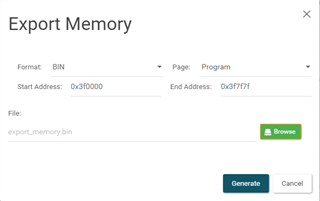
    The image attached shows the setting done to read the memory of the microcontroller after the code is dumped in the controller.

    Please suggest a solution for this observation.

    Regards,

    Rishabh P.

  • Ah I understand now. You are comparing the generated binary output from the hex conversion utility.

    Uniflash 3.0.

    Based on your screenshot, you are not using UniFlash 3.x. If you press the 'About' button, what is the version number that is specified?

    Can you attach both the generated binary and also the binary file exported from memory? If you wish to share privately, please start a private conversation with me.

    thanks

    ki

  • In post-build steps for the generation of BIN File in using the following command

    "${CCE_INSTALL_ROOT}/utils/tiobj2bin/tiobj2bin.bat" "${BuildArtifactFileName}" "${BuildArtifactFileBaseName}.bin" "${CG_TOOL_ROOT}/bin/ofd2000.exe" "${CG_TOOL_ROOT}/bin/hex2000.exe" "${CCE_INSTALL_ROOT}/utils/tiobj2bin/mkhex4bin.exe"

    Can you clarify:

    1. If the output format for the project is set to "legacy COFF" or "eabi (ELF)"
    2. Which version of the C2000 compiler is being used

    Using CCS 11 and C2000 compiler v21.6.0 created an "Empty project (with main.c)" for a TMS320F28027 and copied your post-build step to generate a .bin file:

    1. With the output format as "legacy COFF" the size of the .bin file matched that reported as the FLASH0 usage in the linker map file.
    2. With the output format as "eabi (ELF)" the size of the .bin file less than that reported as the FLASH0 usage in the linker map file. If looks like by default the post-build step is omitting the contents of the .cinit section in FLASH to the bin file; since the difference between the size of the .bin file and the FLASH0 usage in the linker map file matched the size of the .cinit section reported in the linker map file.
  • Hi,

    I do the same thing in my project (however without using the Uniflash). A least I get a file that exactly matches the flash content loaded by debugger from the out file.

    I think you don't have to use any post-build steps. Just enable the HEX utility and call it with a command file as a parameter. Like this:

    ${command} ${flags} ${output_flag} ${output} ${inputs} ${PROJECT_LOC}/comandfile

    Also define the output file in the "General options":

    "comandfile"is the Hex Utility command file (use any filename you want). In your case its content will probably look like this:

    --image
    --binary
    --zero
    ROMS
    {
    IMAGEBIN:
    org = 0x7E0000,  /* 0x3f0000 * 2 */
    len = 0xFE7E,      /* 0x7F7F * 2 */
    romwidth = 16,
    fill = 0xFFFF
    }

    This will generate the binary image of all the sections in the defined memory range.

    Than you can probably program it with the Uniflash utility in the way you described.