This thread has been locked.

If you have a related question, please click the "Ask a related question" button in the top right corner. The newly created question will be automatically linked to this question.

TMS320F280049C: Problem with printf for floating point values

Part Number: TMS320F280049C
Other Parts Discussed in Thread: C2000WARE, CCSTUDIO, ENERGYTRACE

I have a simple "Hello World" application running on a TMS32F80049C  that I can printf() out literal text and integers with "%d".  Output appears in Code Composer Studio's console window.

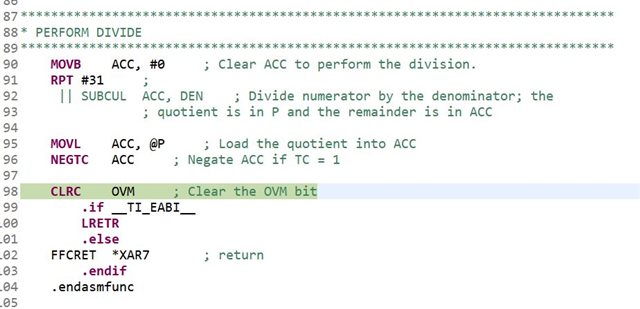
However, when I try printf("Value = %f", 1.23);   nothing is displayed and the processor seems to usually be caught (when I pause execution) in l_div28.asm in a section of code commented as "PERFORM DIVIDE".

I have tried increase the heap to 0x800 and the stack to 0x1000.

I am using the linker command file 280049C_FLASH_lnk.cmd (with slight modifications to accomodate increased stack & heap and .cio section)

Runtime support library was set to <auto> on project creation.
  • Hi Eric, 

    Thanks for reaching out.  Please let us know which version of the tools (C2000Ware, CCS, Compiler...) you are using?

    Regards,

    Krishna 

  • Hi Krishna,

    Thanks for your reply.  I am pasting the "Configuration Contents" below:

        Analysis Suite    4.1.0.202106281057
        Apache Jakarta log4j Plug-in    1.2.15.v201012070815
        ARM Clang Compiler Tools    1.3.0.LTS
        ARM Compiler Help    18.1.0.20181119225258
        ARM Compiler Tools    20.2.5.LTS
        C/C++ Development Tools    10.2.0.202103011047
        C/C++ GCC Cross Compiler Support    10.2.0.202102261947
        C/C++ Memory View Enhancements    10.2.0.202012191711
        C/C++ Remote Launch    10.2.0.202012191711
        C2000 Compiler Help    18.1.0.20180221222139
        C2000 Device Support    6.3.0.0
        C2000 Emulation Flash    1.0.0.5
        C2800 Compiler Tools    21.6.0.LTS
        CCS and SAT Common Components Feature    11.0.0.202109080900
        CCS Documentation    11.0.0.00012
        CCS Launcher    11.0.0.20210910
        CCS Utilities    9.1.0.20190321
        CCStudio p2 Tool Feature    7.0.0.202001271514
        Chromium Browser Feature    11.0.0.202109080900
        Code Composer Studio Base Components    11.0.0.02507
        Code Composer Studio IDE ARM Components    11.0.0.202109080900
        Code Composer Studio IDE C2000 Components    11.0.0.202109080900
        Code Composer Studio IDE C5500 Components    11.0.0.202109080900
        Code Composer Studio IDE C6000 Components    11.0.0.202109080900
        Code Composer Studio IDE C7000 Components    11.0.0.202109080900
        Code Composer Studio IDE Main Feature    11.0.0.202109080900
        Code Composer Studio IDE MSP430 Components    11.0.0.202109080900
        Code Composer Studio IDE Workflow    8.2.0.202109080900
        Code Composer Studio User's Guide    11.0.0.202109231134
        Compiler Tools On-line Documentation    1.1.6
        Debug Server    11.0.0.2507
        Debug Server Flash    11.0.0.2507
        DVT - EnergyTrace    4.1.0.202106281057
        DVT - Graph Visualization    4.1.0.202106281057
        DVT - Profiler Analysis Manager    4.1.0.202106281057
        DVT - Resource Explorer    4.1.0.202106281057
        DVT - System Analyzer    4.1.0.202106281057
        DVT - Trace Control    4.1.0.202106281057
        Eclipse Help System    2.3.500.v20210303-1800
        Eclipse Platform    4.19.0.I20210303-1800
        Equinox p2, Discovery UI support    1.2.800.v20200916-1234
        Equinox p2, Provisioning for IDEs.    2.4.1100.v20210227-0235
        GEF (MVC)    3.11.0.201606061308
        Git integration for Eclipse    5.11.0.202103091610-r
        Graphical Modeling Framework (GMF) Runtime Third-Party Components    1.13.0.202004160913
        GUI Composer Backplane Feature    9.0.0.202109080900
        GUI Composer Program Model Feature    8.2.0.202109080900
        IDE - Debug Server Integration Feature    11.0.0.202109080900
        Image Analyzer    4.1.0.202106281057
        LWInstaller    11.0.0.00012
        Marketplace Client    1.9.1.v20210204-1408
        Node.js    14.16.0
        p2appf    10.1.0.202109080900
        Remote System Explorer End-User Runtime    4.5.300.202101081641
        ROV    4.1.0.202106281057
        RTSC/XDCtools (IDE Client)    3.62.1.16
        RTSC/XDCtools (Target Runtime Support)    3.62.1.16
        RXTX End-User Runtime    2.1.8.0_201606281300
        Sys Config    1.10.0.2163
        TargetDB Default Props    11.0.0.N202109080900
        TI Cloud Agent    0.5.3466
        TI Emulators    9.5.0.00143
        TI Emulators Plugin    1.1.0.202005140757
        TI Target Content    1.0.0.202108240846
        TIREX Desktop    3.8.0.201911142334
        TIREX4 Desktop    4.8.0.202106161344
        TM Terminal    10.2.0.202012191711
        TM Terminal Serial Connector Extensions    10.2.0.202012191711
        Trace Analyzer    4.1.0.202106281057

  • Hi Eric, 

    Thanks...that is a lot of information.  To be more specific, what are the versions of  the following: 

    CCS,

    C2000Ware,

    and lastly the Compiler...

    Regards,

    Krishna

  • Sorry! 

    CCS is version 11.0.0.00012

    C2000Ware is version 4.00.00.00

    The C compiler is ti-cgt-c2000_21.6.0.LTS

    Thanks for your help!

  • Further information:

    1. I have the heap size set to 0x1000 and the stack size at 0x2000

    2. I have also tried using sprintf( strbuff, "%f", floatValue) and then printf("%s", strbuff);  which also fails the exact same way.

    3. When the code crashes, it appears to be stuck in the routine __TI_ltoa(long val, char *buffer) .  It never exits.

    4. In the project settings, the "Level of printf/scanf support" is set to "FULL"

    Any help with this would be greatly appreciated.

  • Answering my own question (again) :-)

    I found the thread:

    CCS/TMS320F28069M: How to make printf work with floats?"

    Refer to the very bottom of the thread.  That was exactly the problem I was having.  I increased both the stack and heap size in the project properties.  When the linker complained that the stack was too big for RAMM1, I naively increased the size of RAMM1 to accommodate the larger size, however, as the thread mentioned above says, you cannot increase RAMM1 beyond the 0x400 size.  Interesting that the linker did not complain about that.  Anyway, reassigning stack to RAMGS1 did the trick!