This thread has been locked.

If you have a related question, please click the "Ask a related question" button in the top right corner. The newly created question will be automatically linked to this question.

TMS320F28379D: C2000 microcontrollers forum

Part Number: TMS320F28379D

Hello,

I have a simple question : how to declare two executable files in GUI Composer, coming froma dual core application ?

Thanks for your help.

  • Hello,

    I have a simple question : how to declare two executable files in GUI Composer, coming froma dual core application ?

    This is apparently supported in GCv3. I will see if I can get this working myself and let you know.

    Note that your screenshot is for GCv2. You will need to use GCv3.

    Thanks

    ki 

  • Hello Ki,

    Thank you very much for your reply.

    Following your remark, I checked the "About" button in my GC dashboard, and I got the following information,

    So it seems that the version is 3.0.0 (but I am not sure).

    Anyway, if I tried to search for another version on the net, each time, I end up with this version.

    Could you explain the process for getting the right version.

    Many thanks again for your advice.

    Best regards. 

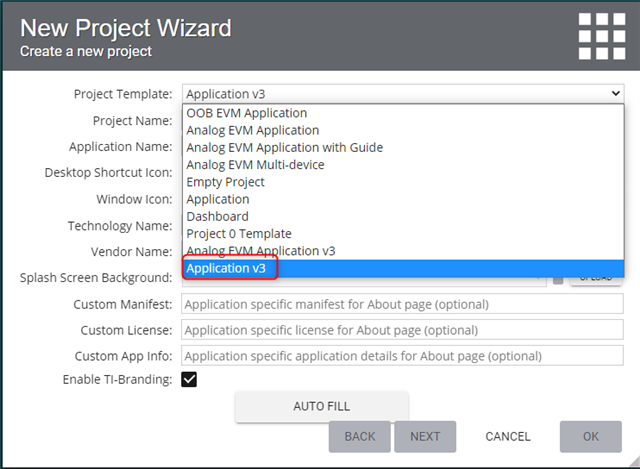
  • GC will default to v2 unless you explicitly chose the v3 option when creating a New Project:

    See Chapter 3 of the GC User's Guide for more details on the v3 Component Library:

    https://dev.ti.com/gc/v2/help/GC_UserGuide_v2/index_gc3.html

  • Hello Ki,

    Thank uou so much for your reply,

    I will check and keep you informed of the results.

    Bruno

  • I was able to get things configured for a multi-core device. I found the steps a bit complicated.

    First off, the steps for configuring for a XDS connection in GC v3 is in section 7.6 of the GC User's Guide:

    https://dev.ti.com/gc/v2/help/GC_UserGuide_v2/xds_jtag_v3.html

    The only difference with a multi-core device is that you would need two Program Models (one for each CPU).

    I found the documentation in the UG lacking detail so I added some screenshots that will hopefully help:

    The setup for my F28377D control card looked like this:

    I uploaded the executables to my project as instructed in the UG

    I then followed the UG and dragged XDS Transport, Connection Manager, and Program Model to the editor

    Then I dragged another Program Model since I need two of them (one for each CPU)

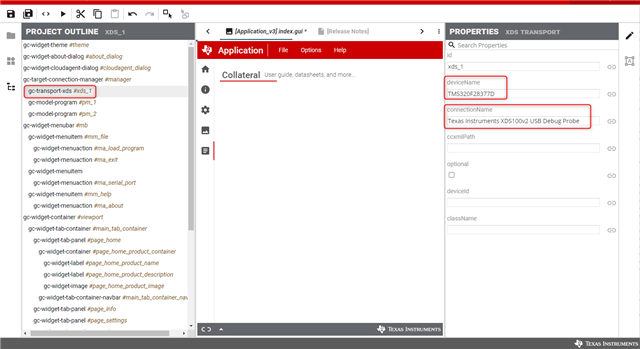
    Then from the Project Outline, I select gc-transport-xds and specified the deviceName and connectionName as below in the properties (it should autopopulate suggestions as you start typing in the fields)

    Then I need to set the properties for each Program Model (gc-model-program), one for each CPU. The below image is for the second CPU.

    Note that the string for the coreName is tricky because there is no autocomplete options here. I opened up a ccxml I created for my f28377d target and looked at the name of the CPUs there:

    Finally I set the properties of the Connection Manager. For the activeConfiguration, I want to specify both Progam Managers. I found that xds_1+pm_1+pm_2 didn't work. But xds_1(pm_1,pm_2) did:

    This seemed to work. When I run the app, I can see GC connecting and loading to both cores.

    Hope this helps

    ki

  • Dear Ki,

    I followed your recommendations to the letter, and indeed it works: I manage to connect to the target via "xds" and download my two executables (".out") in each of the two CPUs.

    Thank you very much for your help because I would never have arrived there alone; the explanations in the UG are far from clear !

    May I ask you for one more piece of advice:

    I can't handle my variables from the CCS application, the binding process doesn't work (it worked with GC v2 and only CPU1).

    My test case is very simple : one button to toggle a Led1 with CPU1, and a second button to toggle a Led2 with CPU2,

    The binding variable for button1 is called "Gui_Led1Start" in CCS ; the corresponding IHM led is called "Gui_VisuGO1",

    And it is the same process for the second button,

    I thought this would work because I'm applying the same method I use in GC v2.

    But in reality, nothing reacts: the target LEDs do not flash on the board, and even the HMI display does not work.

    Everything happens as if the programs had not been loaded.

    Do you have any idea ?

    Sorry to bother you with this again.


    Bruno

  • I am also having issues with binding variables. It appears to be a bug. I am currently working with engineering on a resolution.

    I filed a bug for this. Tracking link: https://sir.ext.ti.com/jira/browse/EXT_EP-10736

    Thanks

    ki

  • Engineering has applied a preliminary fix for the issue. It seems to be working for me now. Can you try again?

  • Hello Ki,

    That's perfect for me now : IT WORKS !!

    Thank you so much.

    Bruno

  • Excellent! Thank you for trying it out and your patience with all of this.

    I will also request that the documentation be improved.

    Thanks

    ki

  • Thank you for your support, I appreciate.

    Have a nice day.

    Bruno