This thread has been locked.

If you have a related question, please click the "Ask a related question" button in the top right corner. The newly created question will be automatically linked to this question.

LAUNCHXL-F28069M: Standalone Mode

Part Number: LAUNCHXL-F28069M
Other Parts Discussed in Thread: UNIFLASH, C2000WARE

I am trying to put my F28069 Launchpad into standalone mode but it is not executing my program. I had flashed the program onto my board then unplugged the USB and set SW1 High, SW2, High, and SW3 Low. I also removed the jumpers from JP1 and JP2. I then applied power to the 3.3V pin on J9 and ground to the GND pin on J9. The D1 LED lights up but my code doesn't execute. What am I doing wrong?

  • Hi Andrew,

    Just to clarify, were you able to program the flash successfully? As in, you configured the software for your project to write to flash? There is some information on that here: https://dev.ti.com/tirex/explore/content/c2000_academy_2_00_00_00_all/modules/Module_12_System_Design/module_12_system_design.html#flash-programming

    The hardware configuration sounds correct from what you have described, GetMode/Flash is the correct boot mode.

    Regards,

    Peter

  • No I did not program the flash and I am trying to look through what you sent. I guess I can use the CCS on-chip Flash programmer (Tools → On-Chip Flash) option but I don't see where that option is in CCS.

  • Hi Andrew,

    That Flash option does not display unless you are in an active debug session within CCS. See the following: 

    https://e2e.ti.com/support/tools/code-composer-studio-group/ccs/f/code-composer-studio-forum/212566/i-don-t-find-on-chip-flash

    Regards,

    Peter

  • So how do I configure the on chip flash so I can run the board in standalone mode?

  • Hi Andrew,

    This is the Flash Programmer plugin so you can manually change the flashing settings. There should be an execute button in the GUI.

    Also, did you change the linker command file to write to flash as opposed to RAM? CCS will automatically load the program into flash if you're using a flash linker command. See this FAQ for more information: https://e2e.ti.com/support/microcontrollers/c2000-microcontrollers-group/c2000/f/c2000-microcontrollers-forum/878674/faq-flash---how-to-modify-an-application-from-ram-configuration-to-flash-configuration

    Regards,

    Peter

  • What exactly do I need to be doing in order to setup the board in standalone mode? I believe I have setup the hardware correctly but does that need to be done first before I flash the board with CCS? As far as the software, what am I trying to do in order to setup standalone mode? Do I need to communicate with SPI, CAN, etc? Do I need to use RAM? There are alot of different options and I dont know which one I need to be spending time learning about? So can you direct to the exact info I need to know in order to setup standalone mode?

  • Hi Andrew,

    Apologies for any confusions. The FAQ I referenced in my previous post does a good job of explaining how to turn your project into a flash project and the essentials of running in standalone mode. 

    You will want to write the program to flash so that it gets stored in the device. It will then start executing the program on startup even if power was disconnected to the board. If you write to RAM, the program will be deleted when the device loses power. 

    To write to flash, the easiest thing would be to make sure you're using a flash linker command file. This is included in the SDK. When you look at this flash linker command file, you will see that there are various sections, such as program data, that get written to FLASH, and you can adjust the section sizes if you need to allocate more flash.

    When you switch out the linker command file, you can then launch a debug session and CCS will automatically know that you have configured to write to flash. There should be something within the loading popup to the effect of "Writing to Flash." This communication is done through JTAG, but you can employ SCI if you want to do something like write to the console.

    You have the hardware configured properly and that needs to be done so that the device knows where to load from after running its boot sequence. 

    Please let me know if you run into other difficulties or if you have any other questions.

    Regards,

    Peter

  • I am using the FAQ sheet you provided and it references where to find the flash linker cmd. I don't see it in the folder it suggested below.

    Also, can I use the F2806x_CoderStartBranch.asm from the examples folder as the branch instruction at flash entry point?

    Do I have to add any code to my program like the coder below in order to put my program in flash?

  • Part Number: LAUNCHXL-F28069M

    I am trying to use UniFlash to program my board to use my code in standalone mode. I am able to select my board and connect to it using the UniFlash interface. I browse to and select the .out file for Uniflash to use to flash my board. After flashing, I get a successful notification once UniFlash completes. However, once I set SW1 High, SW2 High, and SW3 low, apply power to the 3.3V pin of J9 and ground to the GND pin of J9, and remove the jumpers from JP1 and Jp2, the code never executes but the D1 LED is illuminated.

  • Hi Andrew,

    Uniflash is definitely a method to program the device, in regards to your linker command question, the files which don't have RAM in the name are designed for flash. You can verify that by seeing that .cinit and .text are mapped to flash rather than RAM.

    Can you confirm whether the code runs from flash after you program it initially and the LaunchPad is still connected to the host computer through the USB cable? You should be able to keep the SW1 switch in the HI HI LOW configuration even while you are programming the device and to ensure that it boots from flash. While the device is connected to the host and after it has been programmed, power cycle the device and it should still be running your program once it finishes its boot up sequence.

    From this, I can verify if the issue comes from flashing the program or from the hardware set up of the LaunchPad. Looking forward to your response.

    Regards,

    Peter

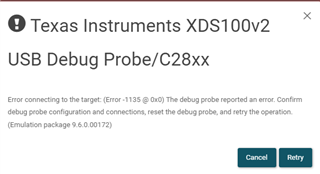
  • I want to try and figure out Uniflash then. So if I set the SW to Hi Hi Lo and try and program the board, I get the following error.

    I have to have the SW in Lo Hi Hi mode in order to program but when though it says it programmed successfully in SW Hi Hi Lo mode. The board never executes my code after power cycling and changing the SW to Hi Hi Lo.

  • Hi Andrew,

    I reached out to a colleague of mine for more insight into this. We actually have an FAQ which goes over running in standalone mode for devices with F05 flash chips (which the F28069M has) and it is located here: https://e2e.ti.com/support/microcontrollers/c2000-microcontrollers-group/c2000/f/c2000-microcontrollers-forum/758797/faq-f05-flash-how-do-i-convert-a-ram-based-project-to-a-flash-based-project

    I recommend first using the example flash programs provided within C2000Ware and trying to run them on your board. This way you can first debug the hardware and ensure that the device is configured properly and that the code rights to flash. Once you are able to run this example flash program in standalone mode, next you can work on converting your existing project to flash. Like I mentioned, there are specific app notes that go over this which are linked in the FAQ post above. If you run into any issues with the JTAG connection, you can try setting the boot mode to Wait mode when you are trying to flash the device and see if that may resolve any connection issues.

    Regards,

    Peter

  • If I change my RAM based program to Flash based will I still be able to use the CCS debugger to troubleshoot the code? I like the idea of using Uniflash since it seems like I could leave my debuggable code unchanged so I can flash and reflash the board for my colleagues at will without them having to have CCS.

  • Hi Andrew,

    Yes, you will still be able to run through your code using a CCS debug session, that will not be an issue. The only difference between flash and RAM is just where the program gets stored in the device, but you will still be able to debug it like you would your current project.

    Regards,

    Peter

  • Peter,

    Does Uniflash put the RAM based program into flash so it can be run in standalone mode?

  • Hi Andrew,

    I'm not an expert on Uniflash, but I am pretty sure that Uniflash requires a flash-based program too, in a similar manner to how you would do for CCS. This is because the flasher needs to know what areas in flash to write the program to, which would be defined in the linker command file.

    Regards,

    Peter