This thread has been locked.

If you have a related question, please click the "Ask a related question" button in the top right corner. The newly created question will be automatically linked to this question.

TMS320F28379D: usb host

Part Number: TMS320F28379D
Other Parts Discussed in Thread: TMDSCNCD28379D,

Dear All,

My company is working on usb host ex7 msc , but the usb is not getting detected by the pc while we are inserting the pendrive in microcontroller. Nothing is coming in device manager whether I connect or disconnect the pendrive .Kindly help how to resolve this issue and proceed further .

Thanks & Regards

Drishti

  • Hi Drishti,

    Are you using the TMDSCNCD28379D evaluation board currently? If so, please verify that dip switch 'A:S1' states are valid for UART connection.

    And have you followed all instructions in the comments at the top of the 'usb_ex7_host_msc.c' file?

    but the usb is not getting detected by the pc while we are inserting the pendrive in microcontroller. Nothing is coming in device manager whether I connect or disconnect the pendrive

    Does it get connected when the USB MSC is not connected to the F28379D board?

    Best,

    Kevin

  • Hi Kevin,

    We are using TMS320F28379D evaluation board & have followed all the prerequisite instructions given in the example. 

    I am able to send and receive the data in USB device mode but in host mode ,I am unable to see any connection

    Thanks & Regards

    Drishti

  • Hi Drishti,

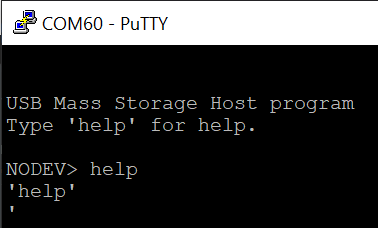
    OK I can try the example on my side to see if I have any similar issues. The issue you're having is with the serial port connection to the PC terminal, correct? This should be working before you plug the USB MSC device into the board.

    //! The first SCI, which is connected to the FTDI virtual serial port on the
    //! controlCARD board, is configured for 115200 bits per second, and 8-N-1
    //! mode.  When the program is started a message will be printed to the
    //! terminal.  Type ``help'' for command help.
    //!
    //! After loading and running the example, open a serial terminal with the
    //! above settings to open the command prompt.  Then connect a USB MSC device
    //! to the microUSB port on the top of the controlCARD.

    Best,

    Kevin

  • Hi Kevin,

    Actually we have not connected any uart terminal to see this way, hence not sure about it .The issue we are facing is
    that while connecting pen drive and debugging the program , its not going in enumeration loop also . So that's why we
    draw this conclusion that usb host is not getting connected. Kindly help

    Thanks & Regards
    Drishti

  • Hi Drishti,

    OK, I will feedback after testing on hardware. There may some blocking mechanism in the code that waits until the UART connection is established.

    Best,

    Kevin

  • Hi Drishti,

    It looks like the example may block until you provide some input through a UART terminal, but I'm having some issues getting the program to respond. I will request a SW expert on the team look into this further.

    Best,

    Kevin

  • Hi Drishti, 

    Are you able to get to the point which Kevin shared. ? 

    As Kevin suggested, you will have to provide a command to execute it. 

    Currently the following commands are supported

    1 . "ls", Cmd_ls, " : Display list of files" 
    2.  "chdir", Cmd_cd, ": Change directory" 
    3.   "cd", Cmd_cd, " : alias for chdir" 
    4.  "pwd", Cmd_pwd, " : Show current working directory" 
    5. "cat", Cmd_cat, " : Show contents of a text file" 

    Best Regards

    Siddharth