This thread has been locked.

If you have a related question, please click the "Ask a related question" button in the top right corner. The newly created question will be automatically linked to this question.

LAUNCHXL-F280049C: blink user LED using Sysconfig : how to make it

Part Number: LAUNCHXL-F280049C
Other Parts Discussed in Thread: C2000WARE, SYSCONFIG, LAUNCHXL-F28379D,

Hi everybody , 

I  m using latest C2000ware and latest CCS  .

now using  GPIO_EX2_Toggle   :  used as default it works no problem  (  I can change GPIO etc )

now  I switch HW to  LP -F280049C     and  if I compile  and use a pin  for example  GPIO 28 it works ,   but  I m not able to  use GPIO23 /LED4  ( same issue on LED5 )

no matter if I use the GPIO pin or  if I  set "use HW "  : I always  get erros in compiling .

please which is correct way to force Sysconfig to use  LED4  in launchpad ?

thank you 

BR

Carlo

  • Hi Carlo,

    Please take a look at C2000 Academy module 5 lab

    https://dev.ti.com/tirex/explore/node?node=Aep4mVcTNF8u5NHZXQRtZQ__jEBbtmC__LATEST

    The lab walks through the steps how to configure both LEDs (LED4 and LED5) blinking. It works on all devices. Just need to select the GPIOs for LED4 and LED5 from the table in the lab instruction page. The lab exercise is just using the pins, not using SysConfig H/W.

    We also provided the solution to the project in C2000Ware SDK. 

    Please take a look and let us know if you have any feedback to improve, more useful.

    Thanks & Regards,

    Santosh

  • Hi Santosh , 

    thank you , it is a little different the issue . if I use   GPIO number as  per your suggestion & for lab it works  ( but I am reffering to the device F280049 ) 

    If I switch to the Launchpad F280049  omstead ,   then  I can select in HW  LED 4 or LED 5  and it force me the number   and in this case it does not work 

    see hereunder my screenshot and  error :  please  how to be on the LP  and use  LED  ( same for LED 4 or LED 5 ) 

    thank you 

    here it is ( as you can see I swicthed to LP ) 

    and errors:

    BR

    Carlo

  • Carlo,

    Let me try to recreate the issue on my system. I will get back to you by tomorrow.

    Thanks & Regards,

    Santosh

  • Carlo,

    When you have Lab5 is working, and you want to switch board view, you need to follow two steps:

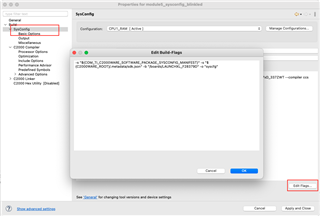
    1) Open Project build settings, and select SysConfig. Press the edit button and add board parameter.

    I tried on Launchxl-F28379D, you can change it for Launchxl-F280049C

    -s "${COM_TI_C2000WARE_SOFTWARE_PACKAGE_SYSCONFIG_MANIFEST}" -s "${C2000WARE_ROOT}/.metadata/sdk.json" -b "/boards/LAUNCHXL_F28379D" -o "syscfg"

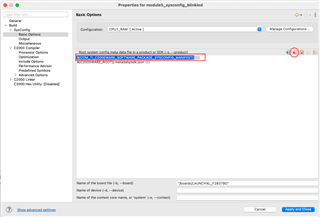
    2) Remove the manifest from the setting. Select basic option.

    Delete ${COM_TI_C2000WARE_SOFTWARE_PACKAGE_SYSCONFIG_MANIFEST}

    Save and close the setting window. Now it is ready to build.

    3) Update the source code

    In your source code, you will need to change

    Blink_LED_1 =>  myBoardLED0_GPIO

    Blink_LED_2 =>  myBoardLED1_GPIO

    Please try this, and let me know if you are still encountering any issue.

    Thanks & Regards,

    Santosh

  • Hi Santosh 

    Working !  Thank you !

    FYI  I used also  the C2000ware gpio_ex2_toggle  example , I did the same and you need in basic config of sysconfig to add the board 

    "/boards/LAUNCHXL_F280049C     .

    it worked there too

    thank you 

    BR
    Carlo

  • Carlo,

    Thank you for confirming that it is working for you. If you have any feedback on C2000 Academy or SysConfig , please let us know. We are constantly looking for opportunity to improve so that it is easier for our customers to get started quickly.

    With Best Regards

    Santosh