This thread has been locked.

If you have a related question, please click the "Ask a related question" button in the top right corner. The newly created question will be automatically linked to this question.

TMS320F28388D: A Third Compare Register

Part Number: TMS320F28388D

Hi,

I am currently using CMPA and CMPB but was wondering if there is a way to have a third register to set or clear based on the signals in the model or being able to set or clear at zero based on another signal in the circuit. The way I see it now is that you can only predetermine each ePWM block to set, clear, toggle or do nothing in counter=0 and you can change it while the program is running. 

An example of where we need this:

Our gate signals are setting at 0.1 and resetting at 0.6. In a certain condition, we transition to setting at 0.7 and resetting 0.2. The gate is initialized with zero therefore in the transition period we will have a long zero gate signal (from 0.6 of the first pulse to the 0.7 of the second pulse). It will be great if we could initialize the ePWM to start from 1 at "counter equals to zero" in this situation.

  • Hi,

    Our gate signals are setting at 0.1 and resetting at 0.6.

    I believe you tend to use the up-down count mode and by setting at 0.1, you mean 0.1 of TBPRD value. Is that correct understanding?

    You can achieve this using 2 registers itself, i.e. CMPA and CMPB. The rising edge and falling edge of the EPWM can be independently controlled using CMPA and CMPB within the same PWM cycle. What I mean is that you can control the rising edge using CMPA and falling using CMPB.

    For the transition period, you can update the value of CMPA and CMPB using the shadow load mode which updates the value only at CTR = ZERO/PRD.

    Thanks,

    Aditya

  • Yes by setting at 0.1 I mean 0.1 of TBPRD. Sorry for not explaining it well. The issue with using CMPA in rising edge and using CMPB is that sometimes we are setting at the rising edge and sometimes we are setting at the falling edge. But it seems like you cannot change that after you set the registers. I have attached a picture of the situation.

  • By the way, we are using up count (sawtooth) but if there is a solution that uses up-down we can switch to that.

  • Hi,

    What is the next pattern after this? What is in section 3 shall continue forever. I'm trying to create a reference design for you to use.

  • After the third section, it gets back to normal. Here is the picture:

  • Hi,

    First thing, I believe this transition is supposed to happen based on a particular event so that we can track the event and enter an ISR in which the PWM data can be updated.

    Now when you enter the ISR, multiple things can be done: (This is considering that you're using the up-count mode as mentioned earlier)

    1. Update the CMPA and CMPB values to what you've marked in the image when the TBCTR = TBPRD. This will ensure that before the start of new cycle, i.e. Section 3 in your case, the counter values are ready to generate the required PWM.

    2. The conditions of CTR = CMPA/B and CTR=ZRO can be utilized to generate the PWM. Configure the PWM to set when CTR = ZRO; reset when CTR=CMPB (0.2) and set it again when CTR = CMPA (0.7).

    The next condition CTR = ZRO would become a don't care since anyways the PWM is high because of CTR = CMPA (0.7).

    You can do something similar using the up-down count mode as well. I believe that can be little easier to configure since the flexibility in updating the CMPA and CMPB registers is high (both CTR = ZRO and PRD are different events)

    You can work on this as well to see whether it fits your requirement.

    Hope this helps.

    Thanks,

    Aditya

  • Thanks for your reply.

    These all are incorporated but it does not work because if we " Configure the PWM to set when CTR = ZRO" as you mentioned our PWM signals will be wrong for the first two PWM cycles shown in the picture. The issue is that you cannot configure the PWM to change between "set or reset" when ctr=zero after you are done with configuring and the program is running.

  • Marzieh,

    Tommorow is holiday for the TI team, please expect our next response by Monday end of day.

    Best,

    Matthew

  • Thank you and enjoy your holiday:).

  • You can use immediate load in place of shadow load to resolve this issue.

  • Marzieh,

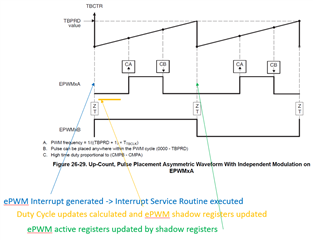
    From our offline conversation, we discussed the following as a method to implement the phase shift by manipulating the duty cycle and position of the edges with the CMPA and CMPB.  The attached example C code illustrates an example.  Your specific implementation would likely vary from this.

    Also, the following diagrams try to illustrate the behavior of the C code.

    Attached example C code

    //
    //  Function Prototypes
    //
    void InitEPwm1(void);
    __interrupt void epwm1_isr(void);
    
    //
    // Main
    //
    void main(void)
    {
    //
    // Initialize System Control:
    // PLL, WatchDog, enable Peripheral Clocks
    // This example function is found in the f2838x_sysctrl.c file.
    //
        InitSysCtrl();
    
    //
    // Initialize GPIO:
    // This example function is found in the f2838x_gpio.c file and
    // illustrates how to set the GPIO to it's default state.
    //
    //    InitGpio();
    
    //
    // Enable PWM1
    //
        CpuSysRegs.PCLKCR2.bit.EPWM1=1;
    
    //
    // For this case just init GPIO pins for ePWM1
    // This function is in the f2838x_epwm.c file
    //
        InitEPwm1Gpio();
    
    //
    // Step 3. Clear all interrupts and initialize PIE vector table:
    // Disable CPU interrupts
    //
        DINT;
    
    //
    // Initialize the PIE control registers to their default state.
    // The default state is all PIE interrupts disabled and flags
    // are cleared.
    // This function is found in the f2838x_piectrl.c file.
    //
        InitPieCtrl();
    
    //
    // Disable CPU interrupts and clear all CPU interrupt flags:
    //
        IER = 0x0000;
        IFR = 0x0000;
    
    //
    // Initialize the PIE vector table with pointers to the shell Interrupt
    // Service Routines (ISR).
    // This will populate the entire table, even if the interrupt
    // is not used in this example.  This is useful for debug purposes.
    // The shell ISR routines are found in f2838x_defaultisr.c.
    // This function is found in f2838x_pievect.c.
    //
        InitPieVectTable();
    
    //
    // Interrupts that are used in this example are re-mapped to
    // ISR functions found within this file.
    //
        EALLOW; // This is needed to write to EALLOW protected registers
        PieVectTable.EPWM1_INT = &epwm1_isr;
        EDIS;   // This is needed to disable write to EALLOW protected registers
    
    //
    // Setup a GPIO just for debug
    //
        EALLOW;
        GpioCtrlRegs.GPAMUX1.bit.GPIO3 = 0;  // GPIO3 = GPIO3
        GpioCtrlRegs.GPADIR.bit.GPIO3 = 1;   // GPIO3 = output
        GpioDataRegs.GPACLEAR.bit.GPIO3 = 1;   // Load output latch
        EDIS;
    //
    // For this example, only initialize the ePWM
    //
        EALLOW;
        CpuSysRegs.PCLKCR0.bit.TBCLKSYNC = 0;
        EDIS;
    
        InitEPwm1();
    
        EALLOW;
        CpuSysRegs.PCLKCR0.bit.TBCLKSYNC = 1;
        EDIS;
    
    //
    // User specific code, enable interrupts:
    //
    // Enable CPU INT3 which is connected to EPWM1-3 INT:
    //
        IER |= M_INT3;
    
    //
    // Enable EPWM INTn in the PIE: Group 3 interrupt 1-3
    //
        PieCtrlRegs.PIEIER3.bit.INTx1 = 1;
    
    //
    // Enable global Interrupts and higher priority real-time debug events:
    //
        EINT;  // Enable Global interrupt INTM
        ERTM;  // Enable Global realtime interrupt DBGM
    
    //
    // IDLE loop. Just sit and loop forever (optional):
    //
        for(;;)
        {
            asm ("  NOP");
        }
    }
    
    //
    // epwm1_isr - EPWM1 ISR to update compare values
    //
    __interrupt void epwm1_isr(void)
    {
        //
        // Change the CMPA/CMPB values upon required condition
        //
        if (ChangeDuty == 1)
        {
            EPwm1Regs.CMPA.bit.CMPA = 1400;     // .7 of TBPRD
            EPwm1Regs.CMPB.bit.CMPB = 400;      // .2 of TBPRD
            EPwm1Regs.AQCTLA.bit.ZRO = AQ_SET;
    
            //
            // Set GPIO to high- just for debug
            //
            EALLOW;
            GpioDataRegs.GPASET.bit.GPIO3 = 1;
            EDIS;
            ChangeDuty = 0;
        }
        else
        {
            EPwm1Regs.AQCTLA.bit.ZRO = AQ_NO_ACTION; // Set AQ event for ZRO back to correct action
        }
    
        //
        // Clear INT flag for this timer
        //
        EPwm1Regs.ETCLR.bit.INT = 1;
    
        //
        // Acknowledge this interrupt to receive more interrupts from group 3
        //
        PieCtrlRegs.PIEACK.all = PIEACK_GROUP3;
    }
    
    
    //
    // InitEPwm1 - Initialize EPWM1 values
    //
    void InitEPwm1()
    {
       //
       // Setup TBCLK
       //
       EPwm1Regs.TBCTL.bit.CTRMODE = TB_COUNT_UP; // Count up
       EPwm1Regs.TBPRD = 2000;                    // Set timer period
       EPwm1Regs.TBCTL.bit.PHSEN = TB_DISABLE;    // Disable phase loading
       EPwm1Regs.TBPHS.bit.TBPHS = 0x0000;        // Phase is 0
       EPwm1Regs.TBCTR = 0x0000;                  // Clear counter
       EPwm1Regs.TBCTL.bit.HSPCLKDIV = TB_DIV1;   // Clock ratio to SYSCLKOUT
       EPwm1Regs.TBCTL.bit.CLKDIV = TB_DIV1;
    
       //
       // Setup shadow register load on ZERO
       //
       EPwm1Regs.CMPCTL.bit.SHDWAMODE = CC_SHADOW;
       EPwm1Regs.CMPCTL.bit.SHDWBMODE = CC_SHADOW;
       EPwm1Regs.CMPCTL.bit.LOADAMODE = CC_CTR_ZERO;
       EPwm1Regs.CMPCTL.bit.LOADBMODE = CC_CTR_ZERO;
    
       //
       // Set Compare values
       //
       EPwm1Regs.CMPA.bit.CMPA = 200;     // .1 of TBPRD
       EPwm1Regs.CMPB.bit.CMPB = 1200;    // .6 of TBPRD
    
       //
       // Set actions
       //
       EPwm1Regs.AQCTLA.bit.CAU = AQ_SET;
       EPwm1Regs.AQCTLA.bit.CBU = AQ_CLEAR;
    
    
       //
       // Interrupt where we will change the Compare Values
       //
       EPwm1Regs.ETSEL.bit.INTSEL = ET_CTR_ZERO;     // Select INT on Zero event
       EPwm1Regs.ETSEL.bit.INTEN = 1;                // Enable INT
       EPwm1Regs.ETPS.bit.INTPRD = ET_1ST;           // Generate INT on 3rd event
    
    }