This thread has been locked.

If you have a related question, please click the "Ask a related question" button in the top right corner. The newly created question will be automatically linked to this question.

TMS320F280025C: how to have CCS point to specified C2000WARE

Part Number: TMS320F280025C
Other Parts Discussed in Thread: C2000WARE

I installed C2000Ware_4_01_00_00  and tried to have CCS use/point to it, but failed. 

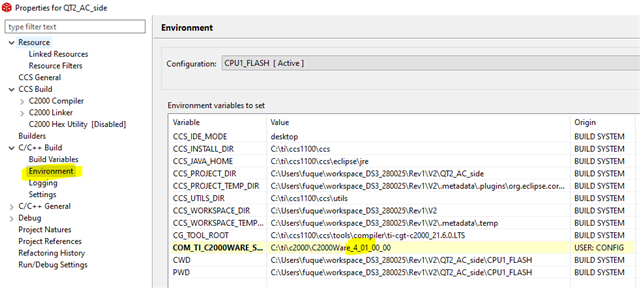
I changed to C2000Ware_4_01_00_00 as shown below:

and click "Apply and Close", quitted CCS, then relaunched CCS, but when compiling, it still errors out with messages such as below:

*******************************************************************************

>> Compilation failure
device/subdir_rules.mk:9: recipe for target 'device/device.obj' failed
"..\device\device.h", line 402: error #148: declaration is incompatible with "void __error__(char *, uint32_t)" (declared at line 53 of "C:\ti\c2000\C2000Ware_3_01_00_00\driverlib\f28002x\driverlib\debug.h")
"../device/device.c", line 146: error #20: identifier "SYSCTL_PERIPH_CLK_HRCAL" is undefined
"../device/device.c", line 261: warning #225-D: function "DCC_verifyClockFrequency" declared implicitly
2 errors detected in the compilation of "../device/device.c".
gmake: *** [device/device.obj] Error 1
gmake: Target 'all' not remade because of errors.

*******************************************************************************

and CCS still points to C2000Ware_3_01_00_00 as shown below:

Could you advise what I should do to have CCS use/point to C2000Ware_4_01_00_00?

  • Quentin,

    A project specifies the versions of software products to include.  Those variables then get automatically populated based on the version selected and where CCS has found that version to be installed.

    You can check to see what products and versions CCS is aware of by opening the preferences and going here (Code Composer Studio -> Products):

    You can confirm that CCS is aware of your 4.01 installation of C2000Ware.  If it is not you can add the location where it is installed at the top of the dialog and then click the refresh button to have it find it.

    If you go to the properties for your project you can change the version it is set to use.  Note that my dialog looks a bit different as you have "Show advanced settings" selected in yours.  I can select General in the tree on the left and the click the products tab on the right.  This will show me which products and versions the project is configured to use.  In my case it is set to use C2000Ware 4.0.0.00.  If I click the Edit button that brings up a little dialog and I can change it to any of the installed versions that CCS is aware of.

    Regards,

    John

  • Hi John,

    Thanks so much for your prompt response. This seems to be the solution. Let me try it.

    Thanks again,

    Quentin

  • Hi John,

    I followed your advice and CCS seems to point to C2000Ware_4_01_00_00 now. Thanks a lot for this.

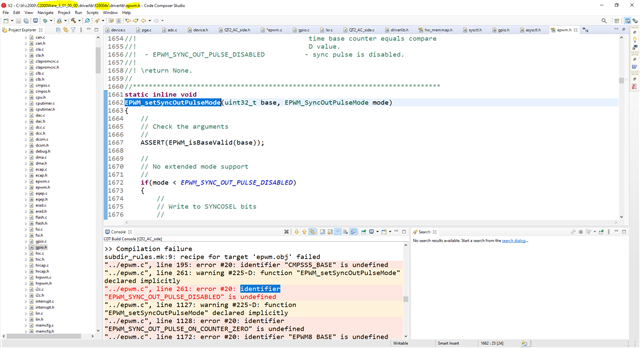
    However, there are still errors related to C2000Ware_3_01_00_00. My project targets 280025, and used a function call EPWM_setSyncOutPulseMode(EPWM3_BASE, EPWM_SYNC_OUT_PULSE_DISABLED) in the code. When compiling, it errors out with message below:

    "../epwm.c", line 261: error #20: identifier "EPWM_SYNC_OUT_PULSE_DISABLED" is undefined

    then I highlighted "EPWM_setSyncOutPulseMode" , mouse right click, and then select "Open Declaration", it brings me to C:\ti\c2000\C2000Ware_3_01_00_00\driverlib\f28004x\driverlib\epwm.h  instead of C:\ti\c2000\C2000Ware_4_01_00_00\driverlib\f28002x\driverlib\epwm.h, as shown below:

    so my questions are:

    1. why did it go to \C2000Ware_3_01_00_00 instead of \C2000Ware_4_01_00_00?
    2. why did it go to \f28004x instead of \f28002x?

    Thanks,

    Quentin

  • why did it go to \C2000Ware_3_01_00_00 instead of \C2000Ware_4_01_00_00?

    For this you could try rebuilding the index as the indexer likely has the old version in its database.  This would not impact the build, just the editor.  Right click on your project to bring up the context menu.  Select Index -> Rebuild

    why did it go to \f28004x instead of \f28002x?

    Something in your source or build options must be referencing \f28004x.  Sometimes C2000Ware example projects have custom variables defined that include that info.  Here I have my mouse over the ${C2000WARE_DLIB_ROOT} folder and you can see that this is defined with /f28002x in the path.  I suspect that there is an include path in your project that uses a variable like this.

    YOu can edit that variable like you were trying to do in your first post.  It will be a variable that is base on another variable.  i.e. in my project it is defined like this: ${COM_TI_C2000WARE_SOFTWARE_PACKAGE_INSTALL_DIR}/driverlib/f28002x/driverlib

    Personally I am not a big fan of variables like that as it makes it hard to move a project from one device to another.  Instead I would just have an include path setup as ${COM_TI_C2000WARE_SOFTWARE_PACKAGE_INSTALL_DIR}/driverlib/f28002x/driverlib.  That way it is easier to find where the device specific part of the path is defined.

    Regards,

    John