This thread has been locked.

If you have a related question, please click the "Ask a related question" button in the top right corner. The newly created question will be automatically linked to this question.

TMS320F28388D: Twincat scanning device error

Part Number: TMS320F28388D
Other Parts Discussed in Thread: TMDXIDDK379D, C2000WARE

HI,expert:

When I used TI's F28388D-ControlCard to implement Ethercat experiment, I burned the corresponding code and used Twincat software to scan the device, but there was such an error message, so how to solve this problem, thank you!
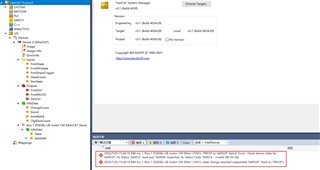
in addition:

1.The code I burned mainly consists of two parts: TI source code (path: D:\ti\ C2000 \C2000Ware_MotorControl_SDK_3_01_00_00\ Solutions \ TMDXIDDK379d \ F2838x) and the code generated by SSC software, and the generated code is transplanted to the project .

2.SSC(EtherCAT Slave Stack Code Tool ) software generated code contains the main () function, and routine CCS also contains the main () function, so how to use? Or which main () function to delete. 

3.The operation steps of the experiment refer to:https://www.ti.com/lit/an/spracm9b/spracm9b.pdf?ts=1658736120669

Johnson Alan

  • Hi Johnson,

    Did you program the ESC EEPROM on the F28388D-ControlCard and power-cycle the board per section 12.5 of the guide you linked? TwinCAT will probably show this error until the EEPROM is properly programmed. Also, are you trying to manually switch to OP mode in TwinCAT or following some other process?

    2.SSC(EtherCAT Slave Stack Code Tool ) software generated code contains the main () function, and routine CCS also contains the main () function, so how to use? Or which main () function to delete. 

    Are these two codes for different F2838x CPU cores?

    Best,

    Kevin

  • Kevin,

    Thank you for your patient reply!

    I have successfully transplanted the generated code to my project, but I have the following questions that need your answers:  

    1.

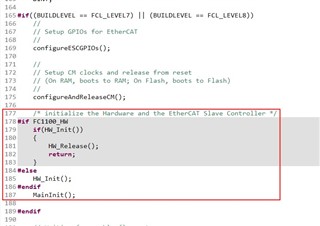
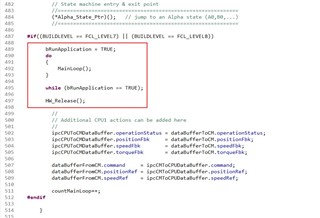
    The code I transplanted is mainly reflected in the generated code in the main function () and related files supporting compilation, as shown in the following figure. In addition, do I need other code or do I need to make any modifications?

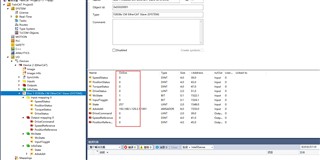
    2. It is mentioned on page 46 of document (link:www.ti.com/.../spracm9b.pdf "For example,  the data entered in 'SpeedReference' in output mapping should return back to show up in 'SpeedStatus' in input mapping   If EtherCAT slave is functioning properly."  

    Does this mean that I enter the value in the "Expression" window of CCS and Twincat will receive the corresponding data in the following variable, but unfortunately I don't seem to be able to do this. 

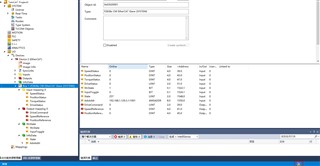
    3.The icon I marked here is constantly flashing between blue and red. Is this normal?

    Best regards

    Johnson Alanl

  • Hi Johnson,

    Are you able to put the F2838x device into OP mode in TwinCAT after scanning and loading the Box? You'll have to Activate "Free Run" in TwinCAT for OP mode to be entered in this example configuration.

    Does this mean that I enter the value in the "Expression" window of CCS and Twincat will receive the corresponding data in the following variable, but unfortunately I don't seem to be able to do this. 

    Not quite. You will set the Output mapping (i.e. DriveCommand, SpeedReference, PositionReference) in TwinCAT and the input mapping Status values will update to match them. This is just a simple loop-back test to verify the EtherCAT comms are working properly.

    Best,

    Kevin