This thread has been locked.

If you have a related question, please click the "Ask a related question" button in the top right corner. The newly created question will be automatically linked to this question.

TMDSCNCD28335: SCI Echoback Example using Hyperterminal

Part Number: TMDSCNCD28335
Other Parts Discussed in Thread: C2000WARE,

Hello,

I am trying to run the example C:\ti\c2000\C2000Ware_3_04_00_00\device_support\f2823x\examples\sci_echoback

In order to run this example, do I need to purchase

https://www.hilgraeve.com/hyperterminal/ ?

I see this example has a .ht file which I'm unable to open.

Thanks,

Kevin

  • Hi Kevin,

    The example was initially developed with support for hyperterminal, but I think if you wish to use something open-source like putty, you can use that as well, just that you'll need to configure the terminal correctly with all the necessary settings such as baud rate and COM port.

    Thanks,

    Aditya

  • Aditya, thanks for your reply.  Can I use the software Terminal https://sites.google.com/site/terminalbpp/ or is there another free RS232 software I can use?

    I have a TMDSCNCD28335 controlCARD with the Peripheral Explorer TMDSPREX28335 docking station, and I'm able to successfully run an RS232 loopback test when I jumper the TX and RX pins out of the RS232 transceiver (I read in the same number that I transmit when I have the pins jumpered.)  

    However, I've been unable to communicate at all with the local computer using RS232 communication.  (JTAG and USB communication with the local computer works fine).  I'm using the following RS232 to USB cable https://www.olimex.com/Products/Components/Cables/USB-Serial-Cable/USB-SERIAL-F/

    However, when running the sci_echoback example, I'm not seeing a data appear on the software Terminal and I'm also not able to send out any messages.

    Thanks,

    Kevin

  • Hi Kevin,

    Yes, I ran the echoback example on a 280049C Launchpad and verified the results on the google terminal that you shared. You can also use 'Putty' or the CCS terminal itself.

    CCS Terminal location: 'View > Terminal' 


    Can you double check the hardware connections on your end?

    Thanks,

    Aditya

  • Aditya,

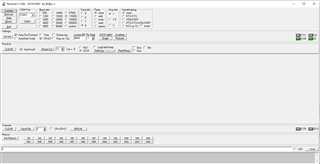
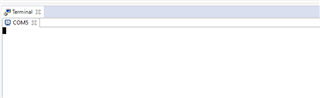
    Thanks for your reply.  I'm still not able to see any data coming in or out from the Terminal.  I just see the screen below with no data.

    What did you select for the baud rate?  (It looked like the code is saying to use 37.5 MHz, but I tried different baud rates without any success).

    Was there anything else you had to do after running the Sci_Echoback example in CCS to see data coming in to Terminal?  Do I need to do something with the SCI-(6.ht file?  (I couldn't find any way to load that from within Terminal.)

    Thanks,

    Kevin

  • Kevin,

    You need to connect to the appropriate COMPort. Check the COM Port number in the device manager of your PC to see which port corresponds to the UART terminal. Based on that, you can select the port in the application that you're using and connect it. Once the connection is established, only then you run the example. DONT run the example before connecting the COM Port.

    Aditya

  • Aditya,

    I can see in my device manager that the RS232 to USB cable I'm using is COM3.  I've tried running the Sci_Echoback example only after hitting the CONNECT button in the Terminal, but I'm still not seeing any data appear in the Terminal.

    What baud rate are you using?

    Was there anything else you had to do after running the Sci_Echoback example in CCS to see data coming in to Terminal?  Did you need to do anything with the SCI-96.ht file?

    Thanks,

    Kevin

  • The .ht file is only to be used when using hyperterminal. Can you cross check the hardware connections on your end for RS232 - the Tx and Rx channel connections?

    Baud rate used in the echoback example is 9600 with 1 stop bit, no parity.

    Aditya

  • Aditya,

    By cross check the hardware connections, do you just mean make sure that the cable is not loose or is there some test to run for this?  I've tried swapping the TX and RX pins, but haven't had any success either way.  I'm using the following RS232 to USB cable: 

     https://www.olimex.com/Products/Components/Cables/USB-Serial-Cable/USB-SERIAL-F/

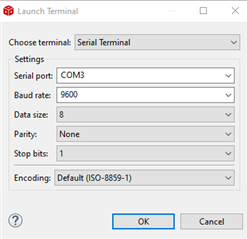
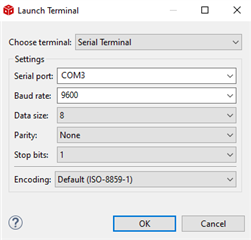
    I've attached a screenshot below of the settings I have in Terminal.  If press the Connect button in Terminal and then run the Sci_Echoback example in CCS, I don't see any data appear.

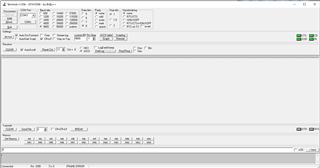
    If after running the Sci_Echoback example, I press the Connect button in Terminal again, I see below garbage data coming in and I see a "FRAME ERROR" on the bottom.  Do I have some setting wrong?

    Thanks,

    Kevin

  • By cross check the hardware connections, do you just mean make sure that the cable is not loose or is there some test to run for this?

    No, I meant the connection between Rx and Tx pins.

    C:\ti\c2000\C2000Ware_3_04_00_00\device_support\f2823x\examples\sci_echoback

    You have mentioned that you're using example from f2823x folder while the device that you're using is f28335 for which the example applicable is available under f2833x folder. Is this just a typo? Can you verify? 

  • Aditya,

    I'm able to successfully run an RS232 loopback test when I jumper the TX and RX pins out of the RS232 transceiver (I read in the same number that I transmit when I have the pins jumpered)

    Yes that was just a typo, sorry.  I'm running Example_2833xSci_Echoback and I have a TMDSCNCD28335 controlCARD with the Peripheral Explorer TMDSPREX28335 docking station.

    Do I have any settings wrong in the Terminal GUI?  Do I need to select any type of handshaking?

    Thanks,

    Kevin

  • Kevin,

    The hardware connections which I wanted you to check were the Rx pin of board to Tx of the RS232 cable and Tx of board to Rx of RS232.

    The primary configurations in the terminal are selection of correct COMPort, Baud Rate - 9600, Stop Bits and Parity. Nothing else to be done.

    Can you try using any other terminal once, may be Putty?

    Also, did you modify the example or are you using as is?

    Aditya

  • I'm using the example as is, no modifications.  Do I need to make any modifications?

    I'm trying with the terminal in CCS now.  For encoding, should I select Default (ISO-8859-1)?

    After connecting, when I hit the Play button in CCS, I see the following garbage data start appearing in Terminal:

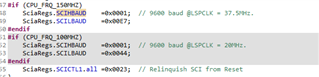
    Looking at the code, I see that the baud rate for this example depends on whether CPU_FRQ_150MHZ or CPU_FRQ_100MHZ

    Where is this getting defined which one this is using?   Neither CPU_FRQ_150MHZ or CPU_FRQ_100MHZ is in Predefined Symbols under the Build Properties of the project.

    Thanks,

    Kevin

  • Hi Kevin,

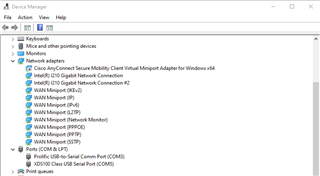
    The configurations in the terminals are correct if the COMPort is validated. Can you share the snapsnot of available COM Ports from the device manager?

  • Here's a screenshot of my Device Manager.  COM3 is my serial port.

    Also, looking at the code, I see that the baud rate for this example depends on whether CPU_FRQ_150MHZ or CPU_FRQ_100MHZ

    Where is this getting defined which one this is using?   Neither CPU_FRQ_150MHZ or CPU_FRQ_100MHZ is in Predefined Symbols under the Build Properties of the project.

    Thanks,

    Kevin

  • Kevin,

    The CPU_FRQ_X parameter is dependent on the device that you're using. The same example is applicable to the F28332 and F28335 class of devices. The first one, F28332, has a max frequency of 100 MHz, whereas the latter one, F28335 has max freq of 150MHz. If you were using the 100MHz version of device, then you would want to mention that in the file DSP2833x_Device.h.

    Since you're anyways using a 150MHz device, you don't need to change anything really. The default setting is done with 150MHz.

    Also, can you try changing the port settings to COM5 and see?

  • Changing the port setting to COM5, I see no data coming in after even after hitting the Play button in CCS.

    By unplugging the USB from my computer, I can tell that COM3 is the serial port.  What would cause me to be getting garbage data on COM3 like shown below?  (Clearly some data is coming in because I see the stream of data start only after I hit the Play button in CCS)

    For Encoding, should I be selecting Default (ISO-8859-1)?

    Thanks,

    Kevin

  • Encoding is correct. Are you running from RAM or FLASH?

  • I haven't changed anything in the example, so I'm running in the "Debug" configuration which I believe is RAM, right?

    What could cause me to see data coming in but for that data to be all garbage?  Could it be a problem with the RS232-USB cable I'm using?

     https://www.olimex.com/Products/Components/Cables/USB-Serial-Cable/USB-SERIAL-F/

  • Do you have any other cable to validate?

  • I don't have any other RS232-USB cables, no.  Do you see any issues with that cable I'm using?  Could that be causing data to come in but for the data to be all garbled like that?

    Do you have a recommendation for the right cable to buy if you think the cable is the issue?

  • Kevin,

    Let me first double check with one of our hardware experts before you get on to changing the cable. I'll get back to you on this.

  • Kevin,

    I will not be able to provide an exact cable to be used, but can suggest two points on selection:

    - The cable that you use should be shielded from external noise.

    - Shorter length to ensure lower voltage drop and inductance.

    On top of this, since you're using the CC, you need to make sure that SW1 on the CC is in 'ON' position to enable the FTDI chip available.

  • Aditya,

    I do have have Switch 1 on the Control Card in the 'ON' position.  I have a short cable but I'm not running in a high-noise environment.  (Eventually I will need to use RS232 with a high-power switching converter, but right I'm just running the Control Card by itself from my desk.)

    Do you see any issues with that cable I'm using? 

    www.olimex.com/.../

    Could the cable be causing data to come in but for the data to be all garbled like that, or does that seem like more of a settings problem?

    Could you please provide me with the part number for the cable you are using?

    Thanks,

    Kevin

  • Kevin,

    As conveyed earlier, from the specs, the cable that you're using seems fine. If you have a scope then you can further debug and see whether the data is coming fine on the TX pin or not. Check at such multiple test points on board / cable and see if you can check whether the connection is breaking down, incase that is the cause.

    Could the cable be causing data to come in but for the data to be all garbled like that, or does that seem like more of a settings problem?

    Seemed to be more of settings issue, but by the description that you've provided, all the settings are fine. So, wanted to check on the hardware side of the problem.

    Could you please provide me with the part number for the cable you are using?

    I was earlier using a LP with direct jumper connections from RX to TX, because of unavailability of additional hardware on my end. So, won't be able to comment on this.

    Aditya