


Part Number: TMDSCNCD28335
Other Parts Discussed in Thread: C2000WARE
Hi Team,
Can you please help us with the issue encountered by our customer with TMDSCNCD28335. According to our customer.
Hello, I have an issue with a f28335 SPI communication, I have all cables disconnected, but it reads what I send, like if the loop back is activated
I'm sure I have this register in zero: SpiaRegs.SPICCR.bit.SPILBK = 0;
Although I wanted to ask if anything comes to your mind of what could it be
Like, in loopback mode, it can happen, but if I turn off the loopback mode how can it be receiving the same message it is sending
I mean, I'm trying to communicate with another board (TMDSCNCD28335) same model, but the signal is not being sent, rather is being read by itself, so that's the whole issue
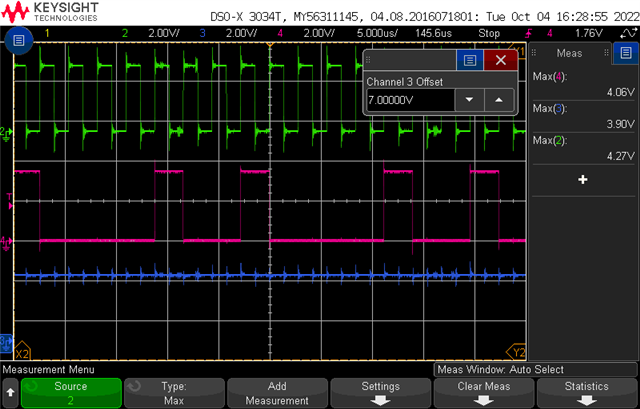
Regarding the monitoring of the lines on a scope, I'm unable to see any data on the SIMO and SOMI lines, although the SPICLKA and the SPISTEA lines work as expected and at the set frequency. Attached you will find a capture from the scope, where the SPICLKA, SPISTEA, SIMO and MOSI lines are monitored and correspond to the colors green, yello, blue and magenta, respectively.
Although no information can be seen on the scope, every time I send a frame, the buffer "SpiaRegs.SPIRXBUF" reads it.
He also added in another email.
Right now I'm preforming communication tests between the two boards, 1 configured as master and the other one as slave. The tests consist of the master sending a message to the slave, with the 4 cables connected to their respective pins. The slave reads correctly the information sent by the master, however it stops reading when I disconnect the SOMI cable, which it shouldn't happen. Also the master continues to read its own messages. The code I'm using in both the master and slave is below, where it is in a while(1) just waiting for the buffer to receive any message and then read it into an array.
if(SpiaRegs.SPIFFRX.bit.RXFFST > 15 ){
for(i=0;i<16;i++){
read[i] = SpiaRegs.SPIRXBUF;
if(i==16){
SpiaRegs.SPIFFRX.bit.RXFIFORESET = 0; // reset RX-FIFO pointer
SpiaRegs.SPIFFRX.bit.RXFIFORESET = 1; // enable RX-operation
}
}
}
The code for sending the message is the following:
if(sendmsg==1){
for(i=0;i<16;i++) SpiaRegs.SPITXBUF= send[i];
}//if send
Hello again, just wanted to update regarding the scope readings. I´m not sure why I wasn´t able to capture the frames, but now I am, so I attach the capture of the readings of the CLK, SIMO and SOMI (green, magenta, blue). It can be seen that the SOMI is always in a high state.
Regards,
Danilo
