


Other Parts Discussed in Thread: TMS320F28335, C2000WARE, TMDSCNCD28335
부품 번호: TMS320F28335
//
// Included Files
//
#include "DSP28x_Project.h" // Device Headerfile and Examples Include File
//
// Function Prototypes
//
void scib_echoback_init(void);
void scib_fifo_init(void);
void scib_xmit(int data);
void scib_msg(char *msg);
//
// Globals
//
Uint16 LoopCount;
Uint16 ErrorCount;
//
// Main
//
void main(void)
{
Uint16 ReceivedChar;
char *msg;
//
// Step 1. Initialize System Control:
// PLL, WatchDog, enable Peripheral Clocks
// This example function is found in the DSP2833x_SysCtrl.c file.
//
InitSysCtrl();
//
// Step 2. Initialize GPIO:
// This example function is found in the DSP2833x_Gpio.c file and
// illustrates how to set the GPIO to it's default state.
//
// InitGpio(); // Skipped for this example
//
// For this example, only init the pins for the SCI-B port.
//
EALLOW;
GpioCtrlRegs.GPAPUD.bit.GPIO14 = 0; // Enable pull-up for GPIO14 (SCITXDB)
GpioCtrlRegs.GPAPUD.bit.GPIO15 = 0; // Enable pull-up for GPIO15 (SCIRXDB)
GpioCtrlRegs.GPAQSEL1.bit.GPIO15 = 3; // Asynch input GPIO15 (SCIRXDB)
GpioCtrlRegs.GPAMUX1.bit.GPIO14 = 2; // Configure GPIO14 to SCITXDB
GpioCtrlRegs.GPAMUX1.bit.GPIO15 = 2; // Configure GPIO15 for SCIRXDB
EDIS;
//
// Step 3. Clear all interrupts and initialize PIE vector table:
// Disable CPU interrupts
//
DINT;
//
// Initialize PIE control registers to their default state.
// The default state is all PIE interrupts disabled and flags
// are cleared.
// This function is found in the DSP2833x_PieCtrl.c file.
//
InitPieCtrl();
//
// Disable CPU interrupts and clear all CPU interrupt flags
//
IER = 0x0000;
IFR = 0x0000;
//
// Initialize the PIE vector table with pointers to the shell Interrupt
// Service Routines (ISR).
// This will populate the entire table, even if the interrupt
// is not used in this example. This is useful for debug purposes.
// The shell ISR routines are found in DSP2833x_DefaultIsr.c.
// This function is found in DSP2833x_PieVect.c.
//
InitPieVectTable();
//
// Step 4. Initialize all the Device Peripherals:
// This function is found in DSP2833x_InitPeripherals.c
//
// InitPeripherals(); // Not required for this example
//
// Step 5. User specific code
//
LoopCount = 0;
ErrorCount = 0;
scib_fifo_init(); // Initialize the SCI FIFO
scib_echoback_init(); // Initialize SCI for echoback
msg = "\r\n\n\nHello World!\0";
scib_msg(msg);
msg = "\r\nYou will enter a character, and the DSP will echo it back! \n\0";
scib_msg(msg);
for(;;)
{
msg = "\r\nEnter a character: \0";
scib_msg(msg);
//
// Wait for inc character
//
while(ScibRegs.SCIFFRX.bit.RXFFST != 1)
{
//
// wait for XRDY =1 for empty state
//
}
//
// Get character
//
ReceivedChar = ScibRegs.SCIRXBUF.all;
//
// Echo character back
//
msg = " You sent: \0";
scib_msg(msg);
scib_xmit(ReceivedChar);
LoopCount++;
}
}
//
// scib_echoback_init - Test 1, SCI-B, DLB, 8-bit word, baud rate 9600bps,
// default, 1 STOP bit, no parity
//
void scib_echoback_init()
{
//
// Note: Clocks were turned on to the SCI-B peripheral
// in the InitSysCtrl() function
//
// 1 stop bit, No loopback, No parity,8 char bits,
// async mode, idle-line protocol
//
ScibRegs.SCICCR.all = 0x0007;
//
// enable TX, RX, internal SCICLK,
// Disable RX ERR, SLEEP, TXWAKE
//
ScibRegs.SCICTL1.all = 0x0003;
ScibRegs.SCICTL2.all = 0x0003;
ScibRegs.SCICTL2.bit.TXINTENA = 0;
ScibRegs.SCICTL2.bit.RXBKINTENA = 0;
#if (CPU_FRQ_150MHZ)
ScibRegs.SCIHBAUD = 0x0001; // 9600 baud @LSPCLK = 37.5MHz.
ScibRegs.SCILBAUD = 0x00E7;
#endif
#if (CPU_FRQ_100MHZ)
ScibRegs.SCIHBAUD = 0x0001; // 9600 baud @LSPCLK = 20MHz.
ScibRegs.SCILBAUD = 0x0044;
#endif
ScibRegs.SCICTL1.all = 0x0023; // Relinquish SCI from Reset
}
//
// scib_xmit - Transmit a character from the SCI
//
void scib_xmit(int data)
{
while (ScibRegs.SCIFFTX.bit.TXFFST != 0)
{
asm(" NOP");
}
ScibRegs.SCITXBUF = data;
}
//
// scib_msg
//
void scib_msg(char * msg)
{
int i;
i = 0;
while(msg[i] != '\0')
{
scib_xmit(msg[i]);
i++;
}
}
//
// scib_fifo_init - Initialize the SCI FIFO
//
void scib_fifo_init()
{
ScibRegs.SCIFFTX.all = 0xE040;
ScibRegs.SCIFFRX.all = 0x204f;
ScibRegs.SCIFFCT.all = 0x0;
}
//
// End of File
//

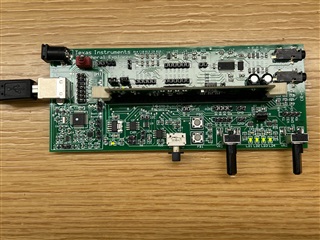

It should work like this:
But nothing appears in the terminal window.
The picture below is the example code I wrote.


