This thread has been locked.

If you have a related question, please click the "Ask a related question" button in the top right corner. The newly created question will be automatically linked to this question.

TMS320F280039C: Stop ePWM module after n pulses

Part Number: TMS320F280039C

Hi,

I want to generate n pulses (e.g 1-10) using ePWM module and then stop the pulse generation. I'm unable to figure out this implementation. I understand I can stop ePWM using trip zone. I need to add counter which interrupt after every pulse and when the counter reaches a specified value, it needs to turn off the ePWM. Kindly help me out with the same. 

  • Hi Rishabh,

    Are you familiar with the configurable logic block (CLB) peripheral on the C2000 device? What you're wanting to do could easily be accomplished with the CLB. The CLB has an internal counter along with some FSM modules which you can use to implement a gated EPWM state. You can pass the EPWM signal into the CLB and use rising edge detect to have the counters count up each time a pulse is received. Then once the counter reaches whichever n value you choose, you can then transition to a gated state where the output of the ePWM is stopped. 

    We have available CLB learning content at our C2000 Academy (https://dev.ti.com/tirex/global?id=c2000Academy)

    Let me know if you need any more clarification on this implementation

    Regards,

    Peter

  • Hi Rishabh,

    In addition to what Peter had mentioned, the other possibility in which I would not recommend, would be having an interrupt to count the number of times the pulses get generated.

    You could use CMPC or CMPD to generate these interrupts.

    However this will not guarantee that the n pulses selected will occur. Since the ISR has different priorities and is not guaranteed to execute your interrupt handler right away, your PWM outputs could have extra pulses that were not wanted.

    In the end, I would recommend using the CLB peripheral to accomplish your goal. Hope this helps!

    Best,

    Ryan Ma

  • Thanks Peter, I'll take a look into this. 

  • Thanks Ryan for the alternate approach. 

  • Hi ,

    I looked into CLB and it seems a steeper learning curve for me in this moment. Coming back to Ryan's suggestion, I'd like to try this out before investing a much longer duration in CLB as my deliverable dates are fast approaching. 

    Can you help me out with the following

    1. How can I make an interrupt on the rising edge of my PWM?

    2. If I disable all other groups of interrupts when this feature is required and enable it again after this feature has ended, will that ensure that I can stop my ePWM after exactly n pulses? Note, my desired on-time can be as low as 300nS. 

    3. How can I disable all interrupts except the PWM rising edge one? Is there something to keep in mind before I do it?

    4. How to use software trip zone when my code enters ISR to ensure pulses stop immediately. 

    Below is my relevant code for PWM

    GPIO_setPinConfig(GPIO_0_EPWM1_A);
    GPIO_setPadConfig(GATE_HB1_HS, GPIO_PIN_TYPE_STD);
    GPIO_setQualificationMode(GATE_HB1_HS, GPIO_QUAL_SYNC);
    
    EPWM_setClockPrescaler(GATE_HB1_BASE, EPWM_CLOCK_DIVIDER_1, EPWM_HSCLOCK_DIVIDER_1);
    
    EPWM_setTimeBaseCounter(GATE_HB1_BASE, 0);
    EPWM_setTimeBaseCounterMode(GATE_HB1_BASE, EPWM_COUNTER_MODE_UP_DOWN);
    EPWM_disablePhaseShiftLoad(GATE_HB1_BASE);
    EPWM_setPhaseShift(GATE_HB1_BASE, 0);
    EPWM_setSyncInPulseSource(GATE_HB1_BASE, EPWM_SYNC_IN_PULSE_SRC_DISABLE);
    
    EPWM_setCounterCompareShadowLoadMode(GATE_HB1_BASE, EPWM_COUNTER_COMPARE_A, EPWM_COMP_LOAD_ON_CNTR_ZERO);
    EPWM_setCounterCompareValue(GATE_HB1_BASE, EPWM_COUNTER_COMPARE_B, 0);
    EPWM_setCounterCompareShadowLoadMode(GATE_HB1_BASE, EPWM_COUNTER_COMPARE_B, EPWM_COMP_LOAD_ON_CNTR_ZERO);
    EPWM_setActionQualifierAction(GATE_HB1_BASE, EPWM_AQ_OUTPUT_A, EPWM_AQ_OUTPUT_NO_CHANGE, EPWM_AQ_OUTPUT_ON_TIMEBASE_ZERO);
    EPWM_setActionQualifierAction(GATE_HB1_BASE, EPWM_AQ_OUTPUT_A, EPWM_AQ_OUTPUT_NO_CHANGE, EPWM_AQ_OUTPUT_ON_TIMEBASE_PERIOD);
    
    
    EPWM_setActionQualifierAction(GATE_HB1_BASE, EPWM_AQ_OUTPUT_A, EPWM_AQ_OUTPUT_NO_CHANGE, EPWM_AQ_OUTPUT_ON_TIMEBASE_UP_CMPB);
    EPWM_setActionQualifierAction(GATE_HB1_BASE, EPWM_AQ_OUTPUT_A, EPWM_AQ_OUTPUT_NO_CHANGE, EPWM_AQ_OUTPUT_ON_TIMEBASE_DOWN_CMPB);
    EPWM_setActionQualifierAction(GATE_HB1_BASE, EPWM_AQ_OUTPUT_B, EPWM_AQ_OUTPUT_NO_CHANGE, EPWM_AQ_OUTPUT_ON_TIMEBASE_ZERO);
    EPWM_setActionQualifierAction(GATE_HB1_BASE, EPWM_AQ_OUTPUT_B, EPWM_AQ_OUTPUT_NO_CHANGE, EPWM_AQ_OUTPUT_ON_TIMEBASE_PERIOD);
    
    
    EPWM_setActionQualifierAction(GATE_HB1_BASE, EPWM_AQ_OUTPUT_B, EPWM_AQ_OUTPUT_NO_CHANGE, EPWM_AQ_OUTPUT_ON_TIMEBASE_UP_CMPB);
    EPWM_setActionQualifierAction(GATE_HB1_BASE, EPWM_AQ_OUTPUT_B, EPWM_AQ_OUTPUT_NO_CHANGE, EPWM_AQ_OUTPUT_ON_TIMEBASE_DOWN_CMPB);
    
    EPWM_setDeadBandDelayPolarity(GATE_HB1_BASE, EPWM_DB_FED, EPWM_DB_POLARITY_ACTIVE_LOW);
    EPWM_setDeadBandDelayMode(GATE_HB1_BASE, EPWM_DB_RED, false);
    EPWM_setDeadBandDelayMode(GATE_HB1_BASE, EPWM_DB_FED, false);
    
    EPWM_setActionQualifierAction(GATE_HB1_BASE, EPWM_AQ_OUTPUT_A, EPWM_AQ_OUTPUT_HIGH, EPWM_AQ_OUTPUT_ON_TIMEBASE_UP_CMPA);
    EPWM_setActionQualifierAction(GATE_HB1_BASE, EPWM_AQ_OUTPUT_A, EPWM_AQ_OUTPUT_LOW, EPWM_AQ_OUTPUT_ON_TIMEBASE_DOWN_CMPA);
    
    EPWM_setActionQualifierAction(GATE_HB1_BASE, EPWM_AQ_OUTPUT_B, EPWM_AQ_OUTPUT_NO_CHANGE, EPWM_AQ_OUTPUT_ON_TIMEBASE_UP_CMPA);
    EPWM_setActionQualifierAction(GATE_HB1_BASE, EPWM_AQ_OUTPUT_B, EPWM_AQ_OUTPUT_NO_CHANGE, EPWM_AQ_OUTPUT_ON_TIMEBASE_DOWN_CMPA);
    
    EPWM_setTimeBasePeriod(GATE_HB1_BASE, period_register);
    
    EPWM_setCounterCompareValue(GATE_HB1_BASE, EPWM_COUNTER_COMPARE_A, compare_register);
    

    Looking forward to your support. Thanks.

  • 1. You can generate an interrupt using the CMPC and CMPD registers. Refer to the Counter Compare Submodule within the TRM, all CMPC and CMPD events will go to the Event Trigger and Interrupt.

    2. I do not believe it will ensure exactly n pulses. There does exist some delay on the CPU to handle an ISR we would have to run a test to verify it can meet your required 300 ns. 

    3. Let me ask an ISR subject matter expert about this, and get back to you.

    4. You can use the one shot software trip zone by clearing the software trip event flag within the ISR. This will ensure pulses stop immediately on the one shot trigger event.

    Let me run some tests to see if I can emulate what you want to do and if it will meet the 300ns timing requirement. I will try and get back to you by tomorrow end of day. 

  • Hi Rishabh,

    Sorry for the late reply.

    3. In order to disable individual interrupts, you can use the PIEIER registers, but take care of any race conditions. Refer to chapter 3.5.4.2 of the TRM. 

    4. The driverlib function to clear a software trip event is EPWM_clearTripZoneFlag(uint32_t base, uint16_t tzFlags)

    I actually ran a test to see how long does it take for the clearing of the trip zone flag and how long it takes the outputs to reflect from this function. With a basic example I found out that it takes longer with the driverlib call than actually writing to the registers.

    Here is the bitfield code to clear the trip zone flag which will meet your requirements

    EALLOW;
    HWREGH(base + EPWM_O_TZCLR) |= tzFlags;
    EDIS;

  • Hi Ryan,

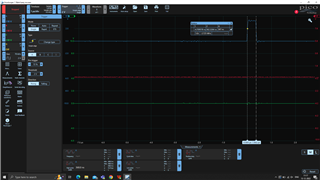
    Thanks. This seems to be a step in the correct direction. I was able to reduce by trip time from 1uS to 350nS. Though I'd like it to be less than 300nS. Is there another level of optimization that I can do? Maybe something like increasing the CPU frequency or using PLL. Can you point me in the direction for it?

    Appreciate your help.

    My ISR code

    __interrupt void INT_GATE_HB1_ISR(void){
        EALLOW;
        HWREGH(GATE_HB1_BASE + EPWM_O_TZFRC) |= EPWM_TZ_FORCE_EVENT_OST;
        EDIS;
        Interrupt_clearACKGroup(INT_GATE_HB1_INTERRUPT_ACK_GROUP);
        EPWM_clearEventTriggerInterruptFlag(GATE_HB1_BASE);
    }

    Regards,

    Rishabh Kaushikj

  • Hi Rishabh,

    Have you tried compiling your code using CCS's C2000 Compiler Optimization? Try setting the optimization level to 4, and increase the speed. This is found under File > Properties (Alt + Enter)

    Best,

    Ryan Ma