This thread has been locked.

If you have a related question, please click the "Ask a related question" button in the top right corner. The newly created question will be automatically linked to this question.

TMS320F280049C: Disabling SysConfigProject

Part Number: TMS320F280049C
Other Parts Discussed in Thread: SYSCONFIG

Hi,

I started with an empty project which have sysconfig tool inside.

I'm trying to disabling sysconfig project.

I'm following steps at below link. I choosed method 2, actually, I had to because method 1 isn't applicable. I couldn't find related files.

https://software-dl.ti.com/simplelink/esd/simplelink_cc13x2_26x2_sdk/4.10.00.78/exports/docs/ble5stack/ble_user_guide/html/sysconfig/sysconfig-disable.html#fig-generated-files-sp

The information in this link isn't well explained to achieve disabling it.

I couldn't achieve disabling.

Step that I do,

1) I rebuilded project

2) I copied rom CPU1_RAM>syscfg folder to main project and named as "folder"

3) I excluded c2000.syscfg file from project.

4) I add ${PROJECT_ROOT}/folderto my include options. ??

I don't know what to do now? It has so much error.

  • Hi Gokhan,

    If you do not want to use SysConfig, then follow following step:

    1. Exclude c2000.syscfg file from project
    2. In the main C file, remove following line:
    3.     //#include "board.h"
          //#include "c2000ware_libraries.h"
      
          
          .....
          .....
          
          
          //
          // PinMux and Peripheral Initialization
          //
          //Board_init();
      
          //
          // C2000Ware Library initialization
          //
          //C2000Ware_libraries_init();
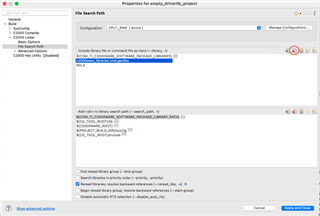
    4. Now open project setting, and remove this from your library

    Save, and rebuild the project.