Part Number: LAUNCHXL-F28069M
Other Parts Discussed in Thread: C2000WARE
Hi,
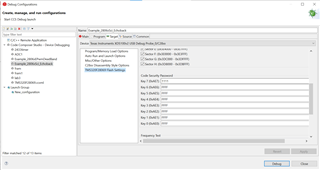
I set on-chip flash key by ccs12 when I debug a TI's routine, but now I can't enter debug.
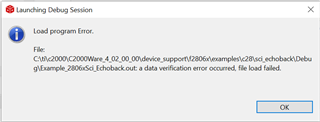
I don't know what's going on.
Thanks & Regards,
Ben
This thread has been locked.
If you have a related question, please click the "Ask a related question" button in the top right corner. The newly created question will be automatically linked to this question.
Part Number: LAUNCHXL-F28069M
Other Parts Discussed in Thread: C2000WARE
Hi,
I set on-chip flash key by ccs12 when I debug a TI's routine, but now I can't enter debug.
I don't know what's going on.
Thanks & Regards,
Ben
Hi Santosh,
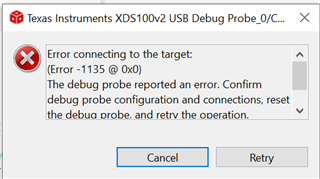
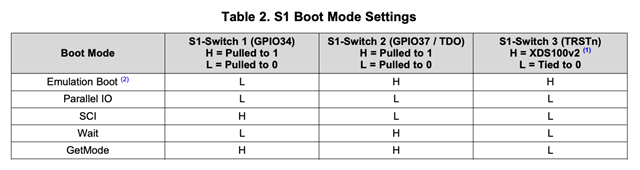
I put the board in Wait Boot mode and it went error:

I pulled Switch3 to H and it went:

Thanks & Regards,
Ben
Hi Ben,
I set on-chip flash key by ccs12
You also need to unlock the device with same key.
Regards, Santosh
Hi Santosh,
I'm sure that I set the right key.

but it still went error.

Thanks & Regards,
Ben
Ben,
If you use the same key for locking and unlocking it should work. We use it all the time. Please take a look at this and go through the full discussion on locking the device:
Hope this helps.
Regards, Santosh
Hi Santosh,
Thanks for your help.

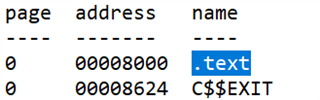
I found 0x008000 at .map file:

That's weird, it seems have nothing to do with password. What dose .text mean?
Thank & Regards,
Ben
Hi Ben,
Please try to run any gpio example from C2000Ware, and check if you still encounter same behavior?
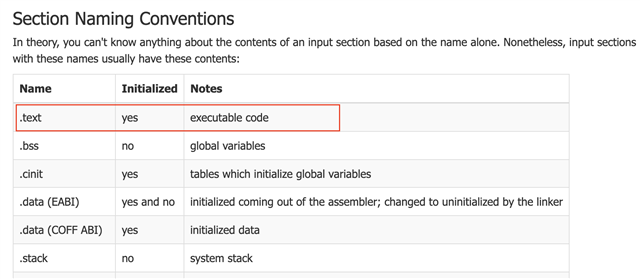
in the '.text' section has executable code. Please refer to this link for details on Linker command File.

Regards, Santosh
Hi Santosh,
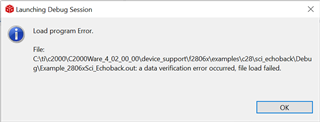
Yes, It still behave like this:
I'm afraid that I have to clear the chip, because the program doesn't matter. Is there any way I can do that?
Best Regards,
Ben
Ben,
Just to confirm, when you put the board in 'WaitBoot' mode, then you are able to connect the target?
Can you open the GEL file? It is located in the CCS installation file.
C:/ti/ccs1200/ccs/ccs_base/emulation/gel/f28069.gel
Make a copy of the file, before editing it.
Now open the file in Text editor.
and add the Keys same as you mentioned earlier.
/********************************************************************/
menuitem "Code Security Module"
hotmenu Unlock_CSM()
{
/* Perform dummy reads of the password locations */
XAR0 = *0x3F7FF8;
XAR0 = *0x3F7FF9;
XAR0 = *0x3F7FFA;
XAR0 = *0x3F7FFB;
XAR0 = *0x3F7FFC;
XAR0 = *0x3F7FFD;
XAR0 = *0x3F7FFE;
XAR0 = *0x3F7FFF;
/* Write passwords to the KEY registers. 0xFFFF's are dummy passwords.
User should replace them with the correct password for their DSP */
*0xAE0 = 0xFFFF;
*0xAE1 = 0xFFFF;
*0xAE2 = 0xFFFF;
*0xAE3 = 0xFFFF;
*0xAE4 = 0xFFFF;
*0xAE5 = 0xFFFF;
*0xAE6 = 0xFFFF;
*0xAE7 = 0xFFFF;
}