This thread has been locked.

If you have a related question, please click the "Ask a related question" button in the top right corner. The newly created question will be automatically linked to this question.

TMS320F280049C: LOW POWER MODE ERROR

Part Number: TMS320F280049C

We have develop a customized kit for PMSM project using F280049C

We tried to load FOC program which get debug and flashed to the controller 

We are controlling the motor speed reference using the Expression windows and feed some reference value the motor start running.

its work fine! till this point

few second later, the controller showing notification (1156 @0x0) Device may be operate in low power mode Do you want to bring it out of this mode? 

choose "yes" to force the device to wake up and retry the operation. choose "No" to retry without waking the device.

whatever option I select in the window! the notification keeps floating again and again 

  • Hi Gowtham,

    Could you post the output log from Testing Connection to your device? So when you use Code Composer Studio to open the Target Configuration for the CCS Project, use the 'Test Connection' option. This tests the JTAG connection to your device, and its output log may give some clues about what is going wrong beyond the error code. If the test succeeds, then something other than the JTAG connection is the source of the problem.

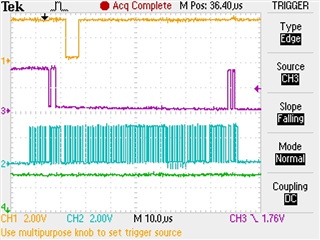
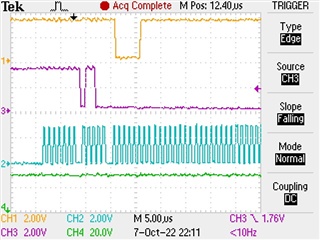
    If you have access to an oscilloscope, you should see the same patterns as I do when I 'Test Connection', with small variability due to the specific debugger. The image below shows TDO (yellow), TMS (purple), TCK (blue), and TRST (green). This is the start of the 'Test Connection' sequence that I captured as a single sequence, triggered on the falling edge of TMS. All signals are 3.3V digital signals.

    If you zoom in more closely, you should see this same pattern at the start. 


    If your 'Test Connection' is not successful, could you post your output log and oscilloscope captures if you take them?

    Best Regards,

    Ben Collier

  • Hi Benjamin,

    The poster stated he entered speed value into the debug expressions window, motorVars.speedRef parameter. The motor runs up too trajectory speed then kicks out XDS110 debug probe. Sounds like EMF spikes the USB port. Best practice to use USB cable with two ferrites one on each end.

    Running lower trajectory speed, does same issue? 

  • Hi GI,

    Yes, I apologize as I misread part of his post. This problem is likely caused by EMF noise somewhere in the JTAG/USB signal chain.

    Gowtham,

    As mentioned by GI, you can buy USB cables with extra shielding and ferrite chokes which would help if the noise is causing problems with the USB signal. If the problem is the JTAG signal between the TMS320F280049C device and the JTAG debug probe, you will likely have to reroute your JTAG traces. 

    If you have access to an oscilloscope, you could try to determine what is causing the problem before you try a solution. I would recommend probing the 4 JTAG signals from my last post, then setting your oscilloscope to Auto capture, then turn on your motor until the JTAG signal disconnects. You might have to adjust the trigger level, but you should be able to see the last JTAG signals sent between the device and the JTAG debug probe. Please post that oscilloscope capture if you are able. If there are visible signal quality issues, then I would say that the problem is with noise in your JTAG signal traces on your board. Otherwise, I would think that the problem is noise in the USB cable.

    Best Regards,

    Ben Collier