This thread has been locked.

If you have a related question, please click the "Ask a related question" button in the top right corner. The newly created question will be automatically linked to this question.

TMS320F280049C: Perference in project

Part Number: TMS320F280049C
Other Parts Discussed in Thread: C2000WARE, SYSCONFIG

Hi all,Perference

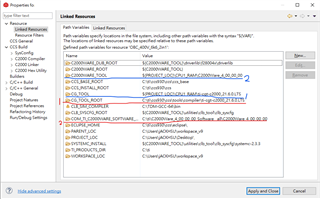
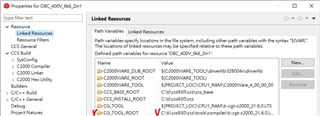
I'm trying to edit the project properties->Linked Resources->Path Variables->CG_TOOL_ROOT: Value, but it always restore defaults by Window->Preference->Code Composer Studio->Build->Compiler.

I would like to save settings in the project so that I could share the project & setting with my partners without another step to check or update IDE preference setting in their computer.

How should I do so that I apply the setting in the project not the IDE?

Kind Regards,

.
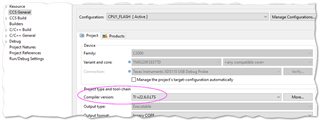
  • If it's just the compiler version then change it here:

    This is stored in the .cproject file....I think.

  • Thanks for your reply, but I wanna to change the compiler root in the computer with some settings in this project not change the settings in IDE preference.

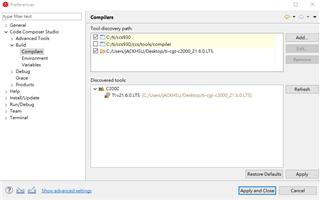
    This was the defaults root in preferences ,and I want to add a new root  just like the next photo that I copy the compiler what I used into my project (this the same mean I copy the compiler in the desktop). This way just was changing the settings in IDE preference.


  • Jack,

    I think 'In Tool Discovery Path', CCS compiler installation path is listed earlier than your custom path. As same version of compiler is available at both location, so it picks up from CCS compiler folder.

    You can try to install 22.06 version compiler to custom location, and then try to pick that version in IDE, it should use that.

    Regards, Santosh

  • Hi Santosh,

    Thanks for your reply.

    Sorry, my leader let me used the 21.6 version in this project, so I'll try the same in the first time. And did it also need to pick the version in IDE->preference, not pick it in project->properties only?

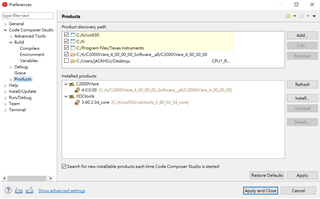
    First picture is the IDE->preference compiler default, and it's just the compiler root in my project unselected, and the same condition with the SDK.

    The third picture is my project properties, red lines pick up from IDE, blue lines are the root I hope. And 1 just compiler, 2 would be the SDK. Now I try to cover the red roots with the blue roots. Because it's too many variables that I could not understand and change by myself just like the fourth picture.

    Besr Regards, Jack

  • Your screenshots are of the Windows -> Preferences dialogue but the answer to your question is in the Project -> Properties

    Under 99% of circumstances, you do not edit environment variables manually to select the tool-chain components. You just need to select A) The compiler and B) the SDK,

    A) Please see the initial picture to select the compiler.

    B) Go to products and select the SDK:

    These are NOT IDE preferences, they are project preferences and they are stored in .cproject file and therefore portable to your colleagues. I believe the addresses your initial question.

  • Hi Kler,

    Thanks for your reply, now I find some variables in .cproject file, but I could not understand the meaning of this code.

    <listOptionValue builtIn="false" value="PRODUCTS=c2000ware_software_package:4.0.0.00;"/>
    <listOptionValue builtIn="false" value="PRODUCT_MACRO_IMPORTS={"c2000ware_software_package":["${COM_TI_C2000WARE_SOFTWARE_PACKAGE_INCLUDE_PATH}","${COM_TI_C2000WARE_SOFTWARE_PACKAGE_LIBRARY_PATH}","${COM_TI_C2000WARE_SOFTWARE_PACKAGE_LIBRARIES}","${COM_TI_C2000WARE_SOFTWARE_PACKAGE_SYMBOLS}","${COM_TI_C2000WARE_SOFTWARE_PACKAGE_SYSCONFIG_MANIFEST}"]}"/>
    

    What is the meaning in this code?

    Regards.

  • Sorry Jack, I don't know.

    If it's important, you might get quicker results by posting in the Code Composer Studio Forum.

  • Hi Kier,

    Thanks for your prompt reply, and I hope that I found the solution ASAP.

    Regards, Jack.

  • t I could not understand the meaning of this code.

    Fullscreen
    1
    2
    <listOptionValue builtIn="false" value="PRODUCTS=c2000ware_software_package:4.0.0.00;"/>
    <listOptionValue builtIn="false" value="PRODUCT_MACRO_IMPORTS={"c2000ware_software_package":["${COM_TI_C2000WARE_SOFTWARE_PACKAGE_INCLUDE_PATH}","${COM_TI_C2000WARE_SOFTWARE_PACKAGE_LIBRARY_PATH}","${COM_TI_C2000WARE_SOFTWARE_PACKAGE_LIBRARIES}","${COM_TI_C2000WARE_SOFTWARE_PACKAGE_SYMBOLS}","${COM_TI_C2000WARE_SOFTWARE_PACKAGE_SYSCONFIG_MANIFEST}"]}"/>
    XXXXXXXXXXXXXXXXXXXXXXXXXXXXXXXXXXXXXXXXXXXXXXXXXX

    What is the meaning in this code?

    #1 - this specifies the project to use C2000Ware version 4.0.0.00 (if available). If it is not available, it will try to use the next closest match that it can find

    #2 - this specifies to import the specified variables from the above mentioned C2000Ware package

    Thanks

    ki