This thread has been locked.

If you have a related question, please click the "Ask a related question" button in the top right corner. The newly created question will be automatically linked to this question.

TMS320F28388D: CCS and Simulink, bad interaction?

Part Number: TMS320F28388D
Other Parts Discussed in Thread: C2000WARE, TMDSHSECDOCK

Hello,

Please does anyone know if there are any known bad interactions between Matlab/Simulink Embedded Coder for C2000 and the TI Code Composer Studio?

I'm developing using Embedded Coder and a TMDSCNDC28388D controlCard.

I was having problems with correctly configuring the ePWM deadband in Simulink 2022a, so I swapped to CCS 11.0 to try the epwm_ex8_deadband example, which worked in debug mode.
I switched back to Simulink and tried my code again, which seemed to download OK but didn't run (I flash an LED on the controlCard when running).
I tried downloading the code again, but this time it threw an error that the controlCard wasn't responding.

Between Simulink and CCS, and switching back again I exited the development environments and power cycled the controlCard. Either Simulink or CCS was running at any one time, not both.

The controlCard is now broken, I can't access the JTAG interface at all from either environment.

This is the second controlCard I have lost to this failure mode.

Any help would be appreciated.

Richard.

P.S. cross-posted to Matlab support for their advice.

  • Hi Richard,

    First of all, my sincere apology for your experience. For Simulink issue, we rely on MathWorks team. We do not have resource to support it. Please post the question at MathWorks forum. Here is link:

    MATLAB Answers C2000 forum.

    Having said that, we can debug why the controlCARD stopped working using CCS.

    Did you try to connect? What is the error?

    Regards, Santosh

  • Hi Santosh,

    The error in CCS is

    Error connecting to the target:
    (Error -2131 @ 0x0)
    Unable to access device register. Reset the device, and retry the operation. If error persists, confirm configuration, power-cycle the board, and/or try more reliable JTAG settings (e.g. lower TCLK).
    (Emulation package 9.6.0.00172)

    The controlCard emulator section of the PCB has the normal LEDs, but the processor GPIOs are all stuck low.

    Kind regards,

    Richard.

  • Richard,

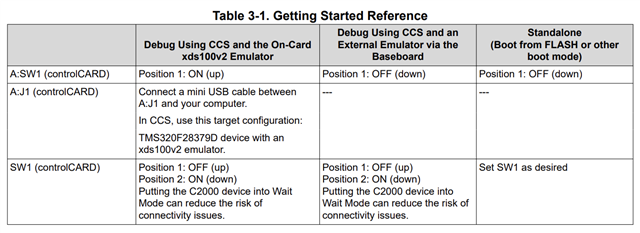
    Can you put the board in 'WaitBoot' mode?

    Please import any example from C2000Ware SDK, then try.

    C:/ti/c2000/C2000Ware_4_02_00_00/driverlib/f2838x/examples/c28x/led/CCS

    Regards, Santosh

  • Hi Santosh,

    The switch settings I have are slightly different

    I have used 'SCI/Wait Boot'.

    Unfortunately, no change to the error.

    Kind regards,

    Richard.

  • Hi Richard,

    Are you running any example I mentioned or trying to connect the target manually?  If you are launching the Target Configuration manually, then can you share the full 'Console Log' debug message after clicking 'Test Connection' ?

    Regards, Santosh

  • Hi Santosh,

    I'm using the epwm_ex8_deadband example and pressing F11 to compile and debug.

    Kind regards,

    Richard.

  • Hi Richard,

    Open the Target Configuration windows by CCS menu 'View -> Target Configuration', Open the target configuration by double-clicking the ccxml file and then run 'Test Connection'.

    Then send the 'Console Log'

    Regards, Santosh

  • Hi Santosh,

    [Start: Texas Instruments XDS100v2 USB Debug Probe_0]
    
    Execute the command:
    
    %ccs_base%/common/uscif/dbgjtag -f %boarddatafile% -rv -o -F inform,logfile=yes -S pathlength -S integrity
    
    [Result]
    
    
    -----[Print the board config pathname(s)]------------------------------------
    
    C:\Users\xxxxx\AppData\Local\TEXASI~1\
        CCS\ccs1100\0\0\BrdDat\testBoard.dat
    
    -----[Print the reset-command software log-file]-----------------------------
    
    This utility has selected a 100- or 510-class product.
    This utility will load the adapter 'jioserdesusb.dll'.
    The library build date was 'Dec  8 2021'.
    The library build time was '11:16:32'.
    The library package version is '9.6.0.00172'.
    The library component version is '35.35.0.0'.
    The controller does not use a programmable FPGA.
    The controller has a version number of '4' (0x00000004).
    The controller has an insertion length of '0' (0x00000000).
    This utility will attempt to reset the controller.
    This utility has successfully reset the controller.
    
    -----[Print the reset-command hardware log-file]-----------------------------
    
    The scan-path will be reset by toggling the JTAG TRST signal.
    The controller is the FTDI FT2232 with USB interface.
    The link from controller to target is direct (without cable).
    The software is configured for FTDI FT2232 features.
    The controller cannot monitor the value on the EMU[0] pin.
    The controller cannot monitor the value on the EMU[1] pin.
    The controller cannot control the timing on output pins.
    The controller cannot control the timing on input pins.
    The scan-path link-delay has been set to exactly '0' (0x0000).
    
    -----[The log-file for the JTAG TCLK output generated from the PLL]----------
    
    There is no hardware for programming the JTAG TCLK frequency.
    
    -----[Measure the source and frequency of the final JTAG TCLKR input]--------
    
    There is no hardware for measuring the JTAG TCLK frequency.
    
    -----[Perform the standard path-length test on the JTAG IR and DR]-----------
    
    This path-length test uses blocks of 64 32-bit words.
    
    The test for the JTAG IR instruction path-length failed.
    The JTAG IR instruction scan-path is stuck-at-ones.
    
    The test for the JTAG DR bypass path-length failed.
    The JTAG DR bypass scan-path is stuck-at-ones.
    
    -----[Perform the Integrity scan-test on the JTAG IR]------------------------
    
    This test will use blocks of 64 32-bit words.
    This test will be applied just once.
    
    Do a test using 0xFFFFFFFF.
    Scan tests: 1, skipped: 0, failed: 0
    Do a test using 0x00000000.
    Test 2 Word 0: scanned out 0x00000000 and scanned in 0xFFFFFFFF.
    Test 2 Word 1: scanned out 0x00000000 and scanned in 0xFFFFFFFF.
    Test 2 Word 2: scanned out 0x00000000 and scanned in 0xFFFFFFFF.
    Test 2 Word 3: scanned out 0x00000000 and scanned in 0xFFFFFFFF.
    Test 2 Word 4: scanned out 0x00000000 and scanned in 0xFFFFFFFF.
    Test 2 Word 5: scanned out 0x00000000 and scanned in 0xFFFFFFFF.
    Test 2 Word 6: scanned out 0x00000000 and scanned in 0xFFFFFFFF.
    Test 2 Word 7: scanned out 0x00000000 and scanned in 0xFFFFFFFF.
    The details of the first 8 errors have been provided.
    The utility will now report only the count of failed tests.
    Scan tests: 2, skipped: 0, failed: 1
    Do a test using 0xFE03E0E2.
    Scan tests: 3, skipped: 0, failed: 2
    Do a test using 0x01FC1F1D.
    Scan tests: 4, skipped: 0, failed: 3
    Do a test using 0x5533CCAA.
    Scan tests: 5, skipped: 0, failed: 4
    Do a test using 0xAACC3355.
    Scan tests: 6, skipped: 0, failed: 5
    Some of the values were corrupted - 83.3 percent.
    
    The JTAG IR Integrity scan-test has failed.
    
    -----[Perform the Integrity scan-test on the JTAG DR]------------------------
    
    This test will use blocks of 64 32-bit words.
    This test will be applied just once.
    
    Do a test using 0xFFFFFFFF.
    Scan tests: 1, skipped: 0, failed: 0
    Do a test using 0x00000000.
    Test 2 Word 0: scanned out 0x00000000 and scanned in 0xFFFFFFFF.
    Test 2 Word 1: scanned out 0x00000000 and scanned in 0xFFFFFFFF.
    Test 2 Word 2: scanned out 0x00000000 and scanned in 0xFFFFFFFF.
    Test 2 Word 3: scanned out 0x00000000 and scanned in 0xFFFFFFFF.
    Test 2 Word 4: scanned out 0x00000000 and scanned in 0xFFFFFFFF.
    Test 2 Word 5: scanned out 0x00000000 and scanned in 0xFFFFFFFF.
    Test 2 Word 6: scanned out 0x00000000 and scanned in 0xFFFFFFFF.
    Test 2 Word 7: scanned out 0x00000000 and scanned in 0xFFFFFFFF.
    The details of the first 8 errors have been provided.
    The utility will now report only the count of failed tests.
    Scan tests: 2, skipped: 0, failed: 1
    Do a test using 0xFE03E0E2.
    Scan tests: 3, skipped: 0, failed: 2
    Do a test using 0x01FC1F1D.
    Scan tests: 4, skipped: 0, failed: 3
    Do a test using 0x5533CCAA.
    Scan tests: 5, skipped: 0, failed: 4
    Do a test using 0xAACC3355.
    Scan tests: 6, skipped: 0, failed: 5
    Some of the values were corrupted - 83.3 percent.
    
    The JTAG DR Integrity scan-test has failed.
    
    [End: Texas Instruments XDS100v2 USB Debug Probe_0]
    

    Kind regards,

    Richard.

  • Hi Richard,

    It looks like it is not able to find the device.

    Can you go to Windows Device Manager, and see if it is enumerated properly?

    Also, I want to confirm, you are using controlCARD + dockingStation.

    The USB cable is connected to both boards. DockingStation provides the power to the controlCARD and usb cable connected to controlCARD is for XDS100v2.

    Regards, Santosh

  • Hi Santosh,

    I have been using my own carrier PCB with extra electronics, 5V power to the controlCard comes from an ATX power supply.

    I have re-tried the connection test in an HSEC180 docking station with the same results.

    Kind regards,

    Richard.

  • Richard,

    For this debugging purpose, let's use HSEC180 docking station, as we are familiar with it. If you are using the connection I mentioned above, do you see that it is enumerated properly in Windows Device Manager?

    Regards, Santosh

  • Hi Santosh,

    It is still visible as before the problems started.

    I'll stick with the docking station as suggested.

    Kind regards,

    Richard.

  • Hi Santosh,

    It appears this board may have a hardware failure. TP8 on the controlCARD is only reading 1.45V. TP9 (1.21V) and TP7 (4.97V) are OK.

    I'll get replacements for U14, but probably not until January now.

    Could this be caused by the programming process? None of the GPIO or ADC lines were being driven externally when it failed, I was only monitoring the ePWM outputs with a logic analyser.

    Kind regards,

    Richard.

  • Richard,

    We should see two entries in Windows Device Manager

    • Port (COM & LPT)
      • XDS100 Class USB Serial Port
    • Texas Instruments Debug Port
      • XDS100 Class Debug probe

    Can you take a look at this AppNote and go through the steps mentioned in debugging the JTAG connectivity issue?

    https://www.ti.com/lit/spracf0 

    Regards, Santosh

  • Hi Santosh,

    Thank you for the information and link. I have another 28388D to compare, and one 28379D, but it will January before I have results to report.

    Kind regards,

    Richard.

  • Okay Richard. Let us know when you have the data.

    Regards, Santosh

  • Hi Santosh,

    For both the malfunctioning 28388D and working 28379D, I get the following ports appearing in Device Manager

    Ports (COM & LPT)

    XDS100 Class USB Serial Port

    Texas Instruments Debug Probes

    XDS100 Class Auxiliary Port

    XDS100 Class Debug Port

    In the JTAG debug flow, Section 4.2 step 2 the Power Good LED is dim, not fully on. See my earlier post about TP8 only reading 1.45V and not 3.3V.

    Kind regards,

    Richard.

  • Richard,

    I am not sure how it will stop working. I am assigning to controlCARD expert if he can help in debugging further.

    Regards, Santosh

  • Richard,

    So the error you're seeing completing 83.3% is a classic error we see when someone has provided power to the emulator, but not to the C2000 device. This is quite common as may people do not realize that they're on split power domains. I don't believe that is your issue here though. This fault is really just a stuck at fault where the Emulator doesn't get a response from the C2000 device(hence why its so popular when users forget to power the device)

    It's interesting that two F28388D controlCARDs have failed. By your messages above I don't expect that you have connected anything incorrectly. ESD has damaged these boards before, but in my personal experience they're pretty darn hard to kill. Can is the LDO getting warm or hot? that is a typical sign. Meaning that the LDO is driving as much current as it can, so much so that the voltage on TP8 may have sagged a bit.

    Are you still having issues debugging the code generated though embedded coder? If so i'll have you manually launch a target configuration then load the binary file using that known target configuration. It seems to me that there may be a minor setting misconfigured on the embedded coder side. Since I'm more familiar with the CCS ecosystem, lets confirm that we can get it to load and then go from there.

    Regards,
    Cody 

  • Hi Cody,

    I had a colleague replace U14 (TPS62420DRCR) voltage regulator on the first controlCARD that failed. This restored the 1V2 and 3V3 rails to normal operation for about a minute, and then failed again. This was too short a time to get to try to reprogram the C2000.

    From this I conclude something is drawing excessive current on the 3V3 rail and causing U14 to overheat and fail. The board, being densely populated and multi-layer will be hard to debug.

    In terms of ESD, that is unlikely. In both cases the controlCARDs remained docked when they failed. The #1 in a TMDSHSECDOCK powered from my laptop's USB, the #2 in a custom PCB powered from the +5V rail of an ATX power supply. Similarly supply voltage damage is unlikely due to the quality of the power sources.

    When #1 was fixed and re-failed, it was in a TMDSHSECDOCK with no connections other than the dock USB power.

    Going back to a variation on my original question, is there a known failure mode in 28388D that can be caused by programming and has the symptom of excessive current draw?

    Kind regards,

    Richard.

  • In terms of ESD, that is unlikely. In both cases the controlCARDs remained docked when they failed. The #1 in a TMDSHSECDOCK powered from my laptop's USB, the #2 in a custom PCB powered from the +5V rail of an ATX power supply. Similarly supply voltage damage is unlikely due to the quality of the power sources.

    Unfortunately this is not always the case. ESD damage can occur ahead of the actual failure damaging the device such that it has a significantly reduced life time. Think of this as over loading a rope for a short duration, perhaps the the rope won't snap, but the fibers of the rope will weaken. Later on a normal load could break the same rope.

    I agree this likely isn't a power supply stability issue at the 5v rail, however there are datasheet requirements on how VDD and VDDIO are turned on and off. I would encourage you to check these. I wouldn't expect this exact failure mode so quickly if those conditions were violated, but its good to check.

    Going back to a variation on my original question, is there a known failure mode in 28388D that can be caused by programming and has the symptom of excessive current draw?

    No there is not. Seeing low voltage on the 3.3V rail is a symptom of the problem. The problem was not with U14, that too is likely a symptom of a low resistance path (likely within the C2000). I actually suspect that even though the original U14 had likely sustained some damage, and would have a reduced lifetime, it was still operating correctly. The C2000 device, which to the best of my knowledge, has not been replace is the issue. I believe it has a low resistance path to ground causing this error. Replacing U14 should not help this problem. Flashing the device also had no effect on the issue arising, it was simply a short amount of time after replacing U14.

    I would recommend replacing the C2000, I believe it was and still is the issue for the low voltage being seen on 3.3V. It would be a good idea to replace u14 too, but just test the board with the C2000 device desoldered, and I bet you'll see good stable 3.3V. 

    Now for the exact cause for the damage, it will simply be tough to say. These controlCARDs are reliable and we have quite a large sample size showing this. I have seen several cases of ESD and EOS which can cause issue. Please note as I said earlier EOS or ESD damage can occur well ahead of the time of failure. I actually mark the boards which I have subjected to EOS myself such that I can save some time looking for root cause if they fail later.

    Regards,
    Cody 

  • Hi Cody,

    We don't have the facilities to rework the BGA package of the MCU. Isolating VDD_3V3 rail from the regulator by removing L3 restores the regulator output, so we have a low impedance path in the MCU, one of the Ethernet drivers, the debug probe latch or the clock selection chip.

    I can neither prove nor disprove the ESD hypothesis, other than saying two failures at the same point in the software workflow is rather coincidental.

    Kind regards,

    Richard.

  • Richard,

    you had connect both boards to your custom hardware, correct? Have you verified that you aren't driving or sinking lots of current from the device pins? If you're using a controlCARD IO damage is probably the most likely cause of damage, not the 5V supply.

    Regards,
    Cody 

  • Hi Cody,

    The second one had been in the custom PCB. The first one had only been in the TMDSHSECDOCK, and the only external connections to that had been a Tektronix MDO34 with logic probes and Ethernet (not EtherCAT). I wasn't driving any input signals to the GPIO or ADCs at that time.

    Fair point on the sourcing/sinking currents. I'll re-verify the design of the custom PCB.

    KInd regards,

    Richard.

  • Sure, please let me know if you see anything that would be out of the ordinary.

    Regards,
    Cody