This thread has been locked.

If you have a related question, please click the "Ask a related question" button in the top right corner. The newly created question will be automatically linked to this question.

CCSTUDIO3: Add a flash config to an existing project.

Part Number: CCSTUDIO3

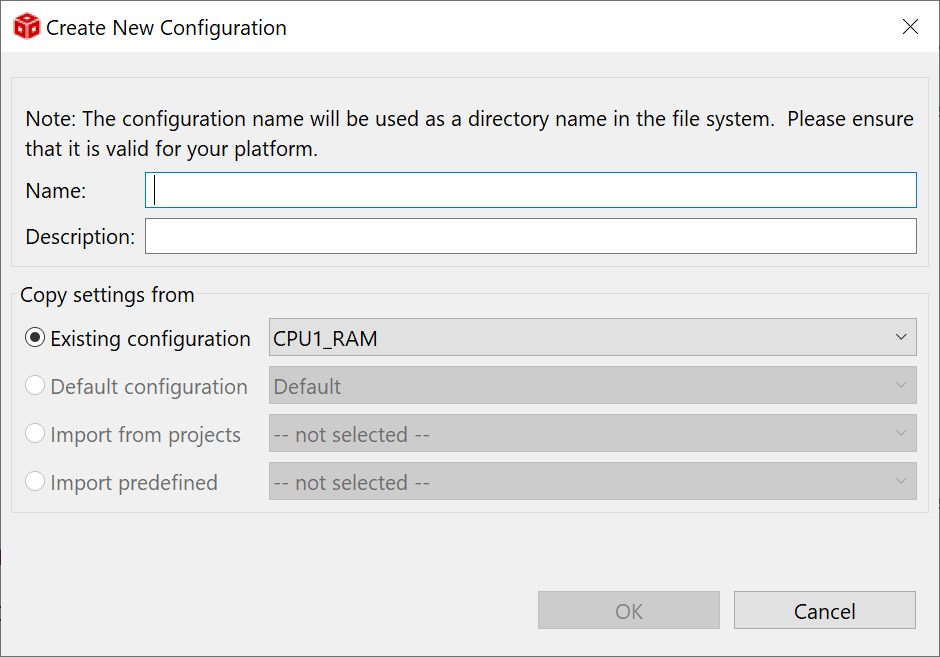
I need to add a flash configuration to an imported project, flash_kernel_c28x_dual_ex1_c28x1. If I select New... I get the pop up below and there is no other choice for copying settings. This is a fairly large project so starting with an empty project with a flash option and adding all of these files might be messy and problematic. But I will try that if it is the only way.
Thanks,

John

  • Hi John, 

    Our flash expert will get back to you tomorrow. 

    Best,

    Ryan Ma

  • Hi John,

    I need to add a flash configuration to an imported project, flash_kernel_c28x_dual_ex1_c28x1. If I select New... I get the pop up below and there is no other choice for copying settings.

    That is the recommend way for adding a new build configuration. You would use default or copy ecisting settings and the modify the confiuration as needed. Is your question more around what build settings are needed for a flash configuration?

    Thanks

    ki

  • Hi Ki,

    I had a project that only had a ram configuration and I wanted it to run from flash. I was wanting to use the existing config file as a basis because I had to add a lot of include paths to the flash version. So I copied all of the paths from the ram project to Notepad++ one by one and then added them to the flash version one by one. So it works now but I was hoping for a less tedious way should the need rise again.

    Thanks,

    John

  • . I was wanting to use the existing config file as a basis because I had to add a lot of include paths to the flash version. So I copied all of the paths from the ram project to Notepad++ one by one and then added them to the flash version one by one

    If your CPU1_RAM configuration already had t he include paths configured in the project settings, the you could have created a new configuration and use the option to "Copy settings from -> Existing configuration -> CPU1_RAM". This would create the new configuration with the same settings as the copied one and all the include paths should have carried over.

    This did not work for you? 

  • It was still a RAM configuration so I did not see where that gained any ground.