This thread has been locked.

If you have a related question, please click the "Ask a related question" button in the top right corner. The newly created question will be automatically linked to this question.

TMDSCNCD28388D: Ethernet port applications issue

Part Number: TMDSCNCD28388D
Other Parts Discussed in Thread: C2000WARE,

Hi team,

Here's an issue from the customer may need your help:

Requirement: The control board of the 28388D is used to communicate with the PC. Sending and receiving data is a normal binary number, similar to SCI applications. 

Implement:

  1. Address: 192.168.2.22
  2. Port number: 6600
  3. Communication via TCP or UDP
  4. Send 8-bit data and receive 8-bit data.

Is it possible to implement something like I2C that can each be configured by function individually, not all data is mixed together?

When debugging the network interface for the first time, refer to the example file in C2000 ware. There seems to be no example of setting up TCP and UDP (local port number). In some cases, addresses are also directly mixed in the data stream. The example of a third-party lwip seems to be adequate, but the functions used are different. For example, device_delay_US() has a problem at compile time. Is there a better example for debugging a development board available for reference? Or are there simple, easy-to-use routines like hands-on lab in C2000?

Could you help check this case? Thanks.

Best Regards,

Cherry

  • Hi,

    The expert is out of the office because of Holiday. Please expect a reply by Tuesday.

    Thanks.

  • Hi Pranali,

    Well noted and just giving some updates:

    When debugging Enet_lwip_UDP for libraries\communications\Ethernet\third_party\lwip\examples, what is the network port on the PC side? It does not appear to be configured in the code, nor does it appear in the readme. 

    Thanks and regards,

    Cherry

  • Cherry,

    the easiest way to communicate from TMDSCNCD28388D to a PC is to use SCI(UART) on GPIOs 28 and 29. We added a secondary communication channel though the embedded emulator which connects to GPIOs 28 and 29. C2000ware examples show this off.

    If you would like support on the Ethernet SW implementation I can have the thread transferred to that owner.

    Regards,
    Cody 

  • Hi Cody,

    Thanks for your support.

    If you would like support on the Ethernet SW implementation I can have the thread transferred to that owner.

    Could you please help transfer it since the customer prefer the Ethernet SW implementation? 

    Thanks and regards,

    Cherry

  • Cherry, 

    Did the customer already run or looked at the Ethernet udp example provided in C2000Ware? 

    It is available at C:\ti\c2000\C2000Ware_4_02_00_00\libraries\communications\Ethernet\third_party\lwip\examples\enet_lwip_udp

    The port used in this example is 28000 in the call to the function (udp_bind)

    Best Regards

    Siddharth

  • Hi Siddharth,

    Thanks for your support.

    UDP_bind is the port value for the specified DSP side, and UDP_connect should appear to be the port value for the specified PC side. How to get the port values on the side of computer when debug the network port?

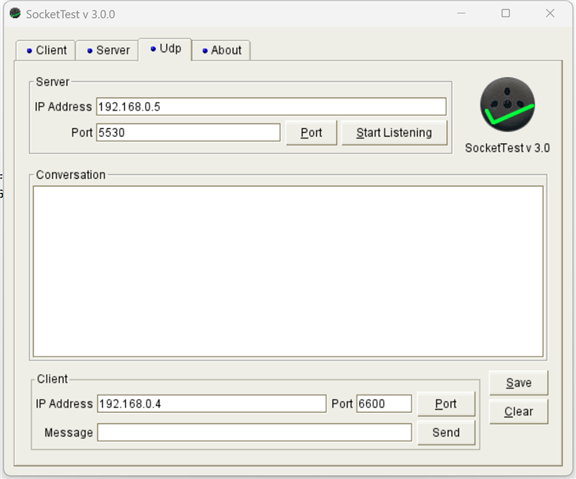
    The above image is a SocketTest software shot that requires two port values. As you suggested, 6640 there could be changed into 28000. But what is the other port value?

    Thanks and regards,

    Cherry

  • Cherry, 

    Only the client side configuration is sufficient to run the example.  You should set it to 28000 or whatever port specified in the udp_bind() function. Once it receives the data from the client, the udp_rx_callback function is called whenever the data is recevived from the client.

    Best Regards

    Siddharth