This thread has been locked.

If you have a related question, please click the "Ask a related question" button in the top right corner. The newly created question will be automatically linked to this question.

TMS320F28384D: One question of USB Enumeration.

Part Number: TMS320F28384D

Hi champs,

My customer uses one USB Type-C connector in his system, finds that when he uses one Type-C cable and power his system via USB host, F28384D USB module can be enumerated without problem. However, when the F28384D is powered on by system power stage first and then plug in Type-C cable, then F28384D USB module fails to be enumbeated.

My customer conducts another test, uses one USB Type-C to Type-A cable. Power on system first, plug in this cable and then F28384D USB module is enumerated well. He is wondering why this USB enumeration problem happens when using the Type-C to Type-C cable?

Please advise your comments on this situation, thanks.

Regards,

Luke

  • Hi Luke,

    USB Type-C connectors have a number of extra pins compared to USB Type-A connector. Is it possible the host device uses these extra signals for some device enumeration / recognition purpose when USB Type-C is used?

    Best,

    Kevin

  • Kevin,

    The strange thing is that when F28384D is powered via USB Type-C host, the F28384D USB port can be enumerated without problems. However, when F28384D is powered by system power stage, it fails to be enumerated.

    Do you have ideas of this situation? What is the USB behavior difference when F28384D is powerd by USB host or system power stage?

    Regards,

    Luke

  • Kevin,

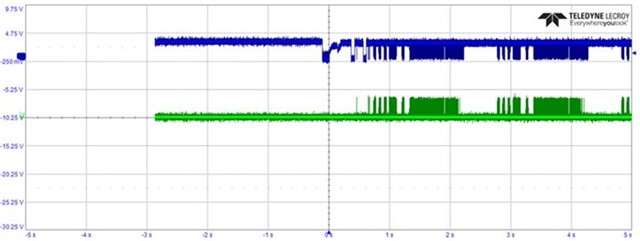
    My customer conducts more experiments, finds that when F28384D is powered by power stage, the USB fails to be enumerated when connecting to older PCs and is enumerated without problem if connect to new PCs, he captures below USB DP and DM waveforms,

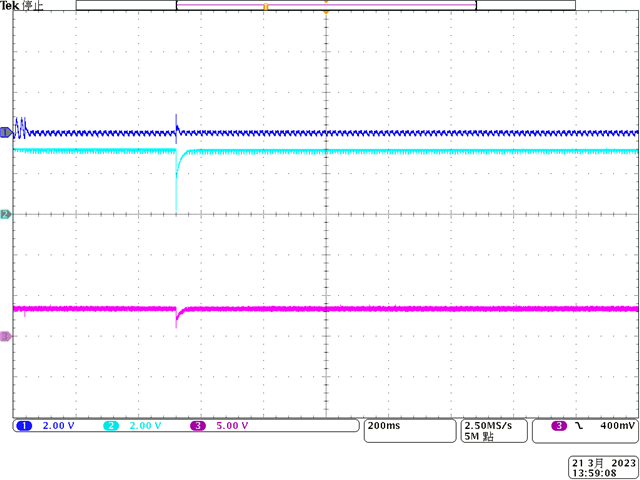
    ** The USB signals when connecting to new PC.

    ** The USB signals when connecting to older PC.

    When USB port fails to be enumerated, reset F28384D and then the USB port can be enumerated successfully. I have one question, when USB port is not enumerated and communication stops, is there any register helps to know the USB host already plug-in?

    Do you think this problem is due to PC hardware or OS USB driver?

    Regards,

    Luke

  • Hi Luke,

    Is there a 5V USB_PWR sense signal from the USB connector to the C2000 device? If so, does it only get set High when the USB cable is connected?

    Best,

    Kevin

  • Kevin,

    No, my customer doesn't design USB_PWR sense signal to C2000 device, so we cannot know the host already plug-in by this method.

    The latest information is that when USB cannot be enumerated and communication stops, reset C2000 device cannot surely fix this problem, there is about 50% of chances DSP USB port still cannot be enumerated after resetting C2000 device, so we cannot use this method to solve this USB enumeration problem.

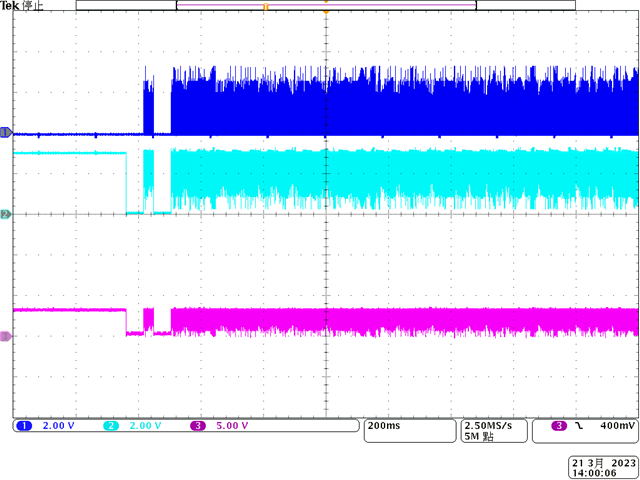
    My customer captures more waveforms for your reference as follows, (CH1: USB DM. CH2: USB DP. CH3: Differential USB signal)

    Waveform 1: Connect that Type-C cable to my laptop's Type-C port, C2000 USB is enumerated. You can see there is one USB DP low period(more than 100ms), is this the normal situation?

    Waveform 2: Connect Type-C cable to my customer's old laptop's Type-C port, C2000 USB fails to be enumerated, there is only one very short USB DP low signal and then no further communication happened.

    Waveform 3: Reset C2000 device and then sometimes USB can be enumerated. In below waveform, we don't see the USB DP low period at the beginning.

    Waveform 4: Connect Type-C to Type-A cable to my customer's old laptop, C2000 USB is enumerated. We don't see the USB DP low period at the beginning, either.

    Here are the questions.

    1. Is it correct we get more than 100ms USB DP low period at the beginning when connecting to Type-C cable? If this is the case, what's the reason we don't see this low period when we reset C2000 device and USB is enumerated?
    2. Do you have comments on this situation? Do you think this problem is due to PC hardware, OS driver or C2000 device?

    Please advise your comment, thanks for help.

    Regards,

    Luke

  • Hi Luke,

    The F2837x USB module complies with USB 2.0 standard, I would not think the connector type being used (i.e. Type-C vs Type-A) should make a difference. The physical interfaces should still be the same (signals: DP+, DM-, USB_VBUS, & GND) and USB 2.0 communications should still get used.

    Is it correct we get more than 100ms USB DP low period at the beginning when connecting to Type-C cable? If this is the case, what's the reason we don't see this low period when we reset C2000 device and USB is enumerated?

    I'm not familiar with this level of the USB protocol.

    Is there any status or indication of what's going wrong from the C2000 software side?

    Best,

    Kevin

  • Kevin,

    Could you advise the specific registers to check from the C2000 software side? I will ask my customer uses old laptop to check that.

    Regards,

    Luke

  • Luke,

    The following registers can be checked on the C2000 side

    1. USBPOWER Register - Soft Connect/Disconnect bit

    2. USBDEVCTL Register - VBUS Level bit

    You can check the setupAPI logs on Windows - https://learn.microsoft.com/en-us/windows-hardware/drivers/install/setupapi-logging--windows-vista-and-later-

    Best Regards

    Siddharth

  • Siddharth,

    My customer figures out the root cause, this strange problem is due to hardware design, it can be fixed by modify the power source of ESD components from VBUS +5V to system power +5V.

    I have two questions need your comments,

    1. My customer asks for detailed description of USB communication waveforms(D+, D- and VBUS) to check his USB waveforms when he plug-in USB cable, do you know where can we find this information?
    2. In USB slave CDC mode, we limit the maximum packet size to 64 bytes. Is this due to the hardware limitation or we follow USB standard?

    Regards,

    Luke

  • Luke,

    1. Will try to get information regarding the waveform during enumeration and share it . 

    2.  The F2838x USB module's max packet size is 64 bytes.  The USB on F2838x complies USB2.0 full speed and hence it has 64 bytes as the max packet size.

    Best Regards

    Siddharth

  • Siddharth,

    I check online and find that the maximum packet size of USB 2.0 full speed is 1023 bytes. However, you said F2838x complies USB 2.0 FS and it has 64 bytes as the maximum packet size.

    I am wondering what's the difference, is it related the enumerated device type? For example, for full speed endpoints, the maximum bulk packet size is either 8, 16, 32 or 64 bytes long, but I have no idea about the maximum packet size when USB is working with CDC mode (Virtual COM).

    Could you please advise more about this topic?

    Regards,

    Luke 

  • Luke, 

    I referred this link https://www-user.tu-chemnitz.de/~heha/hsn/chm/usb.chm/usb4.htm#Bulk which mentions that for full speed , the maximum packet size is 64 bytes. 

    Best Regards

    Siddharth

  • Siddharth,

    The USB CDC is based on bulk transfer endpoints, so the maximum packet size of full speed USB CDC is 64 bytes, right?

    Do you have the update of the waveform during USB enumeration please?

    Regards,

    Luke

  • Luke ,

    Yes you are correct regarding the  CDC maximum packet size. 

    i did not find any info on the enumeration waveform, will keep you posted if I get it.

    Best Regards

    Siddharth 

  • Luke ,

    For the USB enumertion process, you can refer the following link

    https://www.perytech.com/USB-Enumeration.htm

    Best Regards

    Siddharth