Hi, team Can I use Current control mode in level 4?
I would be grateful if you could tell me how to do current control in level 4.
Speed mode is working fine.
This thread has been locked.
If you have a related question, please click the "Ask a related question" button in the top right corner. The newly created question will be automatically linked to this question.
Hi, team Can I use Current control mode in level 4?
I would be grateful if you could tell me how to do current control in level 4.
Speed mode is working fine.
Hi,
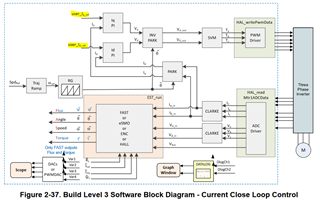
Build Level #3 is for evaluating closed current loop. You are wanting to control Iq_ref and Id_ref in the diagram below? Or something else?

Best,
Kevin
Dear, Kevin
Is there any way to use the encoder and Hall sensor together?
Torque mode does not work well because it is difficult to find an accurate electrical angle if it is turned only with an encoder.
Is there a way to calibrate the encoder using a hall sensor?
Best,
Hwang
Hi Hwang,
Is there any way to use the encoder and Hall sensor together?
This is not supported in the software by default. i.e. you cannot enable both MOTOR1_ENC and MOTOR1_HALL algorithms at the same time. You could make changes to the software yourself to support both or switch between them however.
Best,
Kevin
but, Idq_out_A.value[1] can not be directly modified.
It's likely that Idq_out_A is getting overwritten. If using Build #3 I see the code below, so you can try setting Idq_set_A variable instead.
obj->IdqRef_A.value[0] = obj->Idq_set_A.value[0];
obj->IdqRef_A.value[1] = obj->Idq_set_A.value[1];
Best,
Kevin