Part Number: TMS320F28069M
Other Parts Discussed in Thread: CCSTUDIO, CONTROLSUITE
Hello,
After installing the CCStudio 12.3.0 and ControleSUITE v3.4.9, I am using the Simulink support package to program a LaunchPadXL TMS320F28069M.
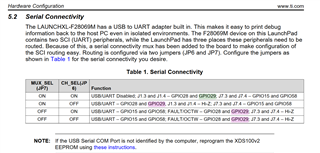
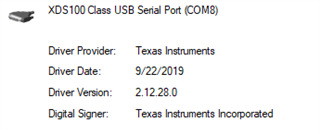
I have 2 boards, 1 rev 1.1 and 1 rev 1.2. When I plug in the rev 1.1 card, I have 2 COM ports opened on my computer, and only 1, as expected with the rev 1.2. Is there a known issue regarding that revision and this issue, or an issue with the actual board itself? The drivers seem to be working just fine on the other board, both had JP6 OFF and JP7 ON, boot 1,2,3 ON.
Regardless of the revision and the number of ports, I am facing severe IO interference (mouse unusable, keyboard unusable, device manager not responding) when using the COM port of the cards with the computer in my program, occasionally. I am using SCI module A on GPIO Rx 28 and Tx 29, with data header 'S' and terminator 'E'. The code is generated by Simulink from models and consists of 3 int16 values. Do you have any guess on what is the issue here?
Immediately opening (one of) the COM port of the board seems to prevent the interference, I managed to upload a simple blinking sketch after closing Putty (thus the COM port), so with no SCI blocks in Simulink and I am getting no interference.
This is a follow up on issue: https://e2e.ti.com/support/microcontrollers/c2000-microcontrollers-group/c2000/f/c2000-microcontrollers-forum/1200855/launchxl-f28069m-mouse-control-interference/
To answer last question, USB-C adaptor is a HAMA 00200101, and I can confirm one of the boards is activating 2 COM ports while the other is activating 1 COM port.
Best regards,
Alexis