This thread has been locked.

If you have a related question, please click the "Ask a related question" button in the top right corner. The newly created question will be automatically linked to this question.

TMDSCNCD28379D: Re-assigning SCI-A Pins in SCI echoback sample

Part Number: TMDSCNCD28379D
Other Parts Discussed in Thread: SYSCONFIG, C2000WARE

I am trying to get a serial communication sample (sci_ex3_echoback) to run on the subject board, but I need to use different pins for SCI-A Rx and Tx. The sample assigns SCIA Rx and Tx to pins 28 and 29 respectively. This appears to be done in file device.h, where several constants (_GPIO_PIN_SCI--- and _GPIO_CFG_SCI---) are defined. The processor documentation indicates pins 35 and 36 can also be used for Rx and Tx. I tried to revise device.h to use those pins, but when I run the program, it hits an error condition and stops.

The code that catches the error is:

rxStatus = SCI_getRxStatus(SCIA_BASE);
if((rxStatus & SCI_RXSTATUS_ERROR) != 0)
{
  //
  //If Execution stops here there is some error
  //Analyze SCI_getRxStatus() API return value
  //
  ESTOP0;
}

I'll attach my revised file device.h so you can see how I attempted to re-assign the pins. Also, I searched the project files for occurrences of GPIO35. It appears in several .h files that all look like TI standard files.

Can you tell me what I need to do so that this program uses pins 35 and 36?

5008.device.h

  • Hi Fred,

    I am trying to get a serial communication sample (sci_ex3_echoback) to run on the subject board, but I need to use different pins for SCI-A Rx and Tx. The sample assigns SCIA Rx and Tx to pins 28 and 29 respectively.

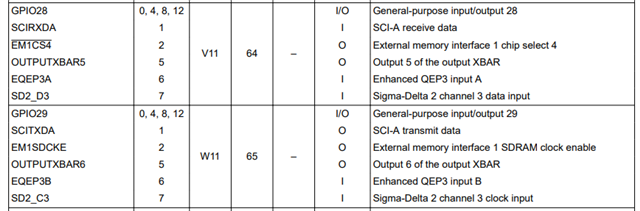
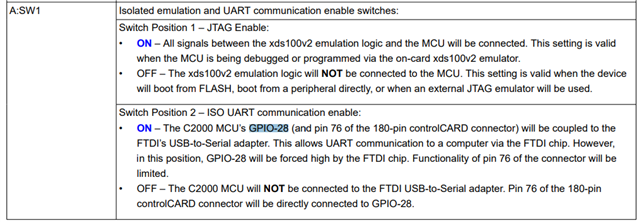
    Firstly, I just want to point out that GPIO28/GPIO29 are used for SCI communication in the example because GPIO 28 is coupled to the FTDI's USB-to-Serial adapter. (see snippets below from the datasheet and the controlCARD User Guide, respectively). If you are changing the pins note that you should set GPIO 28 as a normal GPIO through the A:SW1 and that you will need your own USB-to-Serial adapter for the pins that you are planning to use.

    This appears to be done in file device.h, where several constants (_GPIO_PIN_SCI--- and _GPIO_CFG_SCI---) are defined. The processor documentation indicates pins 35 and 36 can also be used for Rx and Tx. I tried to revise device.h to use those pins, but when I run the program, it hits an error condition and stops.

    To change the pins used, all that needs to be changed is the functions to setup the pins.

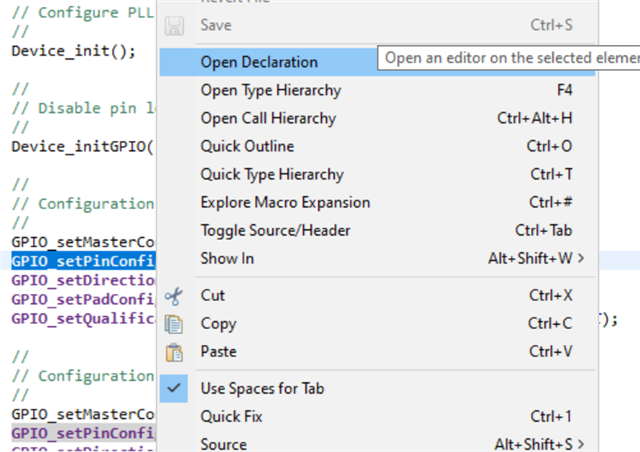
    If you right click on the functions, you have the option to open the declaration:

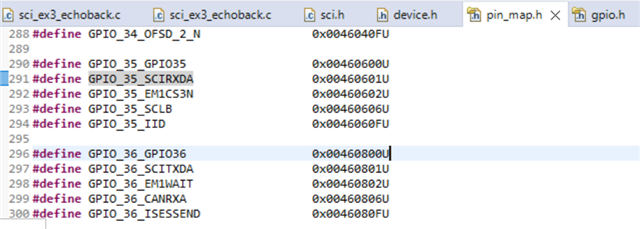
    For example, opening the declaration for 'GPIO_setPinConfig()' shows that we just need to supply the pin mapping within the pin_map.h file.

    Because 'GPIO_35_SCIRXDA' is needed, for that function call you would need to do the following: GPIO_setPinConfig(GPIO_35_SCIRXDA);

    The other functions just take the GPIO number as an input. Same thing applies for the TX side.

        //GPIO_setMasterCore(DEVICE_GPIO_PIN_SCIRXDA, GPIO_CORE_CPU1);
        //GPIO_setPinConfig(DEVICE_GPIO_CFG_SCIRXDA);
        //GPIO_setDirectionMode(DEVICE_GPIO_PIN_SCIRXDA, GPIO_DIR_MODE_IN);
        //GPIO_setPadConfig(DEVICE_GPIO_PIN_SCIRXDA, GPIO_PIN_TYPE_STD);
        //GPIO_setQualificationMode(DEVICE_GPIO_PIN_SCIRXDA, GPIO_QUAL_ASYNC);
    
        GPIO_setMasterCore(35, GPIO_CORE_CPU1);
        GPIO_setPinConfig(GPIO_35_SCIRXDA);
        GPIO_setDirectionMode(35, GPIO_DIR_MODE_IN);
        GPIO_setPadConfig(35, GPIO_PIN_TYPE_STD);
        GPIO_setQualificationMode(35, GPIO_QUAL_ASYNC);

    I would recommend this approach as you don't have to modify any header files, just the application code (.c) file.

    Best Regards,

    Marlyn

  • Hello Marlyn. Thank you so much for your response. It's one of the best I've gotten via this forum. But I think you may have shined a light on my newbie status. Based on your answers, I think that before I continue to try and re-assign SCI port A to different pins, I need to take a step back and ask about some board and MCU basics.

    (1) When I connect my USB probe to the board, for things like downloading and debugging from Code Composer Studio, am I in fact communicating with the MCU thru SCI-A, on pins 28 and 29? If so, then it seems like I want to leave all that alone, otherwise I will break the default connection for debugging. I imagine there are other ways to debug from CCS, but (newbie again) I don't want to explore those options unless I have to.

    (2) Based on (1), would I be better off looking for unused GPIO pins connected to one of the other UARTS (B,C,D)? I have no reason to favor SCI-A. It just happens to be the port used by your sample.

    If I'm better off with B or C or D, then we can close this case and I'll try to revise the echoback sample to use one of the other SCI ports. That might mean a new set of questions in a few days, but if a different UART will preserve my existing debug capability, I think that's best.

    I'd very much like to hear your advice.

  • Hi Fred,

    (1) When I connect my USB probe to the board, for things like downloading and debugging from Code Composer Studio, am I in fact communicating with the MCU thru SCI-A, on pins 28 and 29? If so, then it seems like I want to leave all that alone, otherwise I will break the default connection for debugging. I imagine there are other ways to debug from CCS, but (newbie again) I don't want to explore those options unless I have to.

    No, this is seperate from SCI communication. Its using JTAG with the on-board emulator (XDS100v2). Changing the SCI pins won't affect your connection with CCS or debugging etc.

    (2) Based on (1), would I be better off looking for unused GPIO pins connected to one of the other UARTS (B,C,D)? I have no reason to favor SCI-A. It just happens to be the port used by your sample.

    This is dependent on your application. The benefit to using SCI-A (specifically GPIO28/GPIO29) is that the controlCARD has a USB-to-Serial adapter already connected to those pins. If you use another SCI module then you would need an external USB-to-Serial adapter connected to the pins you choose for the other module.

    Typically, people first look at what functionality they need from the device (ex. 3 ADCs, 2 SCIs etc.) and then based on that work out what pins to use (this could be due to placement on the device - for routing purposes on a pcb, or since GPIOs are muxed with other functionality then you may be restricted to using SCI-B for example because other pins are needed for other purposes).

    We do have a tool called SysConfig (System Configuration) that helps work out the pin-out for you. 

    When you open SysConfig you can choose the specific board you are working on, in your case the F28379D controlCARD:

    Once you 'Start' the tool you will be able to add peripherals and change the pins very easily (also see where on the controlCARD they map to). It will notify you of any conflicts with pins if there are any conflicts.

    SysConfig also generates initialization code for you (so you wouldn't need to modify .h/.c files yourself to change pins, change baud-rate etc.)


    The sci echoback example does not have SysConfig in it, but you can follow the steps in the 'Adding C2000 SysConfig Support to Existing Projects' section of the following application report: C2000 SysConfig

    We also have a video series for SysConfig that walks through how to get started, pin-mux, board support etc.: https://www.ti.com/video/series/C2000-SysConfig.html?keyMatch=SYSCONFIG%20C2000 


    Another great resource for SCI and using SysConfig is a hands-on-lab that we have. It walks you through creating a new project for the controlCARD and setting up the SCI (though SysConfig). You can follow along the instructions here for a reference: https://dev.ti.com/tirex/explore/node?node=A__Adlf59dR9TRikXjOlRRRsg__c2000Academy__jEBbtmC__LATEST 

    Best Regards,

    Marlyn

  • Hello again Marlyn. And thanks again for the help. To clarify, if I want to continue using SCI-A, but with different pins, I should look into the sysconfig tool. Something I don't understand is that you mention a USB-to-Serial adapter several times, kind of implying it's something I need. My goal for this exercise is to add some code to an existing project that will access a serial port, and use it for very simple communication with a microprocessor on another board, using RS-422 transceivers. The other processor will send one of several one-byte commands; and I will either respond by writing to some visible variables in my project, or by sending a 50 or so byte response message.  I don't think I should need any USB adapter. Am I missing something?

  • Marlyn, on the subject of SysConfig, the instructions for Adding say that if there is a SysConfig under Build in the project properties, then sysconfig options are available. I do have a sysconfig under Build, which should mean sysconfig is enabled. But at the same time, there is no file under my project with the dot extension .syscfg.  Do I need to create that file? I don't see any instructions to create it if sysconfig is already enabled.

  • Hi Fred,

    To clarify, if I want to continue using SCI-A, but with different pins, I should look into the sysconfig tool.

    You don't have to use SysConfig. My apologies if I confused you. I was just recommending it as a useful tool especially if you are new to C2000 devices.

    I don't think I should need any USB adapter. Am I missing something?

    Thanks for the background Fred. No, you do not need a USB adapter in this case.

    Best Regards,

    Marlyn

  • Hi Fred,

    But at the same time, there is no file under my project with the dot extension .syscfg.  Do I need to create that file? I don't see any instructions to create it if sysconfig is already enabled.

    The quickest way would be to import a project that already has sysconfig (like the one below) and just copy and paste the .syscfg file into your project.

    C:\ti\c2000\C2000Ware_version\training\device\f2837xd\communication_peripherals\lab_sci\lab_sci_controlcard

    Best Regards,

    Marlyn

  • Hi again Marlyn. Sorry for the delayed reply. I hope you haven't forgotten me! I expect some day I'll need to learn the SysConfig tool, but for now (as the boss is in a hurry), if I can quickly re-assign SCI-A Rx/Tx to different GPIO pins, that will solve the primary problem. The _echoback sample assigns Rx to GPIO28 and Tx to GPIO29. I would like to re-assign them to GPIO35 and 36 respectively. I tried to do that by modifying the device.h file (see below), but the program freezes up. I believe it's getting an error from the SCI_getRxStatus call, but I need to dig deeper to be sure.

    My (simple?) question for you is: why does this change lock up the program. What else do I need to do to use the alternative GPIO (35,36) lines?

    (From file device.h: The indented code is what I added.)


    //
    // SCI for USB-to-UART adapter on FTDI chip
    //
    #if defined (_LAUNCHXL_F28379D)
    #define DEVICE_GPIO_PIN_SCIRXDA 43U // GPIO number for SCI RX
    #define DEVICE_GPIO_PIN_SCITXDA 42U // GPIO number for SCI TX
    #define DEVICE_GPIO_CFG_SCIRXDA GPIO_43_SCIRXDA // "pinConfig" for SCI RX
    #define DEVICE_GPIO_CFG_SCITXDA GPIO_42_SCITXDA // "pinConfig" for SCI TX

         #elif defined (FRED_CHANGE)                                                                                                             // defined above
         #define DEVICE_GPIO_PIN_SCIRXDA   35U // GPIO number for SCI RX
         #define DEVICE_GPIO_PIN_SCITXDA   36U // GPIO number for SCI TX
         #define DEVICE_GPIO_CFG_SCIRXDA   GPIO_35_SCIRXDA // "pinConfig" for SCI RX
         #define DEVICE_GPIO_CFG_SCITXDA   GPIO_36_SCITXDA // "pinConfig" for SCI TX

    #else                                                                                                                                              // original code
    #define DEVICE_GPIO_PIN_SCIRXDA   28U // GPIO number for SCI RX
    #define DEVICE_GPIO_PIN_SCITXDA   29U // GPIO number for SCI TX
    #define DEVICE_GPIO_CFG_SCIRXDA   GPIO_28_SCIRXDA // "pinConfig" for SCI RX
    #define DEVICE_GPIO_CFG_SCITXDA   GPIO_29_SCITXDA // "pinConfig" for SCI TX
    #endif

  • Hi Fred,

    I believe it's getting an error from the SCI_getRxStatus call, but I need to dig deeper to be sure.

    You can setup software breakpoints (by double clicking on the line of interest - where the line number is). That way you can check if different parts of the code are getting reached.

    I would like to re-assign them to GPIO35 and 36 respectively. I tried to do that by modifying the device.h file (see below), but the program freezes up.

    The changes you made should not cause the program to freeze up. What connections do you have on GPIO35 and GPIO36? 

    Can you please do the following? (for debug) - Import another SCI project (sci_ex1_loopback) and disable loopback (open the .syscfg file and uncheck the loopback option under 'SCI'), then connect GPIO35 to GPIO36 *using a jumper wire) and see if the example works. This should re-affirm that the change to GPIO35 and GPIO36 is correct and the problem is most likely with the connections.

    Thanks & Best Regards,

    Marlyn