


Part Number: TMS320F28075
Other Parts Discussed in Thread: UNIFLASH
Dear Sir,
We had several cases that can NOT connect to TMS320F28075 with XDS200.
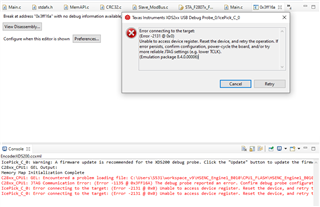
Case1: Unstable Hardwarw1
Sometime we get the following message from CCS. Sometime it works properly.
== CCS Output======
Error connecting to the target:
(Error -2131 @ 0x0)
Unable to access device register. Reset the device, and retry the operation. If error persists, confirm configuration, power-cycle the board, and/or try more reliable JTAG settings (e.g. lower TCLK).
(Emulation package 8.4.0.00006)
==================
Case2: Flash Issue Hardwarw2
We can connect to hardware2 by uniflash or CCS through XDS200. But, we can NOT write the program into TMS320F28075
Here is the message
===== CCS Message 1=========
Memory Map Initialization Complete
C28xx_CPU1: Warning: Failed unlocking device (zone 1) after reset.
C28xx_CPU1: Warning: Failed unlocking device (zone 2) after reset.
C28xx_CPU1: Trouble Setting Breakpoint with the Action "Remain Halted" at 0xc0eb: (Error -1066 @ 0xC0EB) Unable to set/clear requested breakpoint. Verify that the breakpoint address is in valid memory. (Emulation package 8.4.0.00006)
C28xx_CPU1: Breakpoint Manager: Retrying with a AET breakpoint
C28xx_CPU1: Error executing PLL configuration algorithm. Operation cancelled. (0x0)
C28xx_CPU1: File Loader: Memory write failed: Unknown error
C28xx_CPU1: GEL: File: C:\Users\HAL\workspace_v9\HSENC_Engine1_B003_2022\CPU1_FLASH\HSENC_Engine1_B003_2022.out: Load failed.
C28xx_CPU1: Trouble Setting Breakpoint with the Action "Remain Halted" at 0xc056: (Error -1066 @ 0xC056) Unable to set/clear requested breakpoint. Verify that the breakpoint address is in valid memory. (Emulation package 8.4.0.00006)
C28xx_CPU1: Breakpoint Manager: Retrying with a AET breakpoint
C28xx_CPU1: Trouble Setting Breakpoint with the Action "Remain Halted" at 0xc056: (Error -1066 @ 0xC056) Unable to set/clear requested breakpoint. Verify that the breakpoint address is in valid memory. (Emulation package 8.4.0.00006)
C28xx_CPU1: Breakpoint Manager: Retrying with a AET breakpoint
===============================
======= CCS Message 2===========
Memory Map Initialization Complete
C28xx_CPU1: Trouble Setting Breakpoint with the Action "Remain Halted" at 0xc0eb: (Error -1066 @ 0xC0EB) Unable to set/clear requested breakpoint. Verify that the breakpoint address is in valid memory. (Emulation package 8.4.0.00006)
C28xx_CPU1: Breakpoint Manager: Retrying with a AET breakpoint
C28xx_CPU1: Error writing the PLL values. (Flash algorithm returned error code). Operation cancelled.
C28xx_CPU1: File Loader: Memory write failed: Unknown error
C28xx_CPU1: GEL: File: C:\Users\HAL\workspace_v9\HSENC_Engine1_B003_2022\CPU1_FLASH\HSENC_Engine1_B003_2022.out: Load failed.
C28xx_CPU1: Trouble Setting Breakpoint with the Action "Remain Halted" at 0xc056: (Error -1066 @ 0xC056) Unable to set/clear requested breakpoint. Verify that the breakpoint address is in valid memory. (Emulation package 8.4.0.00006)
C28xx_CPU1: Breakpoint Manager: Retrying with a AET breakpoint
===============================
======= CCS Message 3 ===========
IcePick_C_0: Warning: A firmware update is recommended for the XDS200 debug probe. Click the "Update" button to update the firmware. Click the "Continue" button to continue without updating. (Emulation package 8.4.0.00006)
C28xx_CPU1: GEL Output:
Memory Map Initialization Complete
C28xx_CPU1: Error initializing flash programming: Interface returned from dll, but flash is not available on this device.
===============================

Eddie


