This thread has been locked.

If you have a related question, please click the "Ask a related question" button in the top right corner. The newly created question will be automatically linked to this question.

TMS320F28379D: Relative paths in debug configurations (.launch)

Part Number: TMS320F28379D
Other Parts Discussed in Thread: CCSTUDIO

Similarly to the OP in the related question, I have a project with several target configurations (.ccxml) and debug configurations (.launch) for connecting to different combinations of debuggers using specific serial numbers, and want to be able to share these with colleagues without having to change the path in every single one.

After reading the related question, I can now set the .ccxml pointed at by each .launch using

${target_config_active_default:nameofmyproject}

instead of an absolute path. This is a good start.

However, the launch XML file refers to the .ccxml specified to set other parameters, and the relative path does not work here.

For example, if I want to specify the .out from the project to be loaded, this does not work:

<stringAttribute key="com.ti.ccstudio.debug.debugModel.ATTR_PROGRAM.${target_config_active_default:nameofmyproject}.Texas Instruments XDS100v2 USB Debug Probe Lane 1/C28xx_CPU1" value="${build_artifact:nameofmyproject}"/>

Using the debug configuration editor causes the absolute path to be written into the key field in the XML file instead of the relative path above, which causes problems when the file is used on a different machine.

Is there a way to use relative paths to set the other parameters? Otherwise being able to specify a relative path to the .ccxml is pointless.

  • Hi

    Will forward your query to the CCS team.

    Best Regards

    Siddharth 

  • Hi Dave,

    I will look into this and lkeep you posted.

    Thanks

    ki

  • I have a project with several target configurations (.ccxml) and debug configurations (.launch) for connecting to different combinations of debuggers using specific serial numbers, and want to be able to share these with colleagues without having to change the path in every single one.

    I'm trying to understand this use case. Just to clarify: You have a project and there are several ccxml files that is part of project. Each of the these ccxml files are reference specific debug probes via serial numbers. 

    CCS would create a default debug launch configuration that references a ccxml file via ${target_config_active_default:myProjectName} and the program via ${build_artifact:myProjectName}. This launch configuration would launch a debug session for the ccxml file that is set to "Active" in the project. Hence you can control which ccxml file is used by setting it as active in the project. The generated launch file would be part of the project and not have any absolute paths.

    I am trying to understand why you are creating additional debug launch files for the project. Is this to avoid having go set a specific ccxml file as "Active" and just select a launch configuration and instead just select from one of several existing launch files to start a debug session?

    Thanks

    ki

  • Thanks for looking into this.

    I'm trying to understand this use case. Just to clarify: You have a project and there are several ccxml files that is part of project. Each of the these ccxml files are reference specific debug probes via serial numbers. 

    That's correct (I'm running the same code on two microcontrollers via two debuggers, so need to address each with specific serial numbers.

    The reason for creating separate launch files is that I need to change the default debug configuration - for example, disabling auto run. This has to been done separately for each of the 4 cores (2 cores each on two processors). I also need to point CPU2 at the program for that core which is in a separate project. It's very time consuming to repeat this every time! These settings appear to be "locked" to a specific CCXML file in the launch file, and as per my OP, the launch file won't accept a relative path as the link to the CCXML file.

    If I set a relative path for the CCXML file using the debug configuration GUI, when it generates the launch file, it links the settings to a resolved absolute path. If you move this file to a different machine, it will find the CCXML file from the relative path, but the settings are still associated with the absolute path from the first machine, and so will not be read.

    Thanks

    Dave

  • These settings appear to be "locked" to a specific CCXML file in the launch file

    I believe these setting are not locked to a ccxml file. It is associated with the launch file. The launch file would store these debugger options and have the reference to the ccxml file.The ccxml file itself does not have CCS debugger option settings.

    If I set a relative path for the CCXML file using the debug configuration GUI

    Can you provide a screenshot of how you are doing this?

    Thanks

    ki

  • It's a bit tricky to explain, so I'll try and show it in screenshots step-by-step:

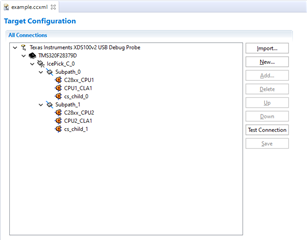
    I create a new ccxml file, example.ccxml. I'll just use one device (two CPUs) for this, to keep it simple, and I won't specify the debugger serial number.

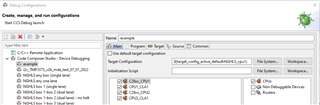
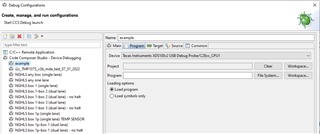
    I create a new debug configuration from the GUI. I point it at the ccxml file using the Workspace browse button - this puts an absolute path in the Target Configuration field (not sure if the behaviour is different in a more recent version of CCS - I'm using v. 8.3.0.00009), but I can change it manually to a relative path:

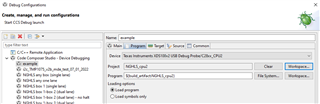
    I set the programs to be loaded into each CPU using relative paths:

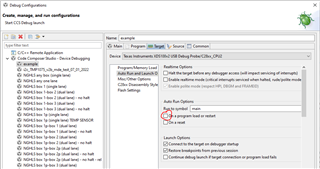
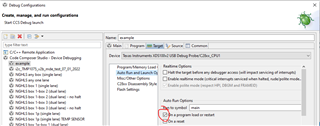
    And disable auto run on load in each CPU:

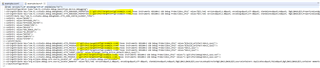
    I apply these changes, and then open the launch file in the text editor to see what has been generated:

    <?xml version="1.0" encoding="UTF-8" standalone="no"?>
    <launchConfiguration type="com.ti.ccstudio.debug.launchType.device.debugging">
    <stringAttribute key="com.ti.ccstudio.debug.debugModel.ATTR_DEBUGGER_PROPERTIES.C:\git\CPU1\targetConfigs\example.ccxml.Texas Instruments XDS100v2 USB Debug Probe/C28xx_CPU1" value="<?xml version="1.0" encoding="UTF-8" standalone="no" ?>
    <PropertyValues>
    
      <property id="AutoRunToLabelOnRestart">
        <curValue>0</curValue>
      </property>
    
      <property id="ConnectOnStartup">
        <curValue>1</curValue>
      </property>
    
      <property id="EnableInstalledBreakpoint">
        <curValue>1</curValue>
      </property>
    
      <property id="IgnoreSoftLaunchFailures">
        <curValue>0</curValue>
      </property>
    
    </PropertyValues>
    "/>
    <stringAttribute key="com.ti.ccstudio.debug.debugModel.ATTR_DEBUGGER_PROPERTIES.C:\git\CPU1\targetConfigs\example.ccxml.Texas Instruments XDS100v2 USB Debug Probe/C28xx_CPU2" value="<?xml version="1.0" encoding="UTF-8" standalone="no" ?>
    <PropertyValues>
    
      <property id="AutoRunToLabelOnRestart">
        <curValue>0</curValue>
      </property>
    
      <property id="ConnectOnStartup">
        <curValue>1</curValue>
      </property>
    
      <property id="EnableInstalledBreakpoint">
        <curValue>1</curValue>
      </property>
    
      <property id="IgnoreSoftLaunchFailures">
        <curValue>0</curValue>
      </property>
    
    </PropertyValues>
    "/>
    <setAttribute key="com.ti.ccstudio.debug.debugModel.ATTR_HIDE_CONFIG_ELEMENT_TYPES">
    <setEntry value="BOARD"/>
    <setEntry value="BYPASSED_CPU"/>
    <setEntry value="BYPASSED_ROUTER"/>
    <setEntry value="CONNECTION"/>
    <setEntry value="DEVICE"/>
    <setEntry value="NON_DEBUG_CPU"/>
    <setEntry value="NO_DRIVER"/>
    <setEntry value="ROUTER"/>
    <setEntry value="SUBPATH"/>
    <setEntry value="SYSTEM"/>
    </setAttribute>
    <stringAttribute key="com.ti.ccstudio.debug.debugModel.ATTR_PROGRAM.C:\git\CPU1\targetConfigs\example.ccxml.Texas Instruments XDS100v2 USB Debug Probe/C28xx_CPU1" value="${build_artifact:NGHLS_cpu1}"/>
    <stringAttribute key="com.ti.ccstudio.debug.debugModel.ATTR_PROGRAM.C:\git\CPU1\targetConfigs\example.ccxml.Texas Instruments XDS100v2 USB Debug Probe/C28xx_CPU2" value="${build_artifact:NGHLS_cpu2}"/>
    <stringAttribute key="com.ti.ccstudio.debug.debugModel.ATTR_PROJECT.C:\git\CPU1\targetConfigs\example.ccxml.Texas Instruments XDS100v2 USB Debug Probe/C28xx_CPU1" value="NGHLS_cpu1"/>
    <stringAttribute key="com.ti.ccstudio.debug.debugModel.ATTR_PROJECT.C:\git\CPU1\targetConfigs\example.ccxml.Texas Instruments XDS100v2 USB Debug Probe/C28xx_CPU2" value="NGHLS_cpu2"/>
    <stringAttribute key="com.ti.ccstudio.debug.debugModel.ATTR_TARGET_CONFIG" value="${target_config_active_default:NGHLS_cpu1}"/>
    <stringAttribute key="com.ti.ccstudio.debug.debugModel.MRU_PROGRAM.C:\git\CPU1\targetConfigs\example.ccxml.Texas Instruments XDS100v2 USB Debug Probe/C28xx_CPU1" value="C:/git\CPU1\Debug\NGHLS_cpu1.out"/>
    <stringAttribute key="com.ti.ccstudio.debug.debugModel.MRU_PROGRAM.C:\git\CPU1\targetConfigs\example.ccxml.Texas Instruments XDS100v2 USB Debug Probe/C28xx_CPU2" value="C:/git\CPU2\Debug\NGHLS_cpu2.out"/>
    <stringAttribute key="org.eclipse.debug.core.source_locator_id" value="com.ti.ccstudio.debug.sourceLocator"/>
    <stringAttribute key="org.eclipse.debug.core.source_locator_memento" value="<?xml version="1.0" encoding="UTF-8" standalone="no"?>
    <sourceLookupDirector>
    <sourceContainers duplicates="false">
    <container memento="<?xml version="1.0" encoding="UTF-8" standalone="no"?>
    <default/>
    " typeId="org.eclipse.debug.core.containerType.default"/>
    <container memento="<?xml version="1.0" encoding="UTF-8" standalone="no"?>
    <cpuSpecificContainer cpuName="Texas Instruments XDS100v2 USB Debug Probe/C28xx_CPU1">
    <childContainerEntry childMemento="<?xml version="1.0" encoding="UTF-8" standalone="no"?>
    <project name="NGHLS_cpu2" referencedProjects="true"/>
    " childType="org.eclipse.debug.core.containerType.project"/>
    <childContainerEntry childMemento="<?xml version="1.0" encoding="UTF-8" standalone="no"?>
    <project name="NGHLS_cpu1" referencedProjects="true"/>
    " childType="org.eclipse.debug.core.containerType.project"/>
    <childContainerEntry childMemento="<?xml version="1.0" encoding="UTF-8" standalone="no"?>
    <default/>
    " childType="org.eclipse.debug.core.containerType.default"/>
    <childContainerEntry childMemento="<?xml version="1.0" encoding="UTF-8" standalone="no"?>
    <productsSource/>
    " childType="com.ti.ccstudio.debug.containerType.products.source"/>
    <childContainerEntry childMemento="<?xml version="1.0" encoding="UTF-8" standalone="no"?>
    <deviceLibrarySource/>
    " childType="com.ti.ccstudio.debug.containerType.device.library.source"/>
    <childContainerEntry childMemento="<?xml version="1.0" encoding="UTF-8" standalone="no"?>
    <librarySource/>
    " childType="com.ti.ccstudio.debug.containerType.library.source"/>
    </cpuSpecificContainer>
    " typeId="com.ti.ccstudio.debug.containerType.cpu.specific"/>
    <container memento="<?xml version="1.0" encoding="UTF-8" standalone="no"?>
    <cpuSpecificContainer cpuName="Texas Instruments XDS100v2 USB Debug Probe/C28xx_CPU2">
    <childContainerEntry childMemento="<?xml version="1.0" encoding="UTF-8" standalone="no"?>
    <project name="NGHLS_cpu2" referencedProjects="true"/>
    " childType="org.eclipse.debug.core.containerType.project"/>
    <childContainerEntry childMemento="<?xml version="1.0" encoding="UTF-8" standalone="no"?>
    <default/>
    " childType="org.eclipse.debug.core.containerType.default"/>
    <childContainerEntry childMemento="<?xml version="1.0" encoding="UTF-8" standalone="no"?>
    <productsSource/>
    " childType="com.ti.ccstudio.debug.containerType.products.source"/>
    <childContainerEntry childMemento="<?xml version="1.0" encoding="UTF-8" standalone="no"?>
    <deviceLibrarySource/>
    " childType="com.ti.ccstudio.debug.containerType.device.library.source"/>
    <childContainerEntry childMemento="<?xml version="1.0" encoding="UTF-8" standalone="no"?>
    <librarySource/>
    " childType="com.ti.ccstudio.debug.containerType.library.source"/>
    </cpuSpecificContainer>
    " typeId="com.ti.ccstudio.debug.containerType.cpu.specific"/>
    </sourceContainers>
    </sourceLookupDirector>
    "/>
    </launchConfiguration>
    

    As you can see, the relative path to the cccxml file has been resolved to an absolute path, and the settings use the absolute path as a reference:

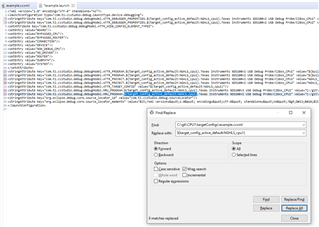
    I can manually replace these absolute paths with the relative path:

    But when I view this in the Debug Configurations GUI, CCS does not recognise the ccxml path referred to in the settings, and so they are lost:

    I hope this helps illustrate the problem. Please let me know if anything needs to be clarified.

    Thanks again

    Dave

  • this puts an absolute path in the Target Configuration field (not sure if the behaviour is different in a more recent version of CCS - I'm using v. 8.3.0.00009)

    We did make some improvements post CCSv9 regarding relative paths and launch files. Please try the current CCS version. When I follow your steps, I don't see the absolute path you have in your launch file.

  • When I follow your steps, I don't see the absolute path you have in your launch file.

    I am using CCS 12.3.0

  • Hi Ki,

    I tested this by creating a target configuration, and a debug configuration linked to it, with relative paths, in CCS v11, and copying the files to another machine running v11. The relative paths persist, so the settings in the debug configuration are preserved. So this seems to have solved the problem.

    CCS v8 doesn't recognise the paths in the files created in v11, so I need to update all my machines.

    Thanks for your help with this.

    Best regards,

    Dave