Other Parts Discussed in Thread: C2000WARE
how to declare variable at known address location in ti ccs ? we have done already done in IAR IDE as like "__no_init unsigned int i @ 0x1c00;"
This thread has been locked.
If you have a related question, please click the "Ask a related question" button in the top right corner. The newly created question will be automatically linked to this question.
how to declare variable at known address location in ti ccs ? we have done already done in IAR IDE as like "__no_init unsigned int i @ 0x1c00;"
Hi Sakthivel,
In TI CCS we use #pragma LOCATION(variable_name, address).
For the above case, you can use the following format -
unsigned int i
#pragma LOCATION(i, 0x1c00)
When you check the memory browser in CCS, you should be able to see this variable in the specified location.
Thanks
Aswin
Hi Sakthivel,
I have tried from my setup and i was able to get the value in the specified address.
I have used a "test" variable and i was getting the value at the address 0x5D22A. In the image attached below, you should be able to see the value in the address 0x5D22A being copied to the variable "test", same shall be observed in the watch window with the address 0x5D22A.
And if you need to update the value at this position, you can make test = 0;
If the location is protected, you need to add EALLOW before writing value into the location and add EDIS after updating.

Can you give me more details when you specified it is not working, did you encounter any errors while building or something else.
Thanks
Aswin
Hi Sakthivel,
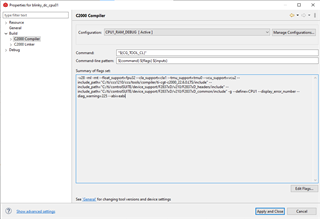
Can you add the EABI flags in the compiler flag settings.

Right click in the project settings -> click on C2000Compiler -> Click on edit flags -> add this flag into the list to use the EABI format (--abi=eabi)
Thanks
Aswin
To change from COFF ABI to EABI, you have to change the initial project properties. Here is a screen shot.

Note any other libraries you use, from C2000Ware and elsewhere, must also change from COFF ABI to EABI.
Thanks and regards
-George
Dear George,
As per your guide i have done it. i have got fatal error #16000: object files have incompatible formats
please check screen shots for your reference.

The link command includes both -lrts2800_fpu32.lib and -llibc.a. Remove the first one.
Thanks and regards,
-George