This thread has been locked.

If you have a related question, please click the "Ask a related question" button in the top right corner. The newly created question will be automatically linked to this question.

LAUNCHXL-F280025C: Version A, XDS-110 failed

Part Number: LAUNCHXL-F280025C
Other Parts Discussed in Thread: UNIFLASH, , TMS320F280025C

Hi,

Today I connect my spare LAUNCHXL to USB and got update message, however at the end it's return failed message : 

Error initializing emulator:
(Error -260 @ 0x0)
An attempt to connect to the XDS110 failed.
The cause may be one or more of: no XDS110 is connected, invalid
firmware update, invalid XDS110 serial number, or faulty USB
cable. The firmware and serial number may be updated using the
xdsdfu utility found in the .../ccs_base/common/uscif/xds110
directory of your installation. View the XDS110SupportReadMe.pdf
file there for instructions.
(Emulation package 9.12.0.00150)

also it's not detect with UNIFLASH tools !

I am using OS X system, can anyone tell me how to rescue it ? 

Danny

  • I am referring this to our CCS Tool team. Someone will get back to you soon.

  • Hello,

    Error initializing emulator:
    (Error -260 @ 0x0)
    An attempt to connect to the XDS110 failed.

    CCS is unable to detect the XDS110, hence the failure.

    Please provide:

    -exact CCS version being used

    -exact macOS version

    -The processor of the mac (is it an Intel or M1/M2)?

    Thanks

    ki

  • Hi Ki,

    CCS version : Version: 12.4.0.00007

    macOS version : 13.5.2

    processor of the mac : M2

    I have 2 LAUNCHXL-F280025C boards, the other work without any issues, however this one was prompted update and during update all of sudden it's crashed ? 

    EDIT : the another LAUNCHXL-F280025C board just also have issues, now all of my 2 LAUNCHXL-F280025C board are same problems

    CCS version : Version: 12.4.0.00007

    macOS version : 13.5.2

    processor of the mac : M2

    1. both board has its own USB cable

    2. no external wire or device connected to LAUNCHXL board, just USB connect to my MAC MINI M2

    3. did system rebooted not help

    4. did test under PROJECT Properties -> CCS General -> Device -> Verify Connection, not help 

    5. did TMS320F280025C_LaunchPad.ccxml -> TEST CONNECTION button, not help

    6. install CCS on my MACBOOK, both boards are not work

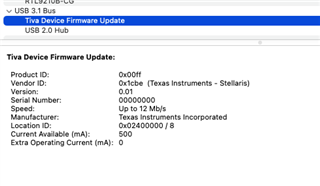
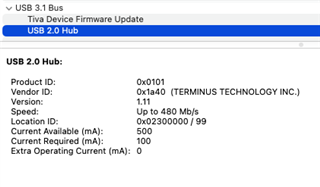
    MAC MINI installed DRIVER 

    Error message : 

    Danny 

  • Hi Danny,

    It looks like the XDS110 is in DFU mode. If something crashed during the firmware update, perhaps the firmware was left in a bad state.

    Could you try loading the latest firmware from the a shell prompt?

    Open a shell, and navigate to <install-dir>/ccs/ccs_base/common/uscif/xds110.  From here, use xdsdfu to enumerate the connected probes (-e option). Assuming the probe is found, you can try to update the firmware with -f firmware_3.0.x.x  -r  (fill in the appropriate version).

  • Hi Andy,

    yes, it's in DFU mode

    /Applications/ti/ccs1240/ccs/ccs_base/common/uscif/xds110/xdsdfu -f /Applications/ti/ccs1240/ccs/ccs_base/common/uscif/xds110/firmware_3.0.0.26.bin -r

    It worked now.

    Danny