This thread has been locked.

If you have a related question, please click the "Ask a related question" button in the top right corner. The newly created question will be automatically linked to this question.

TMS320LF2407A: TMS320LF2407

Part Number: TMS320LF2407A
Other Parts Discussed in Thread: CCSTUDIO

Can anyone point me to a JTAG tool that would allow me to program the 2407?  We have a customer with legacy boards that "were never going to be needed again" that are now needed again and I have to program the boards.  We have an old copy of CCS 3.3 but it refuses to recognize the (now defunct) Digital Spectrum XDS510 emulator that we last programmed the boards with 10 years ago.  I've spent 7 1/2 hours searching/installing/reinstalling/more searching/cussing/etc in an attempt to get things working so I can program a batch of boards for our customer.  The SdFlash software can talk to the emulator and pings the JTAG port without any issues but CCS refuses to recognize the emulator.  Hopefully there is another method to get the code loaded that I haven't found yet so here's to hoping someone here can point me in the right direction.

Thanks for any assistance you can provide.

  • Joe,

                    You may be aware the LF240xA devices were in NRND status for several years before being pulled out of that status. The entire toolchain for these devices is now obsolete and there is very limited support for these devices (support now is only through e2e).  Here are your options: 

    JTAG programming: Either the Prg2xx command line utility (or) SDFlash GUI (or) CCS flash plugin can be used. Supported debug probes are XDS510PP+ or XDS510USB. Note that the company that manufactured these debug probes (Spectrum Digital) has shut down and is no longer in business. However, you may be able to buy these probes online. SDFlash was developed by Spectrum Digital, so no support is available for that tool. Even if you manage to buy a XDS510PP+ probe, you may not be able to find a PC with a parallel port. 

    Serial port programming: These two 3rd parties have programming solutions for LF240xA devices: 

    www.elprotronic.com/collections/c2000   

    www.codeskin.com/programmer 

    These posts provide useful information:

    https://e2e.ti.com/support/microcontrollers/c2000-microcontrollers-group/c2000/f/c2000-microcontrollers-forum/795141/ccs-tms320lf2407a-read-flash-contents

    https://e2e.ti.com/support/microcontrollers/c2000-microcontrollers-group/c2000/f/c2000-microcontrollers-forum/536017/lf2407a-flash-programming

    https://e2e.ti.com/support/microcontrollers/c2000-microcontrollers-group/c2000/f/c2000-microcontrollers-forum/667445/dms-320lf2407apgea-read-copy-firmware    

    https://e2e.ti.com/support/microcontrollers/c2000-microcontrollers-group/c2000-microcontrollers---internal/f/c2000-microcontrollers---internal-forum/1116931/tms320lf2407a-algorithm-file

  • Thank you for the prompt reply.  We are aware that the 2407 is old.  However, our customer still requires legacy boards that use the part so we're trying to accommodate their needs.  We have the Spectrum Digital XDS510USB emulator but per my original message CCS cannot communicate with the emulator.  The emulator is working as the Sdconfig program shows that it recognizes the board it is plugged into based the JTAG status showing a value of "8" whatever that means. I can "test", "verify" and "reset" the emulator and everything appears to function properly.  When we bring up CCS 3.3 (which is the last version to support the 2407) the program states that it cannot communicate with the XDS510.  I've done everything I can to troubleshoot this.  From reloading CCS to trying different versions of CCS and it refuses to work with the XDS510.  I looked at the Codeskin software but it's pretty useless since there aren't any instructions on using it that I can find plus it is serial port based anyway.  The customers board doesn't support serial, JTAG is all we have.  I'd like to try the SDFlash GUI but while the TI site lists it as an option I can't find where to download it even though the site lists it under "Downloads".  Then I noticed it says to get the download from Spectrum Digital which is no longer around as you pointed out.  Kind of frustrating really.  I'll go through the list of posts you provided.  Hopefully one of them may provide a solution.

  • And none of the links above were any use.  They either reference using CCS 3.3 which has already been pointed out to not work, refers to software from a company no longer in business, refers to serial programming which is not an option or in the case of the last link points to a page that doesn't even exist.

    I don't suppose that TI has a copy of the SDFlash GUI software stashed away anywhere does it?

  • Joe,

        Understand the frustration. I wish I could help you better. Let me ask around if anyone has a copy of SDFlash. In the interim, can you try Prg2xx?

    prg2xx.zip

  • Thank you.  I have downloaded both files and will see if I can get them to work.  I appreciate the help since while the 2407 IS an old device the customer still relies on it so we need to get them the boards.

  • OK, I will close the post for now. Good luck.

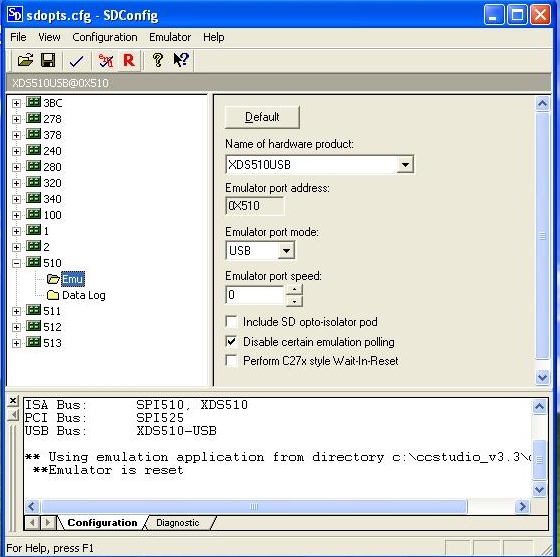
  • OK, SDFlash is doing the same thing that CCSPla v3.3 is doing.  It cannot connect to the emulator.  I know the emulator is capable of functioning:

    SDConfig Test

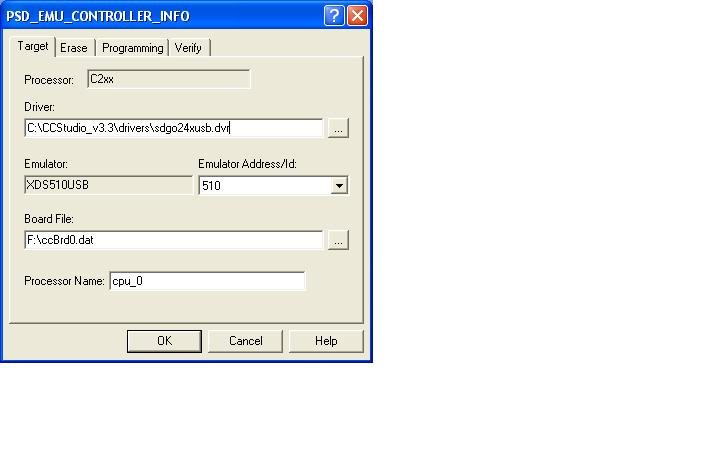
    I printed off the HTML document on setting up and testing SDFlash and configured it based on what I see from SDConfig:

    I had to hunt down the ccBrd0.dat file which is why it is on F: (USB drive).

    When I try to reset the emulator to test if things are working or not I see this:

    SDFlash Reset Result

    I don't know if there is any older engineers out there that might have experience with SDFlash and can possibly give me an idea of what may be wrong.  Unfortunately the computer system the original CCS configuration was running on was decommissioned over 10 years ago when the customer said they would never need any more of the 2407 based boards.  They came to us asking for another "last batch" of the boards and while we have all the bits and pieces we can't seem to get the tools to work properly.  BTW, I'm even running all this on an old Vista laptop which in theory should work but for some reason will not.  Any assistance anyone can provide would be appreciated.

  • Oops, forgot to show that the emulator can be reset, at least it can via SDConfig:

    SDConfig Reset

  • The fact that you see messages like "Found JTAG IR length of 8" and "Emulator is reset" tells me that the scan path is good and that the PC is able to communicate to the device via the scan chain. Did you try Prg2xx? It is a command line utility with less dependency. You may have to change the port address in the batch files from 0x378 (parallel port) to 0x510 for USB. Are you also sure customer board is a working board? You could try another board, if you have one. Sorry I am unable to help better.  

  • The documentation states that the SDFlash files do not work with Prg2xx and that it is no longer recommended.  I did attempt to use Prg2xx prior to reading that but there is very little in the way of documentation that tells how to use it.  The command line is not very user friendly.  As with all the tools to date the directory structure is a nightmare to navigate as none of the documentation matches what actually happens when you install/open/use/configure the different tools.

    I believe the board to be good otherwise the SDConfig program wouldn't work. . . I think.  I'll try a new board just to see what happens.

  • Brand new board behaves exactly the same. 

    It's extremely frustrating to be so close what with SDConfig able to work but CCS and SDFlash not working.

    I'm hoping someone else may chime in eventually with suggestions.  Thing is I need to do something since even though customer EOL the boards long ago they still wound up needing some more.

  • Joe,

         I am sorry about the frustration you are going through. I am trying my best to help you here, but it appears I am reaching the end of the rope. As a last ditch effort, can you share the schematics of the privately with me? You can do this by initiating a friendship request with me first. You can do so by choosing the "Request Friendship" option when you hover the cursor over my name.

    The two Readme files did not help? What do you see when you run BTEST? You need to change the 378 in the line below.

    prg2xxw95 -p 378 -n c2xx -w 6 test\c2xx_btx.out l20.out

    1321.Readme1.pdfReadme2.pdf

  • OK, finally found a work around so I figured I'd share it here in case anyone else needs to know how to do this. 

    Note: CCS Platinum version 3.3 will not work on the more modern versions of Windows.  There are 2 services that it needs to invoke during install that aren't there in later versions of Windows so when trying to start CCS things won't run.  I had to get this running on an old Vista based laptop.

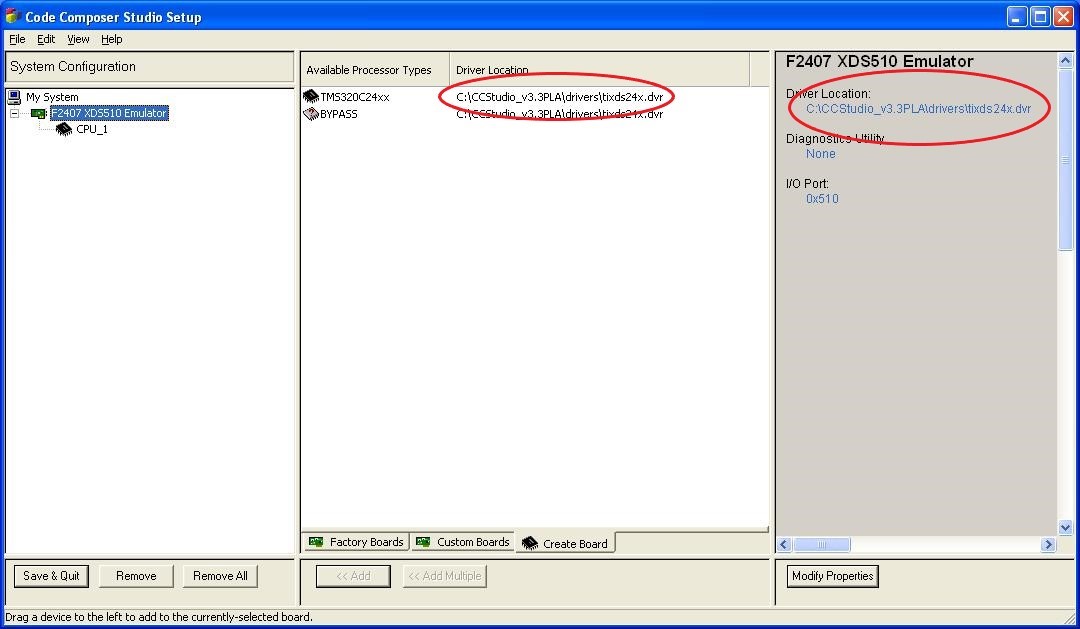
    It turns out that the CCS tool defaults to using a driver located in C:\CCStudio_v3.3PLA\drivers\tixds24x.dvr. It is shown in the F2407 configuration.  The "Modify Properties" DOES NOT allow this to be changed for some reason.

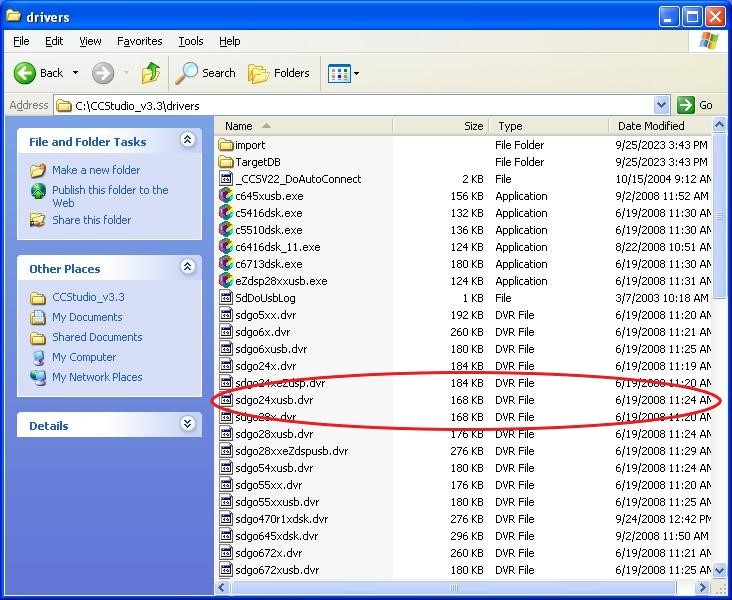
    This driver does not seem to work with the Spectrum Digital XDS510USB.  To get things working I went into the C:\CCStudio_v3.3\drivers directory and located the driver that the SDConfig program uses since I knew that it was working.

    I renamed the tixds24x.dvr file in the CCSPLA driver directory to tixds24x.dvr.original.  I then copied the sdgo24xusb.dvr file from the CCStudio_v3.3 drivers directory into the CCStudioPLA drivers directory and renamed it to tixds24x.dvr so that it was invoked by CCS. This works or at least it did for me.

    Note: BEFORE running CCS you will need to run SDConfig so that it "enumerates" (activates?) the USB port to the XDS510USB emulator.  Things should work as normal from then on.

    Hopefully this is helpful to someone who may encounter this issue in the future.