This thread has been locked.

If you have a related question, please click the "Ask a related question" button in the top right corner. The newly created question will be automatically linked to this question.

TMS320F280025C: Using LIN as UART to serially transmit data

Part Number: TMS320F280025C
Other Parts Discussed in Thread: C2000WARE

Hi team,

I am using TMS320F280025C microcontroller and want to use LIN A to transmit a data buffer on serial terminal (I am using Clear Terminal).

To do so, although I only need the transmission functionality, I have configured GPIO 22 (LIN A TX) and GPIO 23 (LIN A RX) and connected it PC using an external FTDI.

Since I am new to this microcontroller, I find the information given in the TRM quite confusing. I have also referred a few examples provided in the C2000Ware:

"C2000Ware_5_00_00_00\driverlib\f28002x\examples\lin\lin_ex3_sci_dma.c"
"C2000Ware_5_00_00_00\driverlib\f28002x\examples\lin\lin_ex7_external_loopback.c"
"C2000Ware_5_00_00_00\device_support\f28002x\examples\dma\dma_ex1_gsram_transfer.c"

The examples mentioned above do not provide me the answer I'm looking for.

For starters, I am just trying to print simple char data (e.g., "Hello world") in the terminal using the LIN module in SCI mode. I am not entirely sure if it is possible or not, please let me know.

Also, I would like to know when we use the functions "LIN_sendData();" and "LIN_writeSCICharBlocking();"

Thanks

  • Hi Mahesh,

    Thanks for your question.

    To answer your key question first on printing Hello World: I would recommend starting with our "lin_ex2_sci_loopback.c" or "lin_ex7_external_loopback.c" example in C2000Ware. Specifically the EXTERNAL loopback is close to a "Hello World" example.

    You can modify the ex7_external_loopback example to not require an RX interrupt. So basically, you can disable interrupts completely in there. And then you can just add a "LIN_writeSCICharBlocking", inside the main function's "for loop".


    Second: the confusion on getting started with the LIN peripheral. So I recommend if you're completely brand new to starting with C2000 to go through the C2000 Academy training, specifically the SCI lab (SCI is really similar to LIN peripheral in SCI mode, so a lot of the learning helps with both): https://dev.ti.com/tirex/explore/node?node=A__AQzGVO2iy7.Q8lS7.6gUow__C2000-ACADEMY__3H1LnqB__LATEST

    This is a pretty good walk-through of getting started.

    Also, going through the C2000Ware examples like you're doing and getting them running is probably the best training next to the Academy.

    And then last is going through the register descriptions in the TRM. That will help you to know EVERYTHING that is possible in the peripheral, and is really a good way of getting in-depth knowledge of the part.


    For your question on

    "LIN_sendData();" and "LIN_writeSCICharBlocking();"

    The functions that have "SCI" in the name are meant mainly for SCI mode. SCI mode is basic UART communications. LIN mode is the full featured LIN protocol with multiple bytes per packet. I recommend starting with SCI mode like you're doing.

    Regards,

    Vince

  • Hi Vince,

    Thanks for your reply.

    As you had suggested, I went through "lin_ex7_external_loopback.c" example in C2000Ware. This example operates in LIN mode and not in SCI-compatible mode, but it did help me understand the LIN module better. Now I do have a partially working code, but the characters printed it the terminal are not as expected.

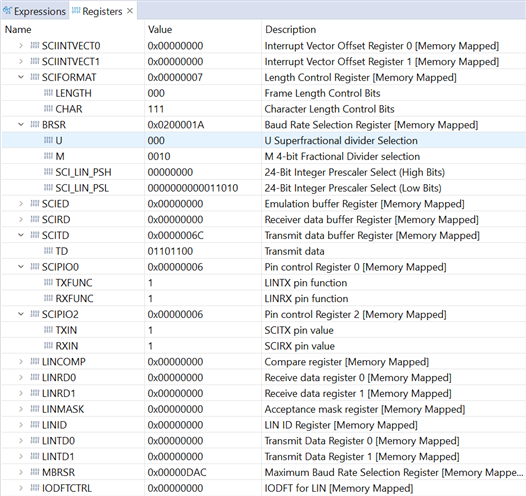
    After debugging, I was able to observe the correct data in the transmit buffer (SCITD) but the data received in the terminal is corrupted. I am assuming this has something to do with the transmitter shift register (SCITXSHF).

    I am attaching the code as well as the screenshots of the registers and terminal window for your ready reference.

    //
    // Included Files
    //
    #include "driverlib.h"
    #include "device.h"
    #include "string.h"
    
    //
    // Defines
    //
    #define CHAR_LENGTH     8
    #define FRAME_LENGTH    1
    
    //
    // Configure the Baud Rate to 115.207kHz
    //
    uint32_t PRESCALER=0x000001a;
    uint16_t DIVIDER=0x0002;
    
    //
    // Globals
    //
    uint16_t data[] = {'H','e','l','l','o',' ','W','o','r','l','d'};
    uint16_t i;
    
    //
    // Function Prototypes
    //
    void configureSCIMode(void);
    
    //
    // Main
    //
    void main(void)
    {
        uint16_t len = strlen(data);
    
        //
        // Initialize device clock and peripherals
        //
        Device_init();
    
        //
        // Initialize GPIO and configure GPIO pins for LINTX/LINRX
        //
        Device_initGPIO();
    
        //
        // Initialize PIE and clear PIE registers. Disables CPU interrupts.
        //
        Interrupt_initModule();
    
        //
        // Initialize the PIE vector table with pointers to the shell Interrupt
        // Service Routines (ISR).
        //
        Interrupt_initVectorTable();
    
        //
        // Configure GPIO pins.
        //
        GPIO_setPinConfig(DEVICE_GPIO_CFG_LINTXA);
        GPIO_setDirectionMode(DEVICE_GPIO_PIN_LINTXA, GPIO_DIR_MODE_OUT);
        GPIO_setPadConfig(DEVICE_GPIO_PIN_LINTXA, GPIO_PIN_TYPE_STD);
        GPIO_setQualificationMode(DEVICE_GPIO_PIN_LINTXA, GPIO_QUAL_ASYNC);
    
        //
        // Initialize the LIN module
        //
        LIN_initModule(LINA_BASE);
    
        //
        // Enable Global Interrupt (INTM) and real time interrupt (DBGM)
        //
        EINT;
        ERTM;
    
        //
        // Configure the LIN module to operate in SCI mode
        //
        configureSCIMode();
    
        for(i=0;i<len;i++)
        {
            //
            // Write data to Tx Buffer of LINA
            //
            LIN_writeSCICharBlocking(LINA_BASE, data[i]);
    
            //
            // Wait until Transmit buffer is empty and has completed transmission
            //
            while(!LIN_isTxBufferEmpty(LINA_BASE));
    
            DEVICE_DELAY_US(10000);  //10ms delay
        }
    
        //
        // Example completed.
        //
        asm("   ESTOP0");
    }
    
    //
    // Configure SCI Mode - This function configures the LIN module to operate as
    // an SCI with the specified settings.
    //
    void
    configureSCIMode(void)
    {
        //
        // Enter LIN reset state to perform configurations
        //
        LIN_enterSoftwareReset(LINA_BASE);
    
        //
        // Enable Transmit Data Transfer.
        //
        LIN_enableDataTransmitter(LINA_BASE);
    
        //
        // Switch LIN into SCI mode
        //
        LIN_enableSCIMode(LINA_BASE);
    
        //
        // Set the SCI communication mode to idle line
        //
        LIN_setSCICommMode(LINA_BASE, LIN_COMM_SCI_IDLELINE);
    
        //
        // Set SCI to transmit one stop bit
        //
        LIN_setSCIStopBits(LINA_BASE,LIN_SCI_STOP_ONE);
    
        //
        // Disable parity check
        //
        LIN_disableSCIParity(LINA_BASE);
    
        //
        // Disable multi-buffer mode
        //
        LIN_disableMultibufferMode(LINA_BASE);
    
        //
        // Module set to complete operations when halted by debugger
        //
        LIN_setDebugSuspendMode(LINA_BASE, LIN_DEBUG_COMPLETE);
    
        //
        // Set character length as 8-bits
        //
        LIN_setSCICharLength(LINA_BASE, CHAR_LENGTH);
    
        //
        // Set to 1 character in response field
        //
        LIN_setSCIFrameLength(LINA_BASE, FRAME_LENGTH);
    
        //
        // Set the Baud Rate
        //
        LIN_setBaudRatePrescaler(LINA_BASE, PRESCALER, DIVIDER);
    
        //
        // Exit LIN reset state
        //
        LIN_exitSoftwareReset(LINA_BASE);
    }
    
    //
    // End of File
    //

    Please let me know your thoughts on this issue.

    Also, thank you for answering the other question. I would also like to know whether the data transmitted and received in SCI-compatible mode of LIN is in the FIFO format or LIFO format?

    Thank you and regards,

    Mahesh

  • Hi Mahesh,

    It looks like the LIN is sending 8 bit words, but the terminal is expecting 16 bit words (notice how each byte in the terminal has "F"). Can you show your terminal settings?

    Regards,

    Vince

  • Hi Vince,

    Here are the terminal settings you requested.

    Apart from this, the display mode is set to "hex" for the time being. Please let me know if you need anything else.

    Also, it would be great if you could answer the question in my previous reply:

    I would also like to know whether the data transmitted and received in SCI-compatible mode of LIN is in the FIFO format or LIFO format?

    Regards,

    Mahesh

  • Mahesh,

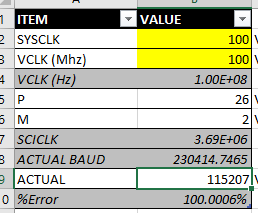
    Looks like your pre-scaler and divider are incorrect.

    Actual baud is 230414 based on your P/M values in the code.

    To get 115207 baud rate, you should probably change to:

    P=0x35         == (decimal=53)

    M=0x4           == (decimal=4)

    Please double check your baud rate calculations, thanks!

    Regards,

    Vince

  • Hi Vince,

    This fixed my problem. Thanks a lot. There was a baud rate calculation error as you mentioned. I assumed the LIN module input clock to be 50MHz hence the fault. My code is now working.

    Thank you and regards,

    Mahesh