Part Number: TMS320F280039C
Dears,
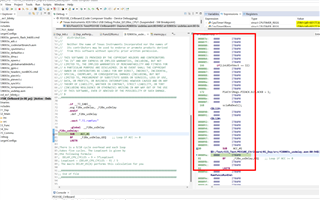
As long as a delay function is activated, the below phenomenon will occur.
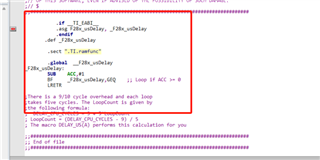
below is delay function
Whether there is a correct CMD file?
This thread has been locked.
If you have a related question, please click the "Ask a related question" button in the top right corner. The newly created question will be automatically linked to this question.
Part Number: TMS320F280039C
Dears,
As long as a delay function is activated, the below phenomenon will occur.
below is delay function
Whether there is a correct CMD file?
Hello,
Have you checked your .map file to see where this function gets allocated to (if it's not some static or intrinsic function)? When you step to where this delay function is called, can you look at the Disassembly view to see if it is pointing to the right address or if there are any discrepancies in the assembly as opposed to what should be expected?
Best regards,
Omer Amir
Dear Omer Amir
Checked .map file the result on function “f28003x_usdelay” is shown below

;
The result of running the programme is shown below

single-step operation The code get lost.
I can't pinpoint the cause of the problem.
Hello,
single-step operation The code get lost.
Were you using the single-assembly step button? It's the green arrow (the yellow arrow is for stepping through a C line of code).
Is the above problem due to the fact that the corresponding RAM space is all 0000 ITRAP0?
May I ask what makes RAM space is all 0000 ITRAP0?
Yes, this looks like the source of the problem. It looks like either you're overwriting the memory, it's being re-initialized at some point, or some other operation in the program is causing it to be overwritten. I recommend stepping through your code and finding at what point that memory changes (at the start of your program it should have whatever functions/data you store in memory there). Once you find the line which clears that memory, you can single-assembly step through it to find out what's going on.
Best regards,
Omer Amir